

How to add a DNS TXT record for a domain name
132 Views
 24.03.2026
  DNS (Domain Name System)
Objective
Do you need to validate a verification or security process for your domain name (service association via a validation token, verification key, etc.) using your DNS zone? Want to add a custom text value to your domain name’s DNS zone?
To do this, you will need to create a TXT record in your domain name’s active DNS zone.
Find out how to add a DNS TXT record to an OVHcloud DNS zone for your domain name.
To modify or delete a TXT record of an OVHcloud DNS zone, follow this guide.
Requirements
- A domain name
- A DNS zone associated with this domain name at OVHcloud
OVHcloud Control Panel Access
- Direct link: DNS zones
- Navigation path:
Web Cloud>DNS zones> Select your domain name
Instructions
Adding, modifying or deleting DNS records in an active DNS zone can cause service interruptions. If in doubt, contact a specialist provider.
Add a DNS TXT record for a domain name
Click on the tabs below to view each of the 5 steps.
Go to the DNS zones page, then choose the domain name concerned.
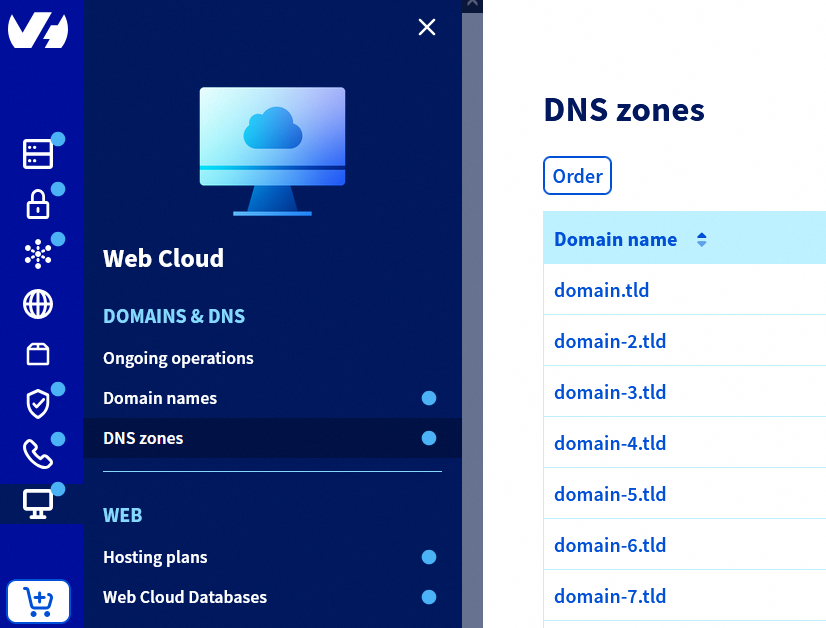
Click the Add an entry button.
In the window that opens, select the TXT extended record type.
Enter the TXT string you want to add in the Value * field (e.g.: AbCdE-Value-of-TXT-fGhIjK), then click Next.
Check the summary, then click Confirm. It takes up to 24 hours for the change to propagate fully over the DNS network.
Click here for more information.
See our detailed guides:
Add a DNS TXT record for a domain name subdomain
Click on the tabs below to view each of the 5 steps.
Go to the DNS zones page, then choose the domain name concerned.
Click the Add an entry button.
In the window that opens, select the TXT extended record type.
Enter the subdomain in the Sub-domain field (e.g.: www for the subdomain www.domain.tld), and the TXT string you want to add in the Value * field (e.g.: AbCdE-Value-of-TXT-fGhIjK). Click Next.
Check the summary, then click Confirm. It takes up to 24 hours for the change to propagate fully over the DNS network.
Click here for more information.
See our detailed guides:
Go further
Everything you need to know about DNS zones.
Everything you need to know about DNS records
For specialised services (SEO, development, etc.), contact OVHcloud partners.
If you would like assistance using and configuring your OVHcloud solutions, please refer to our support offers.
Join our community of users.


 Configure an MX record for email management
 5124
5124