

Object Storage - Setting up CORS on Object Storage
266 visualizações
 06.03.2026
  Cloud / Object Storage S3
Objective
By default, modern browsers impose a same-origin security policy i.e. by preventing a resource loaded from one origin to interact with another resource loaded from another origin.
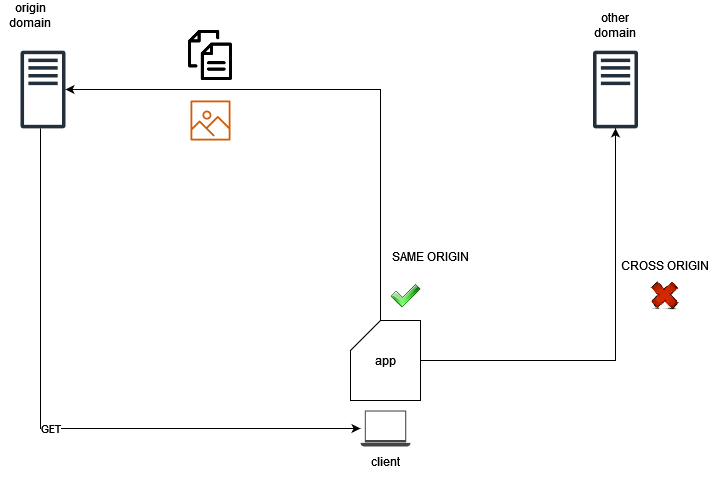
Cross-Origin Resource Sharing (CORS) is a technique that allows resources from a client web application that is loaded from one domain to interact with resources located in a different domain.
This guide explains CORS and how to enable it on your Object Storage buckets.
Use case scenarios
Usual use case scenarios for CORS in OVHcloud Object Storage would be the following:
- You host a static website in a bucket and you want to use JavaScript to access resources hosted in the same bucket or in another bucket.
- You have a frontend application (e.g. a mobile application) that needs to access resources hosted in an Object Storage bucket.
How does it work?
Under the hood, the client must first know if CORS is enabled on the server side. It sends a preflight request (OPTIONS request) to the OVHcloud Object Storage to check the rules for CORS:
- Which origins are accepted
- Which HTTP verbs
- Which headers
- etc.
Then, based on what the server responds, the CORS request is allowed or not:
- The request's
Originheader must be defined in theAllowedOriginselement. - The request method (GET, PUT, etc.) or the
Access-Control-Request-Methodsheader (in case of a preflight OPTIONS request) must be one of theAllowedMethodselements. - All the headers listed in the request's
Access-Control-Request-Headersheader on the preflight request must be defined in theAllowedHeaderselement.
The rules for accepted CORS requests are configured at the bucket level.
Requirements
- A bucket on which you can configure the CORS rule
- Credentials and permissions on the bucket/objects for the user making the requests
Instructions
Configuration
Using the AWS CLI, set up CORS on the bucket:
The cors.json file contains the following configuration:
Configuration example
Let's assume you have a frontend web application hosted on https://my-app.xyz that uses JavaScript (React, Angular, or any frontend framework) to query media files hosted in an Object Storage bucket (https://my-media.s3.gra.io.cloud.ovh.net/).
Enable CORS on the my-media bucket:
The cors.json file contains the following configuration:
Basically, what has been done here is to tell the client application that the targeted bucket allows CORS requests only if:
- The request contains the "Authorization" header.
- The request is limited to "GET" and "HEAD" requests.
- The request comes from the "my-app.xyz" domain.
The Object Storage server will expose the Access-Control-Allow-Origin header in its responses.
Go further
If you need training or technical assistance to implement our solutions, contact your sales representative or click on this link to get a quote and ask our Professional Services experts for assisting you on your specific use case of your project.
Join our community of users.


 Object Storage - Bucket ACL
 293
293