

AI Partners Ecosystem - Lettria - Models features, capabilities and billing (EN)
170 visualizações
 08.08.2023
  AI Partners Ecosystem
Objective
OVHcloud offers different Artificial Intelligence services through its AI Partners Ecosystem. You will benefit from a catalogue of ready-to-use applications provided by our partners which you will be able to easily deploy according to your needs through AI Deploy.
Lettria is an OVHcloud partner that offers AI services dedicated to text. This guide will introduce Lettria models features, as well as covering how it works and associated billing.
Introduction
Lettria is a start-up specialized in NLP (Natural Language Processing). The platform enables all organizations, from start-ups to large corporations, to perform textual analysis on their data to take the best strategic decisions.
Lettria provides text understanding models that allow users to easily identify and extract key information from their text. This method relies on artificial intelligence and NLP techniques to extract sentiments, emotions and entities from a text.
The uses are many:
- Customer service automation
- Social media monitoring
- Content moderation
- Text classification
Lettria models features
The Lettria models available at OVHcloud cover three NLP tasks: sentiment analysis, emotion extraction and name entity recognition.
Sentiment
Lettria gives you the possibility to analyze the sentiments of a text. The principle is to automatically classify textual data as positive, negative or neutral based on the underlying sentiment expressed in the text.
Input example:
Output example:
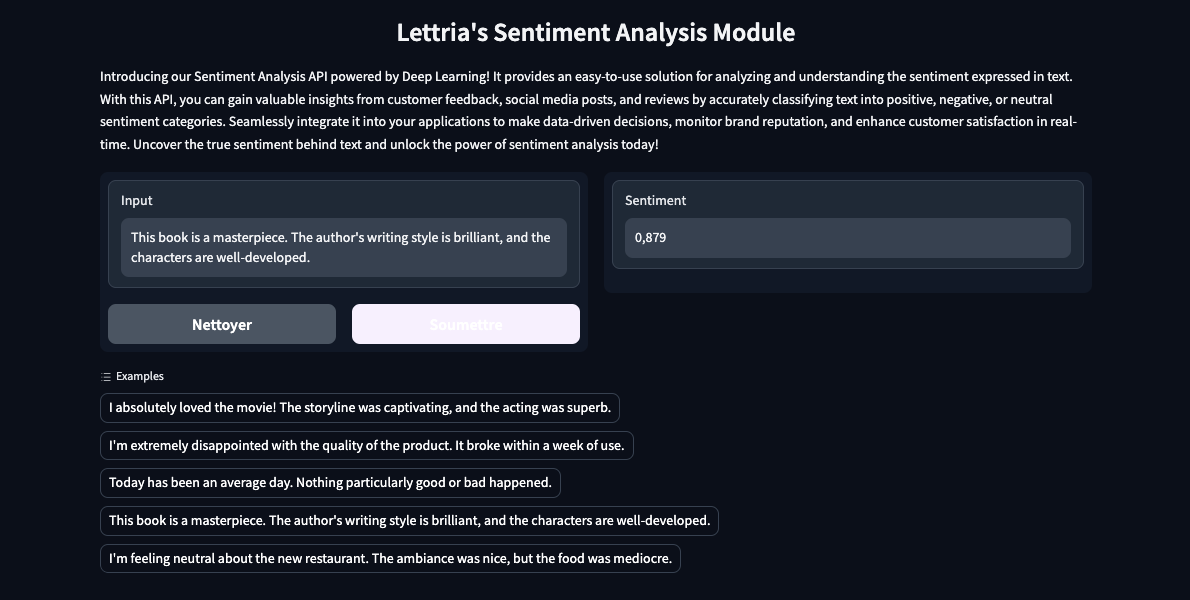
To learn more about Lettria's sentiment analysis model, please refer to this documentation.
Emotion
Lettria allows you to extract emotion from text data. The goal is to automatically classify text data according to the emotions it conveys: happiness, sadness, anger, fear, ...
Input example:
Output example:
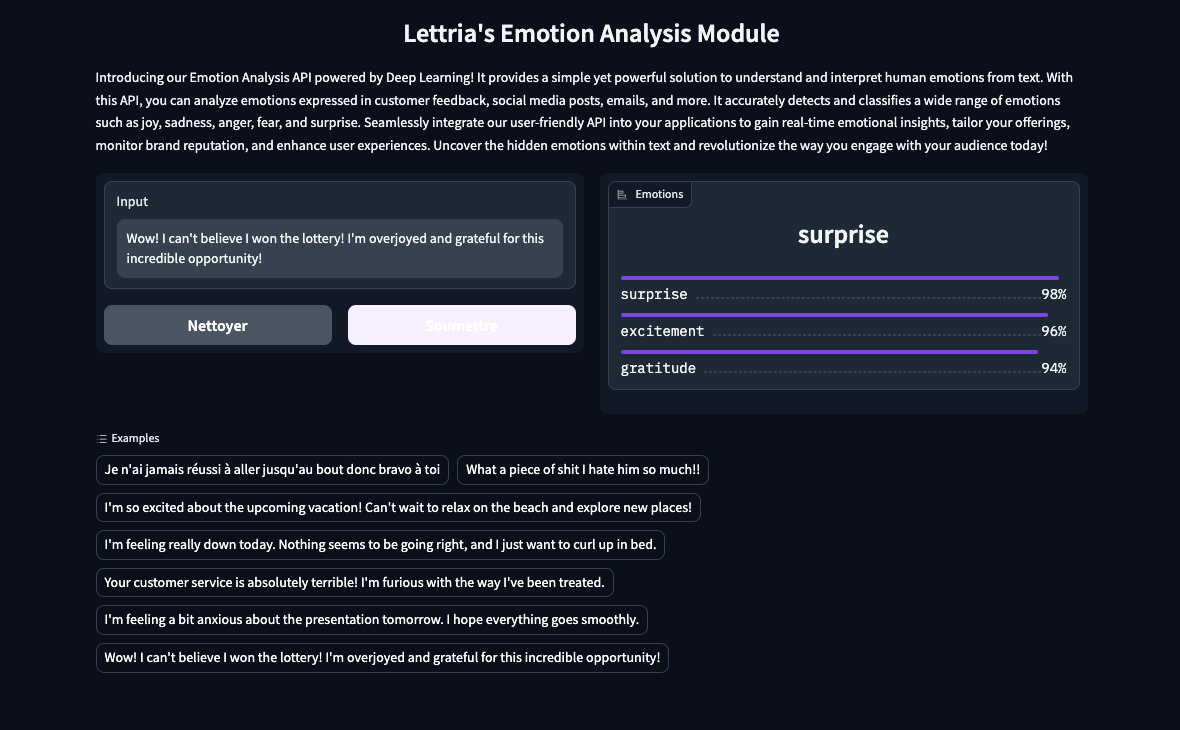
To learn more about Lettria's emotion extraction model, please refer to this documentation.
Name Entity Recognition
Lettria gives you the possibility to extract entities from a text. The principle is to automatically identify and classify key entities such as Locations (LOC), Persons (PER), Organizations (ORG) and Miscellaneous (MISC) within a text.
Input example:
Output example:
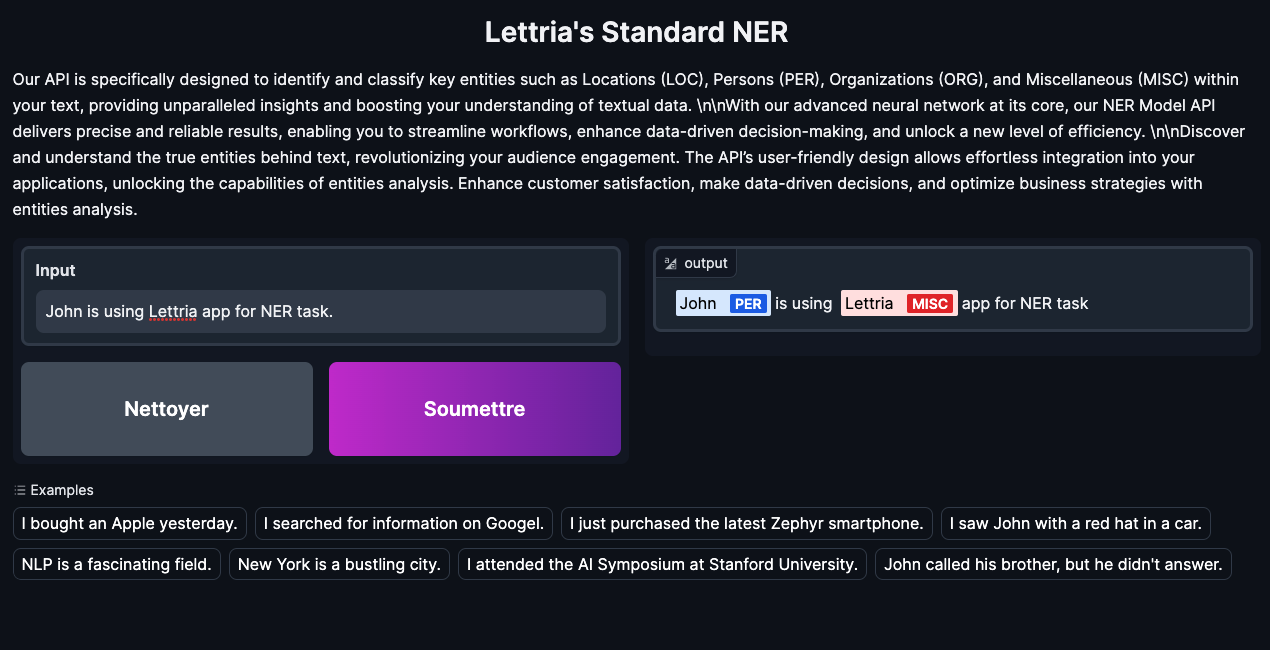
To learn more about Lettria's NER model, please refer to this documentation.
Lettria quick start
To be able to query the Lettria models, you must first deploy one of the Lettria images with AI Deploy.
In this example, we will rely on the emotions extraction from a text.
Launch a Lettria app
To launch an AI Deploy app, there are several possibilities. You can do it from the OVHcloud Control Panel or the CLI ovhai.
Launch an app from the OVHcloud Control Panel
To launch your Lettria app from the UI, you have to fill in some information:
- Location
- Application to deploy - in this example, we choose the "emotions" image with gpu compliance
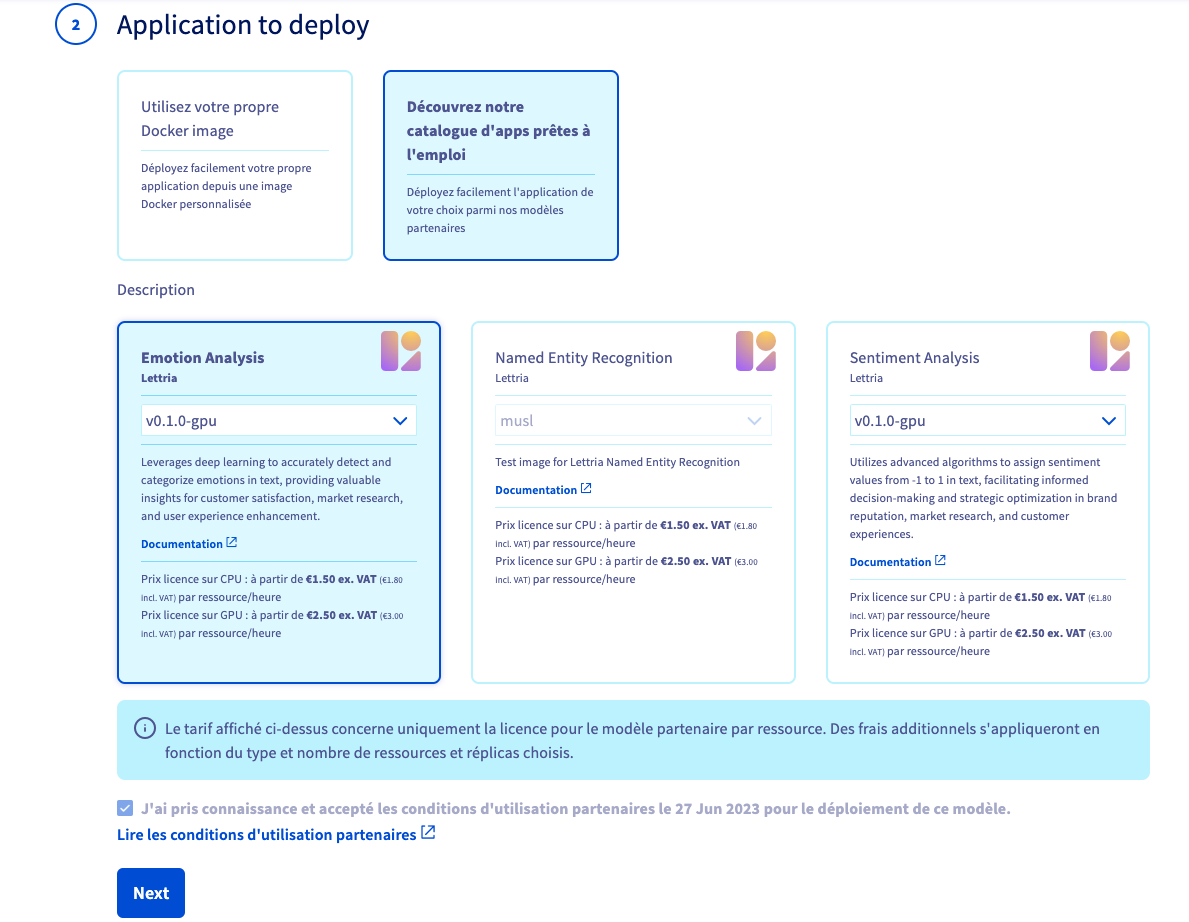
Please be careful when choosing the image, depending on the required resources.
For a GPU app, choose the Lettria image containing gpu in its tag, then choose one or more GPUs as resources.
The same principle of operation also applies for CPU apps.
- Resources - we advise you to use 1 GPU
- Configure your app - add a label if you have chosen a restricted access
To know how to launch an app from the OVHcloud Control Panel, refer to this guide.
Launch an app with ovhai CLI
You can also start this app with the ovhai CLI by running the following command:
Replace <label=name> by the variables corresponding to your token. To know more about the management of the token, refer to this documentation.
Access to your Lettria apps
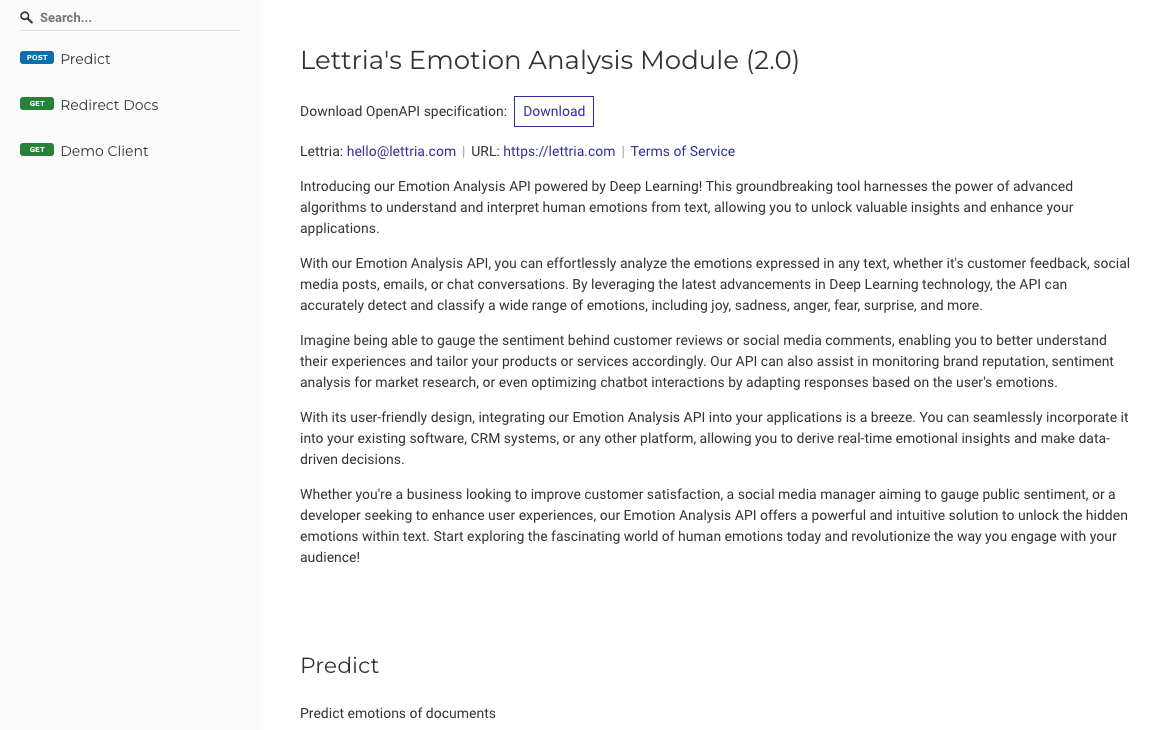
Once the app is launched and in RUNNING status, you can copy the URL and access your app. You will then be redirected and you can interact with the Lettria API.
Ask Lettria models
You can now question the Lettria models about your text sentiments or emotions.
In the following example, we will focus on the model that extracts text emotions. For more detailed information on Lettria models, please refer to this documentation.
Generate a cURL query
Now that your Lettria app is running with AI Deploy, you are ready for questioning the AI models.
You can use the following example with the following parameters:
- url of the app - replace
<app_url>with yours - access token (since we are on restricted access) - replace
<your_token_bearer>with yours - data format
- data to process (text)
Result:
Generate a Python query
If you want to query the Lettria API with Python, this code sample with Python Request library may suit you:
Result:
Lettria billing concept
The pricing of Lettria differs slightly from the classic AI Deploy offer. In order to better understand your invoice, we detail the offer below.
The total cost of your app will include the price of the resources you have selected as well as the partner's model license price.
Please bear in mind Lettria models are billed on pay-per-use. We do not offer yet pay-per-call billing.
Estimate the cost of a Lettria app
How to calculate the total cost of a Lettria app?
The total price is composed of two different parts:
Resources priceLettria model licencing price
Resources price
The first step consists in calculating the price of an AI Deploy app according to the chosen computing resources.
Please keep in mind we bill per second although pricing is displayed per hour HT for a more user-friendly experience.
To launch your app you can choose between two types of resources: CPU or GPU. The price will therefore vary depending on the resource chosen.
To learn more about the basic cost of an app launched with AI Deploy, please refer to this documentation.
Lettria model licenses price
The second step consists in calculating the cost of one of the Lettria partners services according to the chosen resource.
Total price
To obtain the total cost of a Lettria app started with AI Deploy, add the two amounts from the previous calculations:
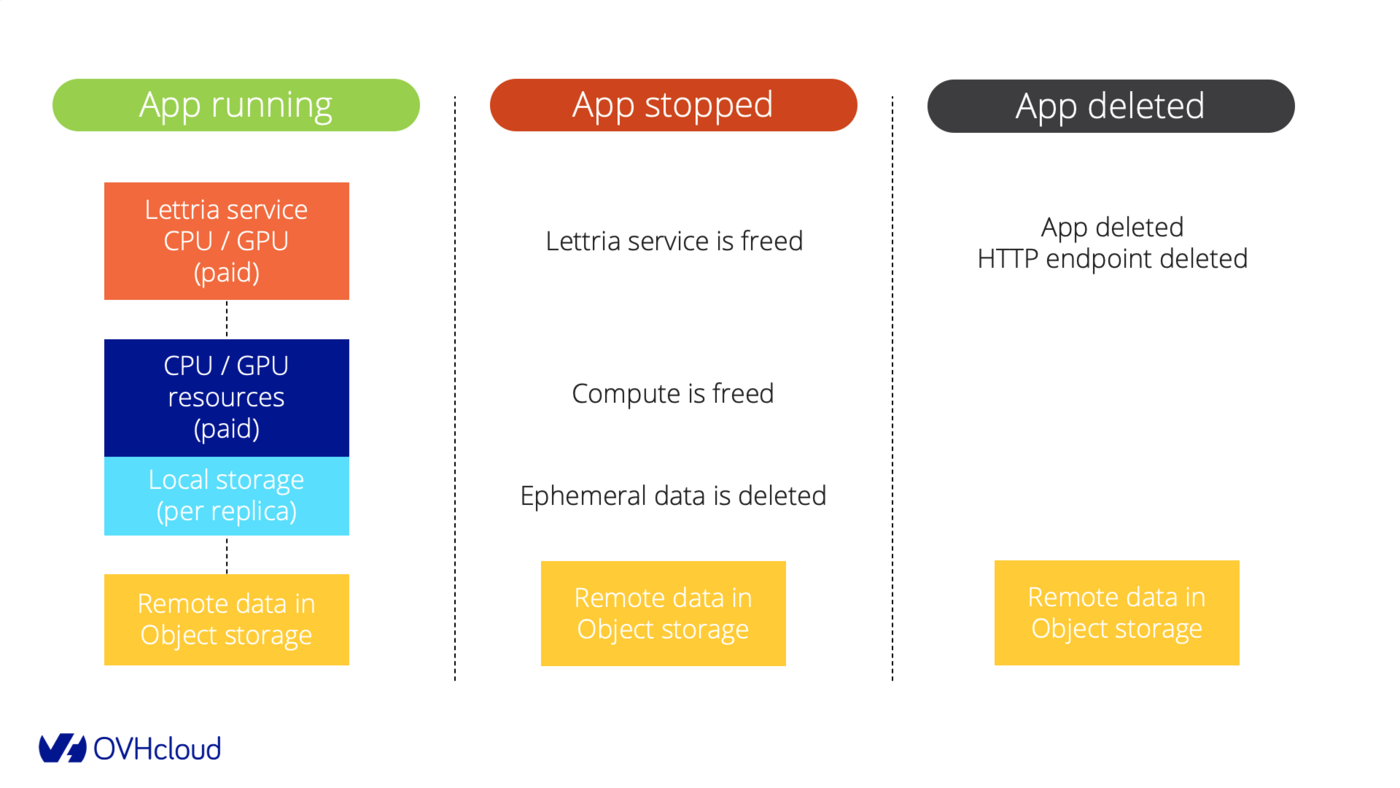
To learn more about the basic cost (resource price) of an app launched with AI Deploy, please refer to this documentation.
Please refer to the OVHcloud Public Cloud website for all information about resources and partners models prices.
Examples
Example 1: 1 GPU app for 10 hours then deleted
We deploy one Lettria app with AI Deploy, with 1 GPU and we keep it running for 10 hours then we delete it.
You receive thousands of calls: it's included (no pay per call provided, you pay running compute).
- compute resources per replica: 1 x GPU NVIDIA V100s (1,93€ /hour /gpu)
- scaling: fixed
- replicas: 1
- amount of calls: unlimited
- duration: 10 hours then deleted
- lettria service: 1 x Lettria service for GPU usage (2,50€ /hour /gpu)
Price calculation for compute: 1,93€ (price /hour /gpu) x 1 (gpu) x 1 (replica) x 10 (hours) = 19,30€
Price calculation for Lettria service: 2,50€ (lettria price /hour /gpu) x 1 (gpu) x 1 (replica) x 10 (hours) = 25,00€
Total price calculation: 19,30€ + 25,00€ = 44,30€
Example 2: 2 CPUs and autoscaling
Deploy one Lettria app with 1 CPU, choose autoscaling configuration with 1 replica minimum, and 3 replicas maximum.
You receive thousands of calls: it's included (no pay per call provided, you pay running compute).
- compute resources per replica : 2 x CPUs (0,03€ /hour /cpu)
- scaling : auto-scaling, from 1 to 3 replicas
- amount of calls : unlimited
- duration: 5 hours with 1 replica running, then a peak with 1 hour at 3 replicas, then stopped and deleted.
- lettria service: 2 x Lettria services for CPU usage (1,50€ /hour /cpu)
Price calculation for compute (it will vary over time due to auto-scaling):
0,03€ (price /hour /cpu) x 2 (cpus) x 1 (replica) x 5 (hours) = 0,30€
+
0,03€ (price /hour /cpu) x 2 (cpus) x 3 (replicas) x 1 (hour) = 0,18€
Total for compute is 0,48€.
Price calculation for Lettria service (it will vary over time due to auto-scaling):
1,50€ (lettria price /hour /cpu) x 2 (cpus) x 1 (replica) x 5 (hours) = 15,00€
+
1,50€ (lettria price /hour /cpu) x 2 (cpus) x 3 (replicas) x 1 (hour) = 9,00€
Total for Lettria service is 24,00€.
Total price calculation: 0,48€ + 24,00€ = 24,48€
Feedback
Please send us your questions, feedback and suggestions to improve the service:
- On the OVHcloud Discord server


 AI Partners Ecosystem - Voxist - Models features, capabilities and billing (EN)
 170
170