

Datamotive - Introduction
114 wyśw.
 22.10.2024
  Cloud / VMware
Objective
The purpose of this guide is to introduce the Datamotive solution into the Hosted Private Cloud VMware on OVHcloud universe.
Instructions
As a multi-cloud orchestrator, Datamotive has successfully built a solution that simplifies the process of hybridizing private and public cloud environments.
Introduction
DataMotive’s multi-cloud and hybrid workload portability platform offers disaster recovery and workload migration as self-service products and enables simplified replication and recovery between hypervisors.
The Datamotive Workload Portability platform can be used to protect or migrate your virtual machines/instances to the primary site by periodically replicating them to the recovery site. VMs/protected instances can then be recovered as needed in the recovery site as target native instances (for example, AWS EC2 protected instances are recovered as native VMware VMs).
This guide provides information on deploying, configuring, and managing Datamotive products. It also provides an overview of the Datamotive platform and its various components.
The platform has 3 products in its solution:
EasyMigrate: Transforming workload portability and management.EasyHybridDR: Protect your workloads seamlessly.EasyAnalytics: Transform your data into actionable insights.
Target audience
This information is intended for anyone wishing to use the Datamotive solution. This information is intended for experienced virtualization and cloud infrastructure administrators familiar with virtualization technologies, business continuity, and datacentre and cloud operations.
Supported DataMotive version
The content of this guide is applicable to the Datamotive EasyMigrate & EasyHybridDR. version 1.1.2 solution.
Architecture of DataMotive components
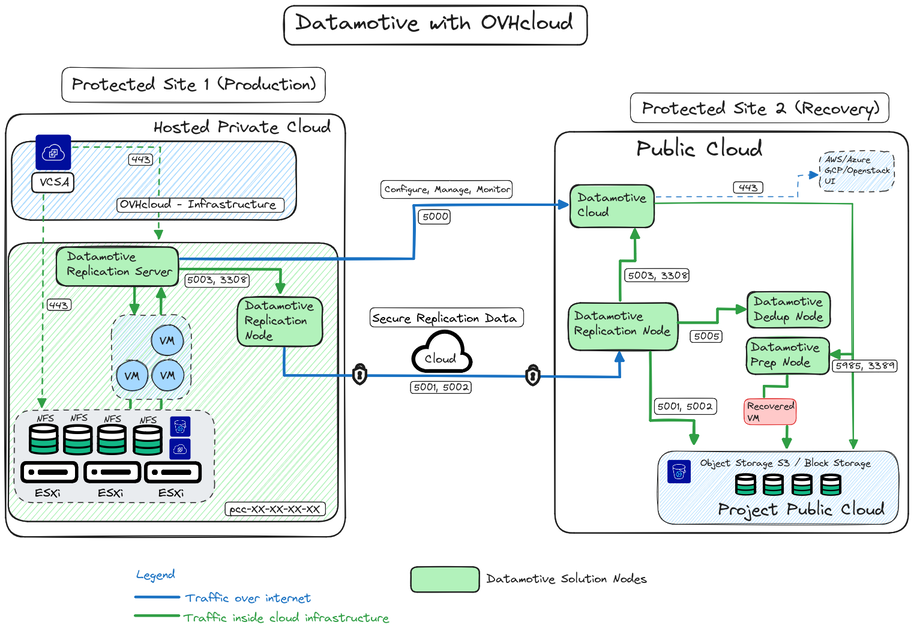
The Datamotive Workload Portability platform consists of the following components deployed as independent virtual machines. All components are delivered as virtual appliances or cloud native machine images, depending on the target infrastructure. All virtual appliances are fully secure and based on CIS Ubuntu-20 Server Edition certified images.
- Datamotive Management Server: A virtual appliance deployed in a protected site or recovery infrastructure where virtual machines must be protected, recovered, or migrated. Management Server provides a user interface, CLI, and RESTful APIs for IT administrators to perform Day0-DayN activities. The server also acts as a replication node. It is delivered as OVA for VMware on OVHcloud environment, image for OpenStack and cloud native machine image for OVHcloud, AWS, GCP and Azure environments.
- Datamotive Replication Node: A virtual appliance deployed to a protected or recovery site. It is used to perform data replication tasks. This node can be used to increase the overall replication capacity of the solution based on the number of VMs/instances protected. The maximum number of parallel replication jobs (1 replication job per disk/protected volume) supported by each node is defined by the limit provided by Cloud platforms (the default limit for replication is 40 and 25 for recovery). It is delivered as OVA for the VMware on OVHcloud environment, image for OpenStack on OVHcloud and cloud native machine image for the OVHcloud, AWS, GCP and Azure environments. DataMotive scales horizontally using replication nodes for large environments where a large number of workloads must be replicated in parallel.
- Datamotive Prep Node: A Windows virtual appliance deployed in the infrastructure of the recovery site (OVHcloud, VMware on OVHcloud, AWS, GCP or Azure). This appliance is powered on and used only when Windows VMs are recovered or migrated. It is delivered as OVA for VMware environment, image for OpenStack and cloud native machine image for AWS, GCP and Azure environment. Each staging node supports parallel recovery of up to 25 VMs/instances.
- Datamotive DeDupe Node: A virtual appliance deployed in both the source site and recovery site (public cloud) infrastructure (OVHcloud, AWS, GCP and Azure). It manages the checksum and data of the data blocks transferred to the recovery site. The DeDupe node, when configured for use, allows the use of already replicated data segments, thus significantly reducing data transfer. It is delivered as OVA for the VMware on OVHcloud environment, image for OpenStack on OVHcloud and cloud native image for OVHcloud, AWS, GCP and Azure environments.
Deployment reference architecture and network topology
What can you do with Datamotive?
Datamotive currently provides a fully functional and intuitive graphical user interface, APIs, and Python SDK to perform all the supported operations. Once deployed, administrators can access the Datamotive graphical user interface by connecting to the management server at the protected site.
The URL to access the management server is : https://<ADRESS_IP_or_FQDN>:5000.
The default credentials for accessing the application are administrator/admin.
Disaster recovery administrators can perform the following Day1-DayN operations using the Datamotive graphical user interface. The following sections of this document detail the user interface and associated options.
The management console
Here is a view of the management user interface that you have access to when you log in:
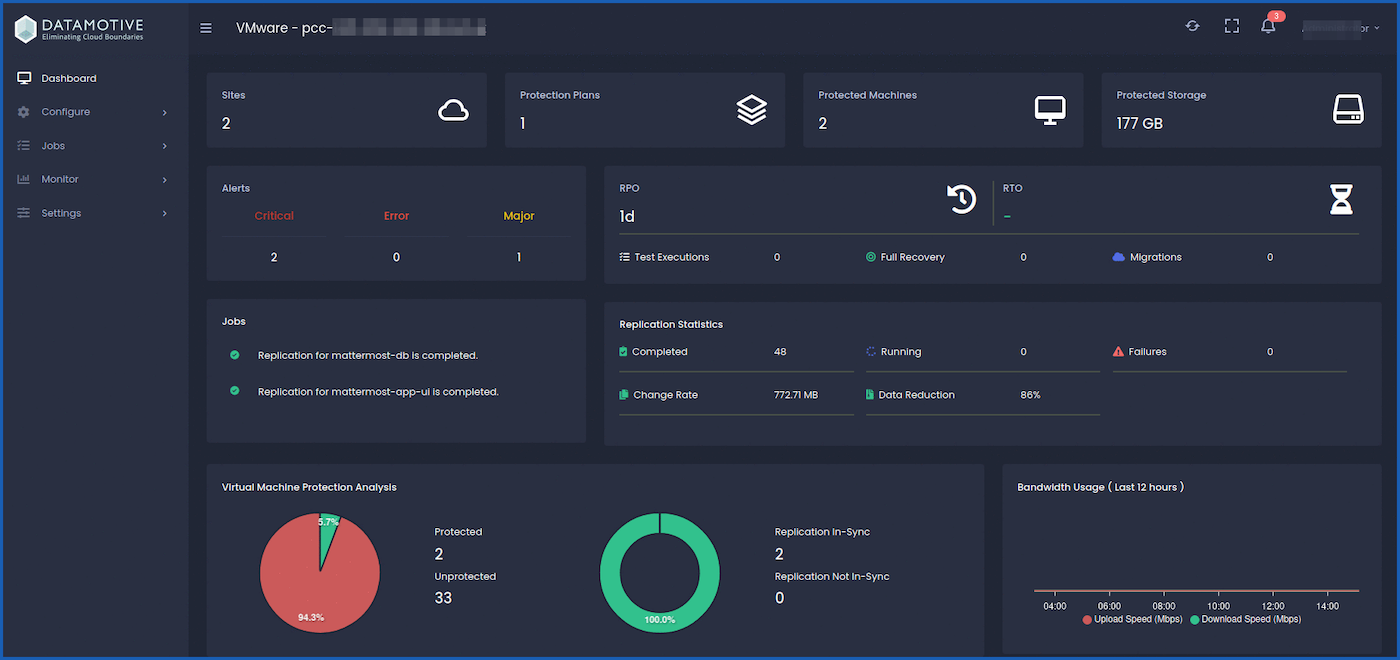
You can access all the Datamotive features from the user manual on the url path /docs, e.g.: https://<ADDRESS_IP_or_FQDN>:5000/docs.
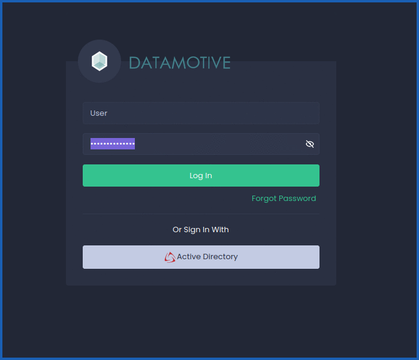
How do I log in?
You can log in by accessing your environment’s URL: https://<ADDRESS_IP_or_FQDN>:5000.
You will access this interface:
Go further
If you require training or technical support to implement our solutions, please contact your Technical Account Manager or visit this page to get a quote and request a custom analysis of your project from our Professional Services team experts.
Ask questions, give feedback and interact directly with the team building the Datamotive solution on the official website.
Join our community of users OVHcloud.


 Możliwości techniczne
 390
390