

SAP logs on OVHcloud Logs Data Platform - Solution Setup
162 wyśw.
 16.05.2024
  Cloud / Logs Data Platform
Objective
This guide provides instructions for configuring your SAP logs on OVHcloud Logs Data Platform.
Requirements
- Access to the OVHcloud Control Panel
- An SAP system installed
Instructions
Logs Data Platform
OVHcloud Logs Data Platform is a service which processes logs generated by your infrastructure and applications. This service classifies and displays them in real-time dashboards. For further information, you can refer to our documentation.
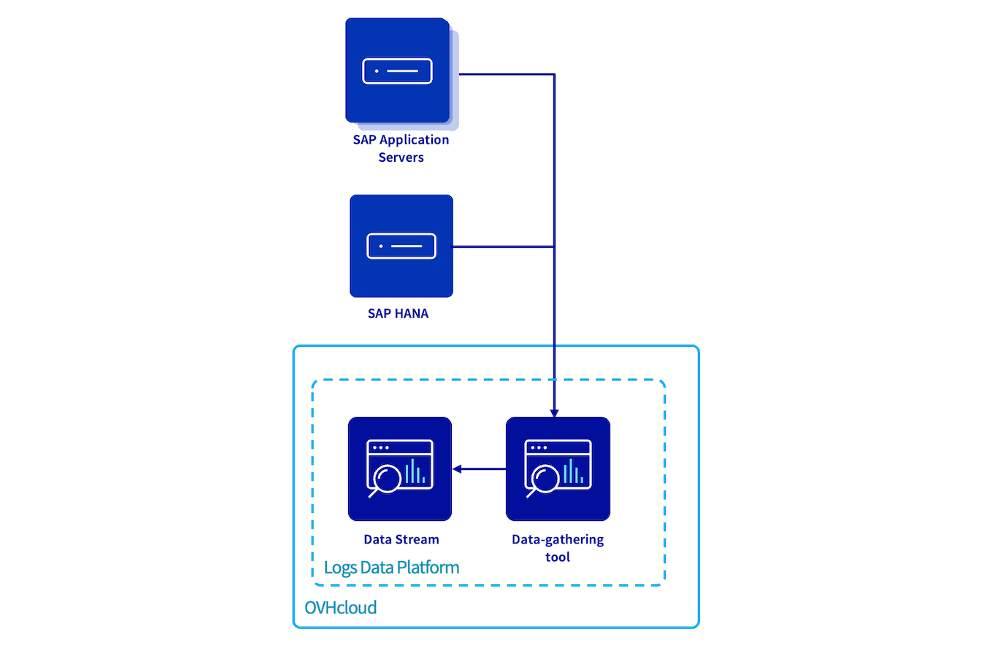
OVHcloud provides resources (SAP logs formatting, dashboards and searches) to leverage OVHcloud Logs Data Platform service for your SAP applications.
A Logs Data Platform account is the highest-level tenancy level specific to Logs Data Platform. Inside of this account, you could deploy your data-gathering tools, OpenSearch Dashboards and others.
You will find instructions in the chapter "Welcome to Logs Data Platform" in our documentation in order to create and configure your Logs Data Platform account.
Data stream
The purpose of a data stream is to serve as a centralized hub for collecting and managing your logs into your Logs Data Platform account.
In an SAP environment, we recommend to create two data streams with different retentions; one will be used to store technical logs, and the second one for audit and security logs.
To establish your data stream configuration, you can refer to the chapter "Let's send some logs" of our documentation.
Note that you can also configure retention of your logs for a certain period of time. You can find more information in our Activating cold storage on a stream documentation.
This table summarizes the key parameters for the two distinct data stream configurations:
| Name | Description | Enable WebSocket broadcasting | Enable indexation | Enable long-term storage | Compression algorithm | Archive conservation period | Storage solutions | Content of archives delivered |
|---|---|---|---|---|---|---|---|---|
| sap-logstash | Data stream for SAP system logs and OS logs | True | True | False | ||||
| audit-sap-logstash | Data stream for audit and security logs | True | True | True | .gz (zlib) | 5 years1 | OVHcloud Archive | An archive containing all of the logs in Gelf format |
1 Refers to the time frame mandated for conservation by your local regulation.
Data-gathering tools
Due to the quantity and diverse type of SAP logs, the deployment of a data-gathering tool to process, format, and structure each type of logs provided by SAP appropriately is essential.
The chapter "Host a logstash collector on Logs Data Platform" of our documentation helps you during the deployment of a data-gathering tool.
Below the suggested inputs for these data-gathering tools:
| Name | Description | Software | TCP port to be opened | Trusted networks2 | Associate with data stream |
|---|---|---|---|---|---|
| tools-sap-logstash | Data-gathering tool for SAP system logs and OS logs | LOGSTASH 8.x | 6514 | X.X.X.X/X | sap-logstash |
| tools-audit-sap-logstash | Data-gathering tool for audit and security logs | LOGSTASH 8.x | 6514 | X.X.X.X/X | audit-sap-logstash |
2 For enhanced security, we recommend configuring trusted networks as part of your setup.
Each instance has a limited capacity to manage logs. In an SAP environment, we advise you to enable the automatic scaling and set the value of the minimum number of instances at 2.
The SAP logs on OVHcloud Logs Data Platform feature provides a Logstash configuration which filters and processes your logs received from a SAP Central Services server, a SAP Application Server, a SAP HANA database, a SAProuter, or a SAP WebDispatcher.
1. Select SAP on OVHcloud in the dropdown list.
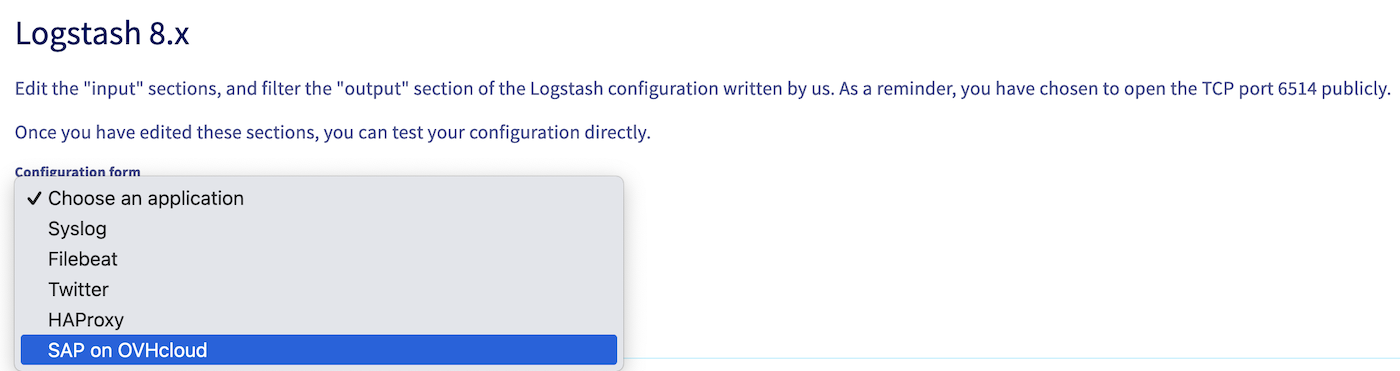
2. The Input, Filter and Customized Grok templates sections will be automatically filled. You can as well develop your own filter if you have introduced new logs.
3. Click on Finish the configuration.
4. On your data stream, click on the three dots icon, then Useful information.
Those information will be needed later to configure your rsyslog service to send your logs to this Logstash data-gathering tool.
Operating system configuration
This section needs to be repeated on each server from which you want to send logs on the Logs Data Platform.
If you use our SAP HANA pre-installation template, please note that configuration can be triggered during the deployment of the template.
Packages
Please ensure that the rsyslog (>=8.23.0) and rsyslog-module-gtls (>=8.2108) packages are presents on your servers.
If the version is lower than required, please update your operating system. If the output message is empty, it means that the package is not present on your operating system and you must install it.
- SLES
- RHEL
Installation
OVHcloud provides many rsyslog configuration files available on our GitHub repository. These files are necessary to correctly handle logs of an SAP system.
To ease the deployment of these rsyslog configurations, two solutions are available as well on our GitHub. The first one is a bash script that will launch the configuration automatically depending on the parameters provided. The second one is an Ansible playbook to launch the configuration on a multiple servers at the same time.
Many options are available to configure rsyslog on your operating system with our automations:
| Name | Bash option | Bash option (long) | Ansible option | Description |
|---|---|---|---|---|
| Help | -h | --help | Print the help | |
| Software Stack | -k | --software-stack | software_stack | Software Stack of the instance, S4 / NW / HANA. Defining only the Software Stack during the installation which allows the process to discover your SAP environment and defined the SAP SID and HANA SID automatically. |
| SAD SID | -s | --sap-sid | sap_sid | SAP SID. Three alphanumeric characters. |
| HANA SID | --hana-sid | hana_sid | HANA SID. Three alphanumeric characters. | |
| LDP target platform | -t | --ldp-target-platform | ldp_target_platform | Logs Data Platform target platform URI. Example: gra159-xxx.gra159.logs.ovh.com. |
| LDP CA file path | -p | --ldp-ca-file-path | ldp_ca_file_path | Logs Data Platform certificate absolute path. Example: /etc/rsyslog.d/logstash.crt. |
| Audit LDP target platform | --audit-ldp-target-platform | audit_ldp_target_platform | Audit Logs Data Platform target platform URI. Example: gra159-xxx.gra159.logs.ovh.com. This parameter is not mandatory but allows you to configure a different Logs Data Platform for your SAP HANA, SAP ABAP and SAP JAVA audit and security files. | |
| Audit LDP CA file path | --audit-ldp-ca-file-path | audit_ldp_ca_file_path | Audit Logs Data Platform certificate absolute path. This parameter is not mandatory but allows you to configure a different Logs Data Platform for your SAP HANA, SAP ABAP and SAP JAVA audit and security files. | |
| Forward AS ABAP Audit log | --collect-sal | collect_sal | Boolean, enables the processing and forwarding of audit logs from an SAP Application Server ABAP. In order to use this option, the audit log must be activated on the SAP ABAP server. |
Terminal
- A minimal deployment requires only the OVHcloud Logs Data Platform endpoint and the location of the certificate:
- Deployment with setting the software stack to let the script discover your SAP environment:
- Deployment with setting the SAP SID:
- Deployment with SAP audit logs on a specific data stream:
- Deployment with setting collect of SAP ABAP audit logs:
The SAP logs on OVHcloud Logs Data Platform feature provides the possibility to retrieve the ABAP security audit logs directly with the parameter --collect-sal. More information about the action of this parameter in the following chapter SAP AS ABAP Security Audit Log.
Ansible (>=2.15)
OVHcloud provides an Ansible playbook to deploy the rsyslog configuration.
Regardless of the method used, if you missed an option or need to reconfigure your rsyslog during the process, you can relaunch the script. A new configuration will be deployed, and the old configuration will be saved with the .old extension.
SAP AS ABAP Security Audit Log
SAP provides the possibility with the Security Audit Log to record security-related system information of your SAP system.
By activating it, all activities that you specify will be recorded into an audit log file located in /usr/sap/<SID>/D<NI>/log/audit_YYYYMMDD for SAP NetWeaver 7.50. Please note that the OVHcloud service only accepts daily files with the name audit_YYYYDDMM.
However, for SAP S/4HANA, the classic approach must be configured. Only one file per day must be generated, the option protection format active must be disabled and the parameter FN_AUDIT (set in the DEFAULT.PFL profile) must be set with the value ++++++++.AUD, where ++++++++ equals YYYYDDMM. In order to load this new configuration, a restart of your SAP system must be done.
These audit files do not have standard rsyslog syntax, OVHcloud developed a Linux service in order to identify and send logs to rsyslog through the /var/log/messages file. These logs come from Security Audit Log process are identified with the tag security_audit_abap.
During the installation, two files are created /etc/systemd/system/ovhcloud-sap-audit.service and /usr/sbin/ovhcloud-sap-auditd. These files are used to create a service named ovhcloud-sap-audit.
You can start or stop this new service using these following commands:
Setup OpenSearch Dashboards
OVHcloud provides a solution enabling you to enhance your dashboards using OpenSearch Dashboards. With this solution, you can save searches and create dashboards tailored to your various use cases.
To create an OpenSearch Dashboards, please take note of our documentation Using OpenSearch Dashboards with Logs Data Platform.
Import OVHcloud objects for SAP
OVHcloud provides a collection of saved queries and dashboards that can be directly accessed on our GitHub repository. These objects can be downloaded and imported in your OpenSearch Dashboards.
In the downloaded files, the keywords <replace-with-your-alias-id> and <replace-with-your-audit-alias-id> must be replaced with the alias ID of your data stream.
In the case of you have only one data stream for your technical logs and your security audit logs, replace both keywords by the same value.
You can find this ID in your OpenSearch Dashboards instance, Stack Management, Index patterns, then select your alias. The ID is displayed in the URL and is composed of alphanumeric characters.
In your OpenSearch Dashboards instance, use the left panel to navigate to Stack Management, then Saved Objects and click on Import to import the file previously downloaded.
By following these steps, you have now many objects available on the Saved Objects page.
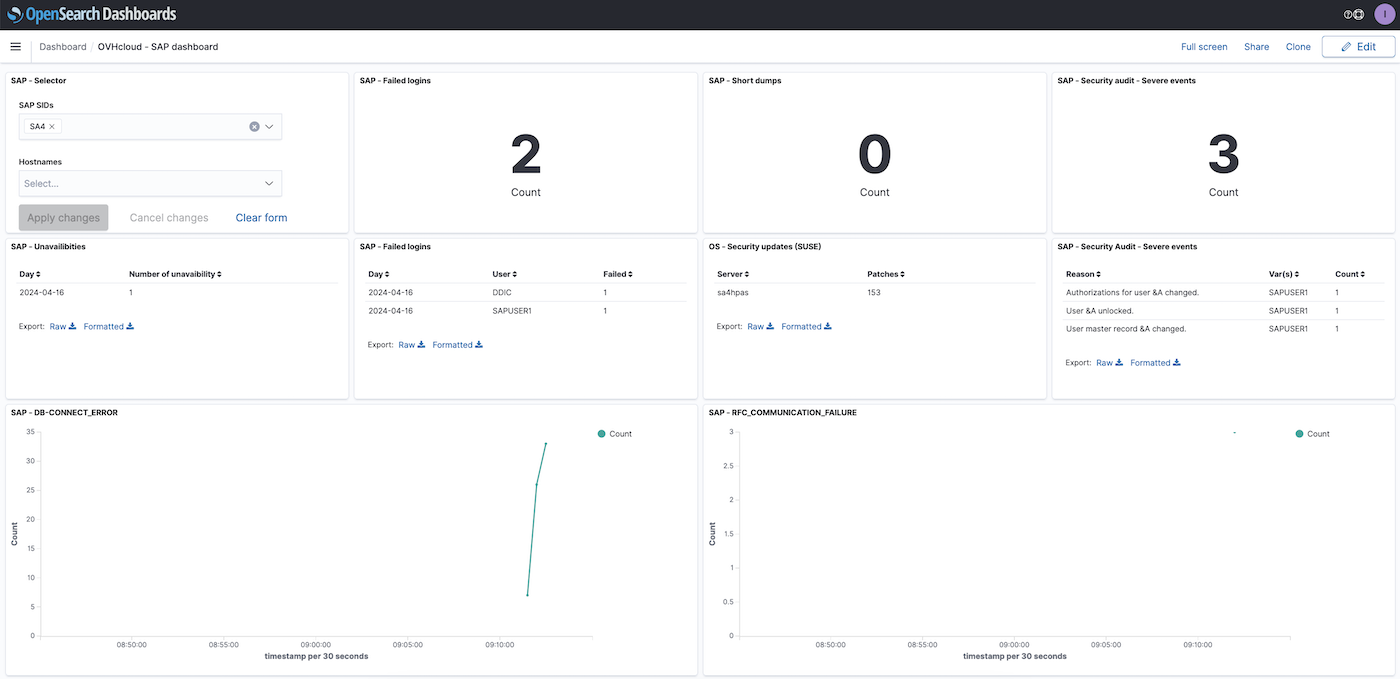
Still in your OpenSearch Dashboards instance, in the main menu, you have now two new dashboards created by OVHcloud. You can also access the saved queries by clicking on the save icon.

Your logs are now sent to the Logs Data Platform and displayed on your data stream via OpenSearch Dashboards.
Set up SAP alerts
You can receive email notifications when specific patterns or threshold values are detected in your SAP logs.
You can create an alert with our documentation Configuring a Field Aggregation alert condition.
Upon choosing the appropriate alert type for your requirements, we provide some example of alerts:
| Alert condition | Name | Field | Value | Threshold type | Threshold | Aggregation type | Grace period | Build-up of messages | Request filter |
|---|---|---|---|---|---|---|---|---|---|
| Content field | SAP - Security audit - Severe events | Severity | Severe | 1 | 5 | saplog: security_audit_abap and not Class: Logon and not Details: "Non-encrypted &A communication (&B)" | |||
| Number of messages | SAP - DB_CONNECT_ERROR | More than | 5 | 1 | 2 | saplog: dev_w and sap_sid: "" and message: "ERROR-DB-CONNECT_ERROR" | |||
| Number of messages | SAP - Short dumps | More than | 50 | 1 | 10 | saplog:syslog and message: ("Short dump" and "created") | |||
| Content field | SAP - Failed logins | Details | Logon failed (reason=&B, type=&A, method=&C) | 5 | 3 | saplog:security_audit_abap and sap_sid: "" | |||
| Content field | SAP - Unavailibities | message | Unavailable | 1 | 1 | saplog: available | |||
| Content field | SAP HANA - Memory outages | message | OUT OF MEMORY | 1 | 1 | saplog: *alert* and hana_sid: "" | |||
| Number of messages | SAP HANA - Backup issues | More than | 1 | 2 | 5 | saplog: backup_tenant or saplog: backup or saplog: backint_tenant or saplog: backint and message: *ERROR* and hana_sid: "" | |||
| Number of messages | SAP HANA - Services alerts | More than | 10 | 2 | 10 | saplog: *alert* and hana_sid: "" | |||
| Number of messages | SAP HANA - Modified parameters | More than | 5 | 5 | 20 | saplog: nameserver and message: "alter system alter configuration" | |||
| Number of messages | SAP HANA - Failed logins | More than | 3 | 1 | 5 | saplog: syslog and program: (HDB_SYSTEMDB or HDB_TENANTDB) and message: "authentication failed" |
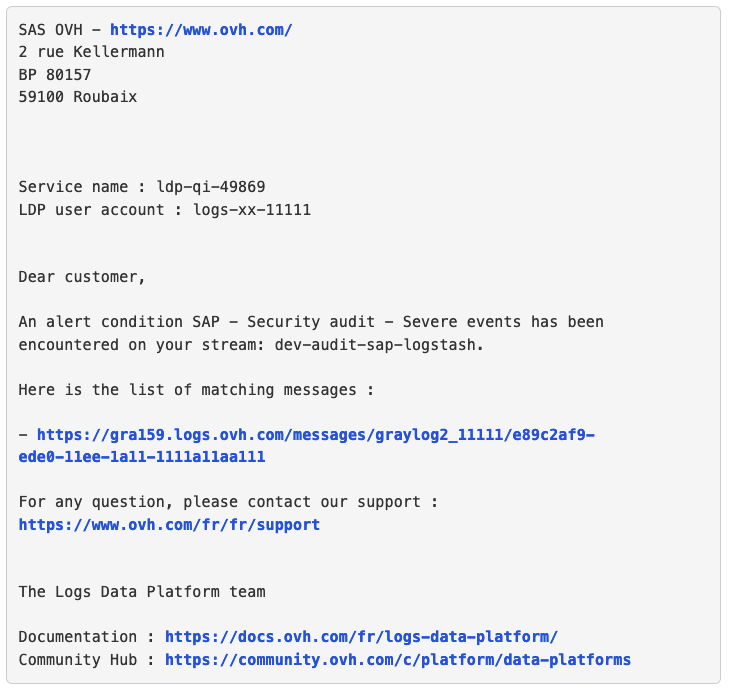
When a threshold is triggered, you receive an email.
Troubleshooting
If messages are not forwarded to your OVHcloud Logs Data Platform, please check that the rsyslog service has no errors with the command:
For example, errors related to your endpoint can be displayed via the rsyslog status, showing an invalid endpoint:
Verify that the indicated endpoint and certificate are correct. You can find these details on your data-gathering tool under the Useful Information section of its menu.
Sometimes, the rsyslog service may be overloaded if a very large number of messages have to be sent. In most cases, it is best to wait a few minutes for the rsyslog service to process messages through its spool (/var/spool/rsyslog). If after several minutes you notice that messages are still blocked, you can then consider restarting the rsyslog and syslog.socket services.
Uninstallation
If you no longer want to use the SAP logs on OVHcloud Logs Data Platform feature, you must remove the rsyslog configuration file /etc/rsyslog.d/ovhcloud-sap-rsyslog.conf and then restart the rsyslog and syslog.socket services.
If you have chosen to install our service to manage SAP audit logs, please run these commands:
Go further
- Introduction to Logs Data Platform
- Quick start for Logs Data Platform
- SAP logs on OVHcloud Logs Data Platform - Analyze and work with your logs
If you need training or technical assistance to implement our solutions, contact your sales representative or click on this link to get a quote and ask our Professional Services experts for assisting you on your specific use case of your project.
Join our community of users on https://community.ovh.com/en/.


 SAP logs on OVHcloud Logs Data Platform - Analyze and work with your logs
 156
156