

Persistent Volumes on OVHcloud Managed Kubernetes Service
388 wyśw.
 30.01.2026
  Cloud / Managed Kubernetes Service
This tutorial goes through the setup of a Persistent Volume (PV) on an OVHcloud Managed Kubernetes Service.
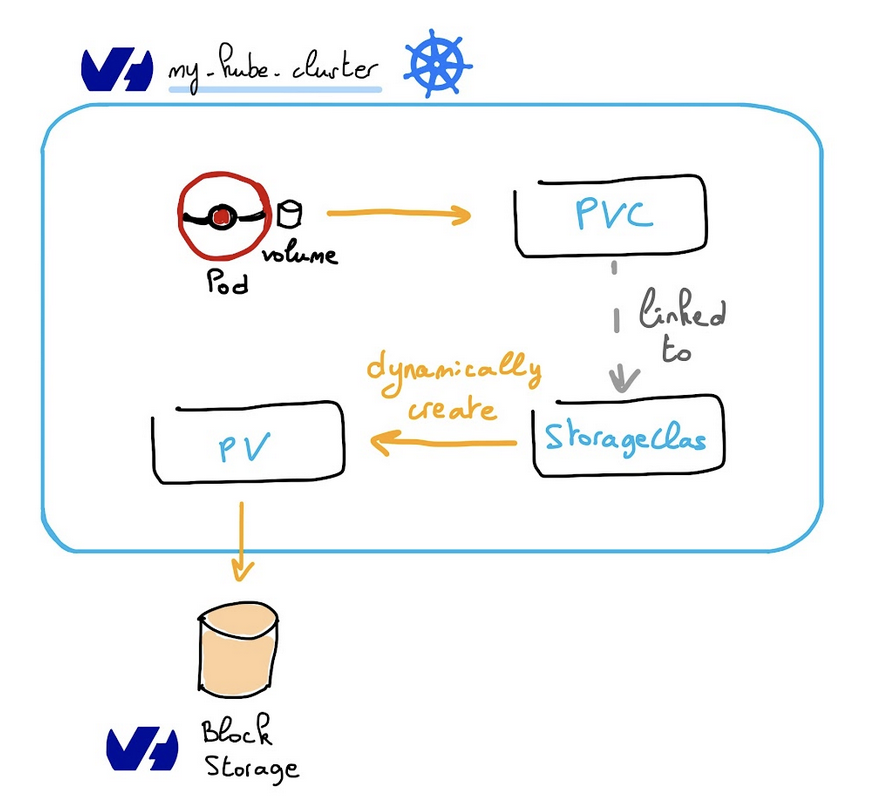
In order to provision a volume, a Persistent Volume Claim (PVC) is required. This will automatically create a Persistent Volume (PV) associated to a Public Cloud Block Storage volume.
The Block Storage volume then becomes available for any pod that claims it via a PVC.
Requirements
A running MKS cluster, see the OVHcloud Managed Kubernetes Service Quickstart guide for more information.
When a Persistent Volumes resource is created inside a Managed Kubernetes cluster, an associated Public Cloud Block Storage volume is automatically created with it. This volume is hourly charged and will appear in your Public Cloud project. For more information, please refer to the following documentation: Volume Block Storage price
Persistent Volumes (PV) and Persistent Volume Claims (PVC)
As the official documentation states:
- A
PersistentVolume(PV) is a piece of storage in the cluster that has been provisioned by an administrator or dynamically provisioned using Storage Classes. It is a resource in the cluster just like a node is a cluster resource. - A
PersistentVolumeClaim(PVC) is a request for storage by a user. It is similar to a pod. Pods consume node resources and PVCs consume PV resources. Pods can request specific levels of resources (CPU and Memory). Claims can request specific size and access modes (e.g., they can be mounted once as read/write or many times as read-only).
Create a PVC
The following test-pvc.yaml example reserves a 10Gi volume, with the csi-cinder-high-speed storage class:
To create it on a cluster:
To check that the PersistentVolumeClaim (pvc) and its associated PersistenVolume (pv) were created:
Sample output:
Using the PVC
This sample pod mounts the provisioned volume via its PVC:
To create it on a cluster:
To check that the pod mounted the volume and started successfully:
Sample output:
Storage Classes
Storage classes point to a particular storage technology used to provision a volume. This storage class is given in the PersistentVolumeClaim definition. See the official documentation for more information.
The following storage classes are currently supported on OVHcloud Managed Kubernetes:
csi-cinder-high-speed-gen2storage class is based on hardware that includes SSD disks with NVMe interfaces. The performance allocation is progressive and linear (30 IOPS allocated per GB and 0.5MB/s allocated per GB) with a maximum of 20k IOPS and 1GB/s per volume. The IOPS and bandwidth performance will increase as scale up the storage space.csi-cinder-high-speedperformance is fixed. You will get up to 3,000 IOPS per volume, regardless of the volume size.csi-cinder-classicuses traditional spinning disks (200 IOPS guaranteed, Up to 64 MB/s per volume). (Not yet supported on the MKS Standard plan. Please refer to the limitations described in theMulti availability zones deploymentssection of our Known limits guide). All theseStorage Classesare based on Cinder, the OpenStack block storage service. The difference between them is the associated physical storage device. They are distributed transparently, on three physical local replicas.
csi-cinder-high-speed is recommended for volumes up to 100GB. Above 100GB per volume, enhanced performance is achieved with csi-cinder-high-speed-gen2 volumes.
LUKS Encrypted Storage Classes
OVHcloud Managed Kubernetes supports LUKS encrypted block storage volumes using OVHcloud Managed Keys (OMK). The following encrypted storage classes are available:
csi-cinder-high-speed-gen2-luks- Encrypted version of High Speed Gen2 (progressive performance)csi-cinder-high-speed-luks- Encrypted version of High Speed (fixed 3,000 IOPS)csi-cinder-classic-luks- Encrypted version of Classic (spinning disks)
This feature is available in specific regions. For detailed regional availability and storage class specifications, see Datacenters, nodes and storage flavors - LUKS Encrypted Storage Classes.
Creating a LUKS encrypted volume automatically generates a dedicated OVHcloud Managed Key (OMK).
Do not modify or delete this key if it is linked to a Block Storage volume. Doing so would make the data on that volume and all its snapshots permanently unrecoverable.
For more information:
- Choosing the right Block Storage class
- Create encrypted Persistent Volumes on OVHcloud Managed Kubernetes clusters with LUKS (Complete tutorial)
When you create a Persistent Volume Claim on your Kubernetes cluster, we provision the Cinder storage into your account. This storage is charged according to the OVH flexible cloud storage prices.
Since Kubernetes 1.11, support for expanding PersistentVolumeClaims (PVCs) is enabled by default, and it works on Cinder volumes. In order to learn how to resize them, please refer to the Resizing Persistent Volumes tutorial. Kubernetes PVCs resizing only allows to expand volumes, not to decrease them.
Access Modes
The way a PV can be mounted on a host depends on the capabilities of the resource provider. Each PV gets its own set of access modes describing that specific PV’s capabilities:
ReadWriteOnce: the PV can be mounted as read-write by a single nodeReadOnlyMany: the PV can be mounted read-only by many nodesReadWriteMany: the PV can be mounted as read-write by many nodes
The default MKS storage classes don't allow mounting a PV on several nodes: only the ReadWriteOnce access mode is supported at the moment.
Additional ReadWriteMany storage classes can be configured to have this capability:
- The Enterprise File Storage offers a managed shared filesystem consumed via NFS.
- The OVHcloud Cloud Disk Array offers a managed shared filesystem consumed via CephFS.
Reclaim policies
The behaviour of a volume when a PVC is deleted is configured using a reclaim policy. This policy is configured at the StorageClass level.
All storage classes installed by default on MKS currently set the RetainPolicy to Delete: when a PVC is deleted, the PV and its associated Public Cloud volume are deleted too.
To control this behaviour at the PersistentVolume level, the persistentVolumeReclaimPolicy attribute can be set in the PV Spec. See the official documentation for more information. A different value such as Retain can be set to prevent the volume from being deleted.
Example: Deleting a PVC and associated resources
Thanks to the Delete reclaim policy, if you delete the PVC, the associated PV is also deleted:
If you created a pod attached to a PVC and you want to delete the PVC, please note that the PVC can't be terminated while the pod is still on. So please delete the pod first, then delete the PVC.
Example: Deleting a PVC while keeping its associated resources
To illustrate how to change the reclaim policy, let's begin by creating a new PVC using the test-pvc.yaml file:
List the PV and get its name:
And patch it to change its reclaim policy:
Where <your-pv-name> is the name of your chosen PersistentVolume.
Now you can verify that the PV has the right policy:
In the preceding output, you can see that the volume bound to PVC default/test-pvc has reclaim policy Retain.
It will not be automatically deleted when a user deletes PVC default/test-pvc
Go further
-
If you need training or technical assistance to implement our solutions, contact your sales representative or click on this link to get a quote and ask our Professional Services experts for assisting you on your specific use case of your project.
-
Join our community of users on https://community.ovh.com/en/.


 Configuring multi-attach persistent volumes with OVHcloud NAS-HA
 391
391