

Using OVHcloud Object Storage as Terraform Backend to store your Terraform state (EN)
248 wyśw.
 04.06.2025
  Compute
Objective
It is possible to store Terraform state on a remote data store/backend like an AWS S3 bucket, a Google Cloud Storage (GCS), etc. but are you aware that you can also store your Terraform states on an OVHcloud Object Storage container?
In this tutorial you will:
- create an OVHcloud Object Storage container
- create a Terraform remote backend
- initialize your Terraform backend
Requirements
- A Public Cloud Instance in your OVHcloud account
- Terraform CLI installed
Dostęp do Panelu klienta OVHcloud
- Link bezpośredni: Public Cloud Projects
- Ścieżka nawigacji:
Public Cloud> Wybierz projekt
Before you begin
- You should have installed Terraform CLI, version 0.12.x minimum, on your machine. You can install it by following the detailed installation instructions or with the tool tfenv.
Terraform
Terraform is an open-source infrastructure as code (IaC) tool created by Hashicorp in 2014 and written in Go. Its purpose it to build, change and version control your infrastructure. You can define and provision your infrastructure by writing the definition of your resources in Hashicorp Configuration Language (HCL).

This tool has a powerful and very intuitive command line interface (CLI). If you are interested in leveraging your knowledge about Terraform CLI, a Cheat Sheet exists.
At OVHcloud we created a Terraform provider that you can use to interact with and manage OVHcloud resources.
Terraform states and backend
Terraform has several concepts, one of them is the state.
A Terraform state is a snapshot of your infrastructure from when you last ran the terraform apply command.
By default, the state file is stored locally in a terraform.tfstate file.
But the common usage in production environment is to store it remotely.
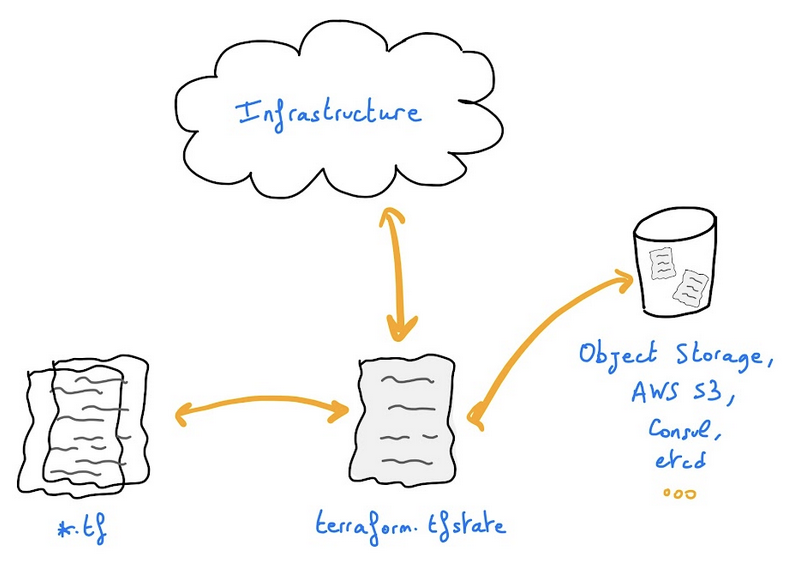
For example, you can store your Terraform state on an OVHcloud High Performance (S3) Object Storage container.
In order to do that you need to configure a backend in your Terraform HCL configuration files.
Terraform States are not encrypted at rest when stored inside an Object Storage container.
Instructions
Creating an Object Storage container/bucket
First, you need to have an Object Storage container. If you don't already have one, you can follow the Getting started with Object Storage tutorial.
For this guide, our Object Storage container is named terraform-state-hp, its storage class is High Performance and its region is GRA.
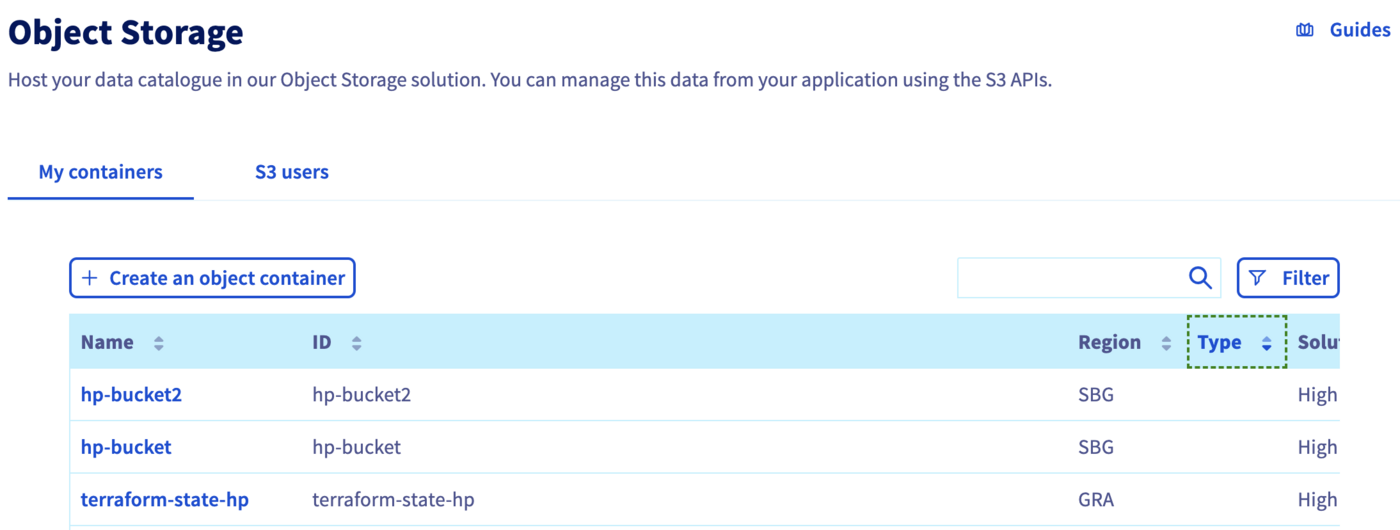
In order to store your Terraform states on an Object Storage, and generally if you want to interact with the Object Storage, you need to have the rights to manage an Object Storage.
So, at this stage of this tutorial, you should have a High Performance Object Storage container and a user. You should also be able to interact with the aws CLI and list the OVHcloud High Performance Object Storage containers that the user is linked to:
$ aws s3 ls
2022-07-11 16:20:48 my-container
2022-07-11 16:55:20 terraform-state-hp
Initializing Terraform configuration
Create a backend.tf file with the following content:
Before Terraform version 1.6.0:
After Terraform version 1.6.0:
In this file you define an Object Storage Terraform backend in the gra region. Do not hesitate to change this parameter if you created an Object Storage container in another region.
Terraform Init
Now you can initialize your Terraform configuration with the terraform init command.
The terraform init command is used to initialize a working directory containing Terraform configuration files. This is the first command to run after writing a new Terraform configuration or cloning an existing one from version control. It is safe to run this command multiple times.
This command initializes the backend (remote or local state).
After executing this command, you should obtain a result like this:
Now you can define your Terraform configuration files and providers and after running the terraform apply command, your Terraform state file will be stored in an OVHcloud Object Storage container.
Go further
Join our community of users.


 Zainstaluj moduł WordPress w instancji
 1806
1806