

Order a free SSL certificate
79 wyśw.
 24.10.2025
  Cloud / OVHcloud Load Balancer
Objective
The OVHcloud Load Balancer service can be configured to support SSL termination.
The purpose of SSL termination is to decrypt the incoming encrypted stream before forwarding it to the appropriate service, such as a web server.
Handling SSL termination on the Load Balancer reduces the computational load on your backend servers and centralizes certificate management. This makes maintenance and security updates easier.
Discover how to order a free SSL certificate via the OVHcloud Control Panel or the API.
Requirements
- You must have an OVHcloud Load balancer in your OVHcloud account.
- You must be logged in to the OVHcloud Control Panel.
Instructions
Via the OVHcloud Control Panel
Configure the frontend for SSL termination
To enable SSL termination, you must first configure your frontend.
You can configure your SSL termination from the OVHcloud Control Panel in the Bare Metal Cloud section, then Load Balancer.
After selecting the Load Balancer you wish to modify, create a new frontend or edit an existing one.
In the Frontends section, click on the Add Frontend button to create a new frontend.
In the configuration window that opens, select the HTTPS protocol. Then, select the Default server cluster.
Finally, open the advanced settings and fill in the HTTPS Redirection field.
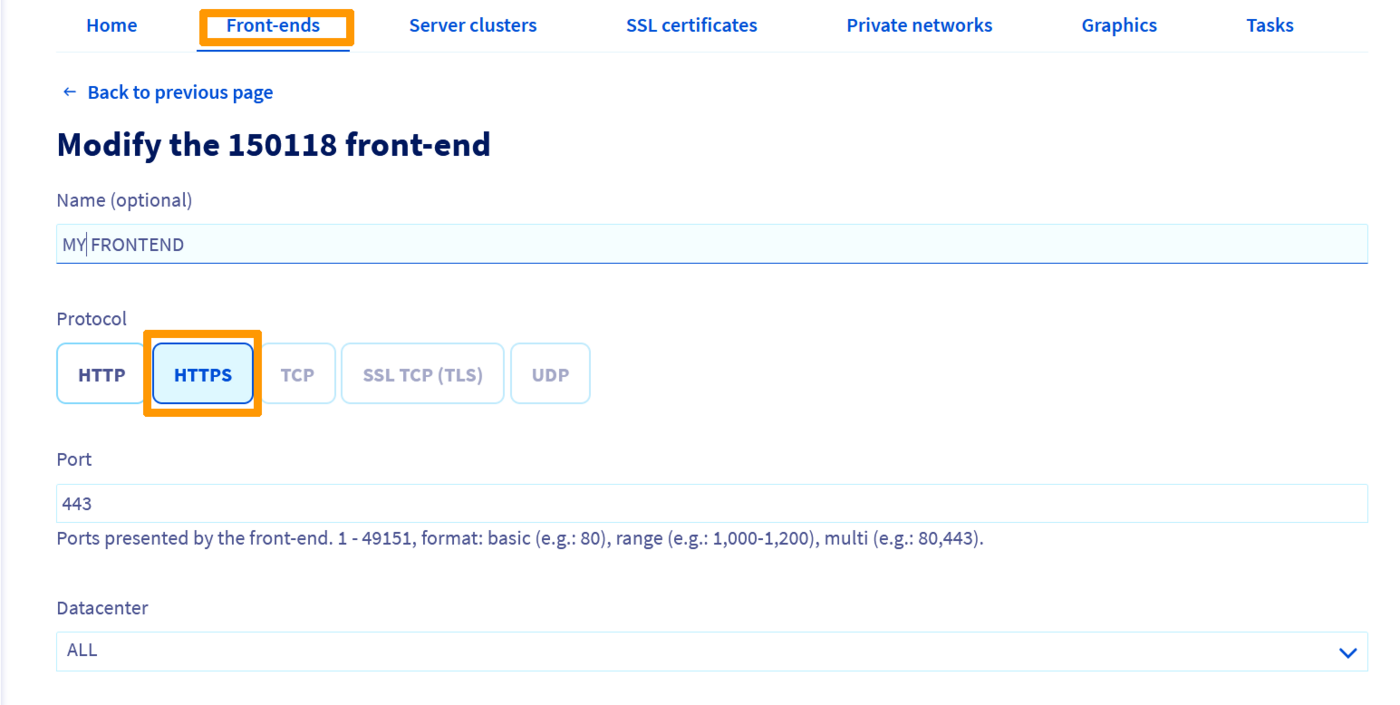
Once the frontend has been created, a banner will appear prompting you to Apply the configuration to deploy your changes in the appropriate zone.
Order the free SSL certificate
In the SSL Certificates section of your Control Panel, click the Order SSL Certificate button to create a new one. An edit window will appear with an FQDN field to be filled in.
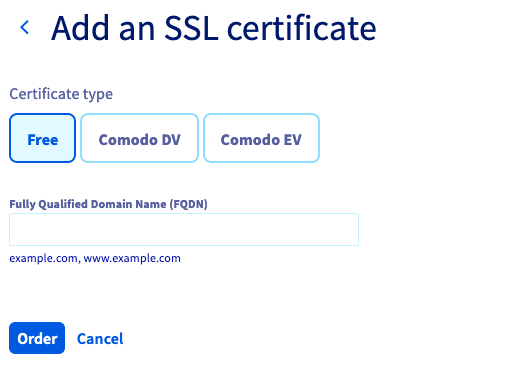
Follow-up of the order
In the Tasks section of your Control Panel, the tasks related to ordering a free SSL Certificate are of the type orderFreeCertificate.
Via the OVHcloud API
Configuring the frontend for SSL termination
In the API, the SSL termination is specified by the ssl boolean. To enable SSL termination, set this parameter to true, then set the defaultFarmId or redirectLocation to the corresponding values.
Then apply the changes:
Order the free SSL certificate
In the API, the call is as follows:
For the order to be finalized, the chosen domain name must point to your OVHcloud Load Balancer service.
Follow-up of the order
- Returning the task list
You can specify the action type orderFreeCertificate to refine the search:
- Returning the status of a particular task:
Once the order is complete, the SSL Certificate is automatically installed on your OVHcloud Load Balancer service.
Go further
Join our community of users.


 Zarządzanie usługą Load Balancer z Panelu klienta
 568
568