

Public VCF as-a-Service - Migrate from VMware vSphere on OVHcloud
249 viste
 06.05.2025
  Cloud / VMware
Public VCF as-a-Service is currently in alpha phase. This guide can evolve and be updated in the future with the advances of our teams in charge of this product.
Objective
The purpose of this guide is to provide you with the information you need to migrate to a Public VCF as-a-Service environment.
Requirements
- A managed VMware vSphere on OVHcloud offer.
- You must have access to the OVHcloud Control Panel and be technical administrator of the managed VMware vSphere on OVHcloud infrastructure.
Instructions
This practical guide is designed to provide you with information and solutions on the process of migrating your managed VMware vSphere on OVHcloud services to a Public VCF as-a-Service solution.
It also details the requirements for each use case, and if applicable, explains the requirements for a migration.
| OVHcloud Control Panel | Steps |
|---|---|
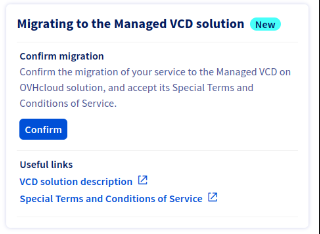 | 1. Before migrating, it is important to read the checklist of specific use cases below and follow any associated recommendations. 2. Once you have met these requirements, you can log in to the OVHcloud Control Panel to sign (in the provided field for this purpose) the specific conditions (T&Cs) of the environment which will be migrated. A confirmation email will be sent, containing a link and a temporary password to access Public VCF as-a-Service. 3. OVHcloud teams will migrate VMs from the chosen datacenter (vDC), using a hot migration path (vMotion). |
This hot migration will minimize disruptions to your public or private networks. Private networks are the most likely to be affected, with downtime of the order of a few minutes.
Your virtual machines will remain operational during the migration, with no downtime. However, there is a risk that some network packets will be lost during vMotion.
Network availability during migration
During the migration, your virtual machines (VMs) are moved using vMotion. Depending on your network topology, some VMs may temporarily lose connectivity:
- Public network (VMNetwork): no impact, as the public network is extended to the new infrastructure.
- Private network without inter-VM communication: no impact.
- Private network with inter-VM communication: possible brief downtime between VMs during the migration phase, as encapsulation technology changes from VLAN/VXLAN to Geneve.
We recommend that you plan accordingly and monitor your environment during the migration.
This migration should be done with no noticeable impact for most applications, but we recommend that you monitor them closely throughout the process.
As a reminder, if you decide to switch to the Public VCF as-a-Service offer, the new prices will not be applied to your existing servers/hosts. We will cover the increase of licensing prices until the migration is complete.
Step 1 - Before migration (mandatory)
Important: The Particular Terms and Conditions (C&P) available since the beginning of September 2024 in the OVHcloud Control Panel must be signed for the migration to be carried out by the OVHcloud teams.
Please review the product demo and webinar to familiarize yourself with this new offering.
You can find all the information you need on our Public VCF as-a-Service pages:
- Webinar - Public VCF as-a-Service (video)
- Webinar - VMware by Broadcom New Offerings and Opportunities (video)
- OVHcloud.com - Public VCF as-a-Service
- OVHcloud Labs - Public VCF as-a-Service
Migrations will be carried out in 4 waves, from november 2024, depending on the services active in your environment.
The planned schedule, which is compatible with these environments during the migration, is as follows:
| Waves | From | Target Offers | Microsoft (SPLA) | vRack | NSX | Summary of migration compatible environments |
|---|---|---|---|---|---|---|
Wave 1 | January 2025 February 2025 | Standard | ❌ | ❌ | ❌ | - Without Microsoft Windows VM license (SPLA) provided by OVHcloud - Without NSX |
Wave 2 | Mid-May 2025 | Standard | ✅ | ❌ | ❌ | - With Microsoft Windows VM license (SPLA) provided by OVHcloud - Without NSX |
Wave 3 | December 2025 | Standard | ✅ | ✅ | ❌ | - With Microsoft Windows VM license (SPLA) provided by OVHcloud - With vRack - Without NSX |
Wave 4 | End of February 2026 | Advanced | ✅ | ✅ | ✅ | - With Microsoft Windows license (SPLA) provided by OVHcloud - With vRack - With NSX |
During this process, your data will remain unchanged, except for vSAN Storage. Your IP addresses will also remain unchanged.
The migration date will be sent to you by email at least 15 days before the migration starts.
We recommend reading our guide Public VCF as-a-Service - The fundamentals of Public VCF as-a-Service to see which features are included in each migration wave of your environments.
Checklist before migration
- Blocking* specific use cases:
The table below lists each individual blocking use cases, bottlenecks, and the criticality levels that must be met before requesting a migration from OVHcloud support teams.
| Checklist | Use cases | Goals | Additional information | Help and references |
|---|---|---|---|---|
| 1️⃣ | 🏢🏢 Multi-vDC | Migrate VMs and vApps to a single vDC | - Can only be migrated if your architecture has only one vDC (for now). If not, please ensure that you transfer all your data (VMs, vApp) into the vDC that will be used for the migration by the OVHcloud teams. | Migrating an infrastructure to a new vDC |
| 2️⃣ | 📜 Non-active PCI-DSS, SecNumCloud and HDS options | No solution for now | - Cannot be migrated if, to date, your VMware vSphere on OVHcloud workloads are PCI-DSS, HDS or SecNumCloud certified. | |
| 3️⃣ | 🔐 Encryption VMs (KMS/OKMS or vNKP) | Decrypt or disable the encryption policy for VMs | - It is not possible to migrate with VMs, vApps encrypted in VMware vSphere on OVHcloud. | Enabling Virtual Machine Encryption (VM Encryption) |
| 4️⃣ | 💾 Zerto | No solution for now | - If you are using Zerto solutions (data continous replication for disaster recovery), you cannot make Zerto work with Public VCF as-a-Service (for now). | Setting up Zerto Virtual Replication between two OVHcloud datacentres |
*Blocking : prevents any possible migration to a Public VCF as-a-Service environnement.
- Non-blocking specific use cases:
| Checklist | Use cases | Goals | Additional information | Help and references |
|---|---|---|---|---|
| 5️⃣ | 🚫 FT (fault tolerance) | Disable VM Fault Tolerance in VMware vSphere on OVHcloud | - Right-click your VMs and select Fault Tolerance > Disable Fault Tolerance in managed VMware vSphere on OVHcloud | VMware fault tolerance |
| 6️⃣ | ⚠️ Affinity/anti-affinity rules DRS | Reconstruction of affinity/anti-affinity rules in Public VCF as-a-Service | - To be retained, DRS affinity/anti-affinity rules will have to be manually recreated by you in Public VCF as-a-Service after migration (for now). | VMware DRS distributed resource scheduler |
| 7️⃣ | 📀 Special devices (CD, DVD, etc...) | Unplug all special equipment in VMware vSphere on OVHcloud | - All special devices (CDs, DVDs, etc.) must be removed prior to migration, otherwise they will be removed by the migration process (for now). | Modify virtual machine resources |
| 8️⃣ | 🛢 Datastore clusters | Delete all clustering rules in VMware vSphere on OVHcloud | - Clustering rules must be removed before migration, as this concept no longer exists with Public VCF as-a-Service | Cluster creation and EVC activation |
| 9️⃣ | 🔄 Over-committed memory | Plan or scale your resource requirements in Public VCF as-a-Service. Or optimize your requirements before migrating (vSphere control panel side) | - Because you cannot over-commit resources within Public VCF as-a-Service. This concept does not exist. | Modify virtual machine resources |
| 🔟 | 🔗 Resource pools (share) | Replace with vApps in Public VCF as-a-Service | - Resource pools will be lost after the migration, as this concept no longer exists on the Public VCF as-a-Service side. Instead, we recommend using vApp concepts within the Public VCF as-a-Service Control Panel. | Using vApps in the Public VCF as-a-Service control panel |
| ⏸️ | 🆓 Hosts + Datastore | Free up resources (hosts + datastore) in VMware vSphere on OVHcloud | - Free "Freespare" and "Hourly" resources (hosts + datastores) must be released before the migration, or converted into monthly resources ("Monthly"). | Hosted Private Cloud billing information |
Step 2 - After migration (mandatory)
Here is a reminder of the tasks you still need to carry out, once the migration is complete (if you have the following uses).
Post action (only for specific use cases)
| Post actions | Use cases | Goals | Help and references |
|---|---|---|---|
| 1️⃣ | 🏢🏢 Multi-vDC | Re-migrate the VMs and vApp data to your multi-vDc datastore in Public VCF as-a-Service if you are in this use case | |
| 5️⃣ | 🚫 FT (fault tolerance) | Fault Tolerance is not available in Public VCF as-a-Service. | |
| 6️⃣ | ⚠️ Affinity/anti-affinity rules DRS | Reconstruct affinity/anti-affinity rules in Public VCF as-a-Service | - Create a VM affinity rule in Public VCF as-a-Service |
| 7️⃣ | 📀 Special devices (CD, DVD, etc...) | Reconnect any special equipment required for VMs to work properly in Public VCF as-a-Service | - Because all special devices (CD, DVD, etc.) must be removed before migration. Insert support into a virtual machine in the Public VCF as-a-Service |
| 3️⃣ | 🔐 Encryption VMs (KMS/OKMS or vNKP) | Reactivate the encryption policy for the VMs in Public VCF as-a-Service with your defined solutions (KMS/OKMS/vNKP) after migration, and launch the VM encryption. | - As it is not currently possible to migrate with VMs or encrypted vApps. You will need to import or configure your encryption solution (KMS/OKMS, vNKP) before enabling VM encryption in Public VCF as-a-Service |
Managed Veeam for Public VCF as-a-Service (mandatory)
Backup is not set up by default following the Public VCF as-a-Service migration. You must subscribe to the Managed Veeam for Public VCF as-a-Service backup service in the control panel and configure it, if you want to protect your new environment.
Storage repository configuration
These settings can be customized to suit your chosen service levels:
| Repository | Target Offer | Comments |
|---|---|---|
🥉 Bronze Repository (100 TB) | Standard | - Standard Object Storage |
🥈 Silver Repository (100 TB) | Advanced | - Standard Object Storage with off-site backup |
🥇 Gold Repository (100 TB) | Premium | - High Performance Object Storage with off-site backup and 14 immutability points |
All these repositories have a storage quota of 100 TB. You can contact the support teams to increase this quota.
For more information, please refer to our guide: Public VCF as-a-Service - Veeam Data Platform backup
Reset the "Admin" password on Public VCF as-a-Service
You can now reset the Admin password for a Public VCF as-a-Service organization using APIv2: Access APIv2.
Accessing datastores after migration
After migrating your Managed vSphere service to your Public VCF as-a-Service organization, you can still access your datastores via the legacy Managed vSphere interface.
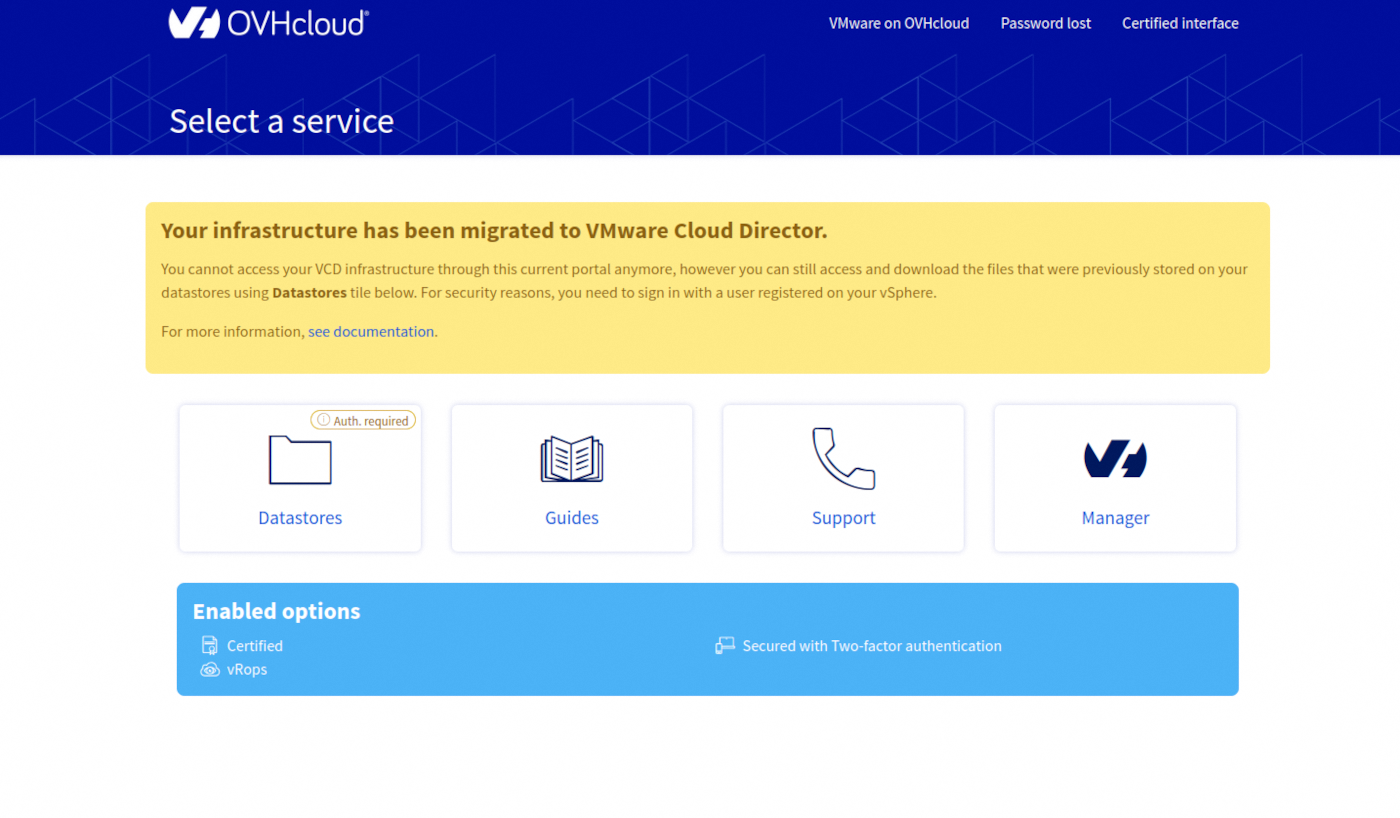
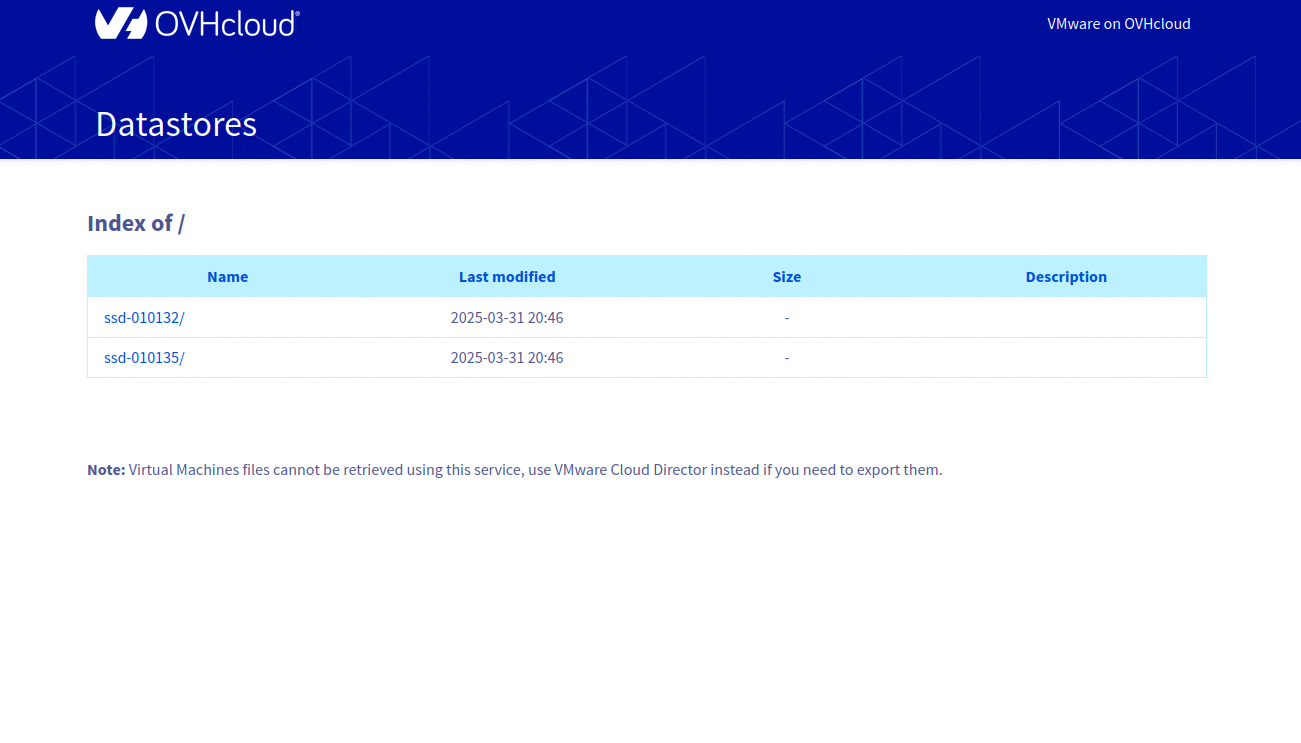
This interface allows you to view and download the files still stored on your datastores.
For security reasons, only users who existed before the migration can log in.
Passwords for these users may have been reset during the migration process. If needed, you can update them using the dedicated OVHcloud API with the following call:
Virtual machines cannot be recovered from this interface. To export your VMs, use your Public VCF as-a-Service organization.
Go further
You can go even further by reading these guides, to get a better understanding of the advantages of using Public VCF as-a-Service:
- Public VCF as-a-Service - Getting started
- Public VCF as-a-Service - Public VCF as-a-Service fundamental concepts
- Public VCF as-a-Service - Frequently Asked Questions
- Public VCF as-a-Service - Log in from the Public VCF as-a-Service control panel
- Public VCF as-a-Service - Network concepts and best practices
- Public VCF as-a-Service - Creating network components via Public VCF as-a-Service
- Public VCF as-a-Service - Veeam Data Platform backup
If you need training or technical assistance to implement our solutions, please contact your Technical Account Manager or click on this link to get a quote and ask our Professional Services experts for a custom analysis of your project.
Ask questions, give your feedback and interact directly with the team building our Hosted Private Cloud services on the dedicated Discord channel.
Join our community of users.


 Public VCF as-a-Service - Setting up your network after vSphere to Public VCF as-a-Service migration
 91
91