

IAM for VMware on OVHcloud - How to create an IAM vSphere role
147 viste
 23.05.2024
  Cloud / VMware
IAM is currently in beta phase. This guide can be updated in the future with the advances of our teams in charge of this product.
Objective
In this guide, we will explain how to create an IAM role in Hosted Private Cloud - VMware on OVHcloud.
Requirements
- An OVHcloud account.
- One or more Hosted Private Cloud - VMware on OVHcloud products linked to this account (Hosted Private Cloud powered by VMware, VMware Service Pack).
- IAM enabled for your Hosted Private Cloud service - VMware on OVHcloud. Follow the steps in the guide IAM for VMware on OVHcloud - How to enable IAM.
Instructions
By default, you have 2 vSphere IAM roles. The creation of an additional role is therefore optional.
We will explain how to create an additional role.
Creating an IAM role via the OVHcloud Control Panel
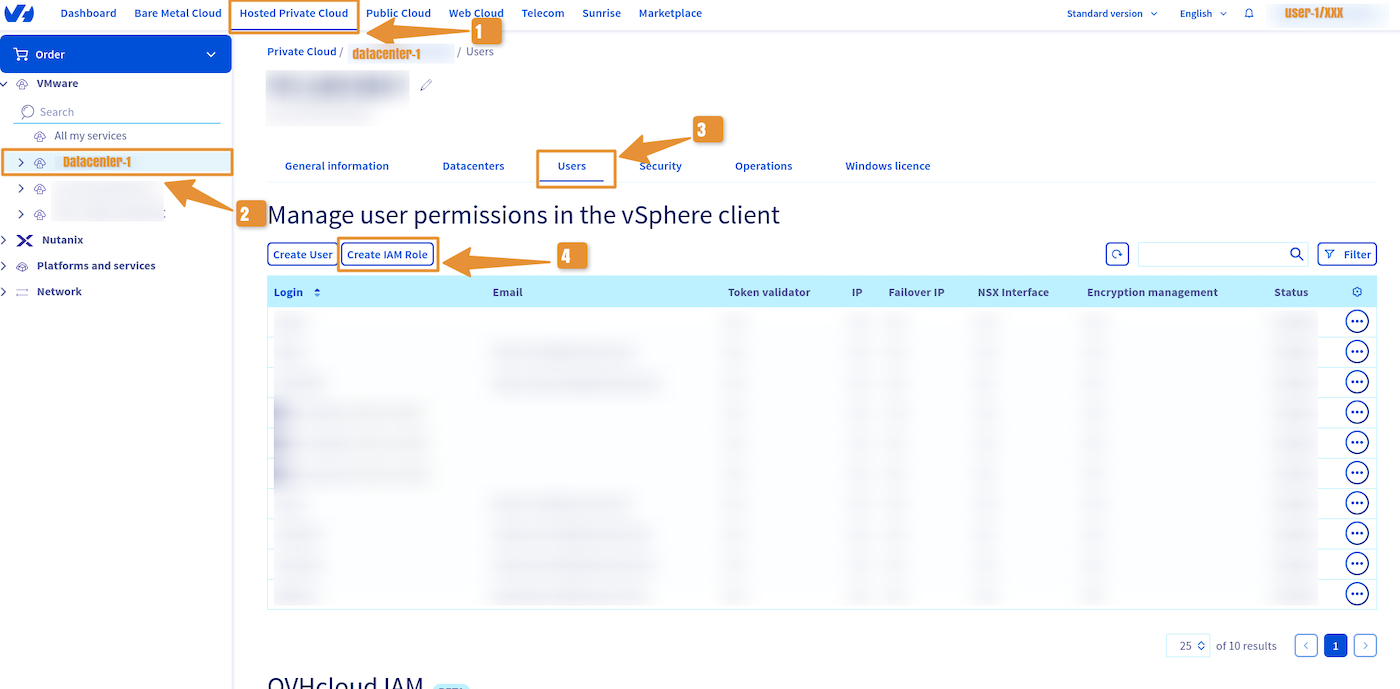
Log in to your OVHcloud Control Panel and click the Hosted Private Cloud tab.
Click the VMware section, select your infrastructure, then go to the Users tab.
Click Create IAM Role.
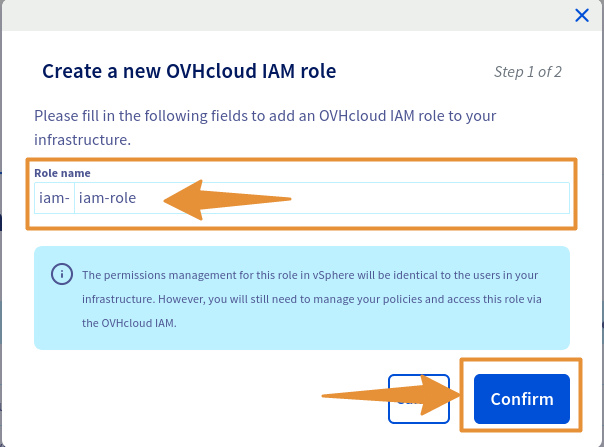
In the window that pops up, enter the name of your role, then click Confirm.
IAM roles are automatically prefixed with iam-.
You can then edit the group rights in the same way as with a vSphere local user.
Creating an IAM role via the OVHcloud API
Read the guide Getting started with OVHcloud APIs to get familiar with using OVHcloud APIv6.
Execute the following API call:
Make sure to replace the serviceName with the reference of your Hosted Private Cloud service, in the form pcc-XXX-XXX-XXX-XXX.
API return:
IAM roles are automatically prefixed with iam-.
Go further
You can now follow the steps in the guide IAM for VMware on OVHcloud - How to associate a role with a global IAM policy.
IAM for VMware on OVHcloud - Guide index:
- Guide 1: IAM for VMware on OVHcloud - Overview and FAQ
- Guide 2: IAM for VMware on OVHcloud - How to enable IAM
- Guide 3: IAM for VMware on OVHcloud - How to create an IAM vSphere role
- Guide 4: IAM for VMware on OVHcloud - How to associate a vSphere role with an IAM policy
- Guide 5: IAM for VMware on OVHcloud - How to associate a user with a global IAM policy
If you need training or technical assistance to implement our solutions, contact your sales representative or click on this link to get a quote and ask our Professional Services experts for a custom analysis of your project.
Join our community of users.


 Modificare la password utente
 862
862