

Cold Archive - Panoramica (EN)
675 viste
 19.01.2026
  Cloud / Object Storage S3
This page is only for existing customers of the OVHcloud standalone bucket-granular Cold Archive introduced in 2023.
You're looking for S31-compatible archiving solutions?
OVHcloud Object Storage now offers individual objects archiving feature rather than archiving the entire container thanks to the addition of the Cold Archive class in the Object Storage lifecycle. Indeed, the feature is now directly available in your Object Storage dashboard, from your existing Object Storage containers:
- Upload your objects in the Cold Archive class,
- or use lifecycle transitions to move data to Cold Archive class.
To learn more about this storage class, see our guide "Choosing the right storage class for your needs".
Moreover, the standalone bucket-granular Cold Archive won't be available from the Control Panel for new customers, with no impact to existing customers. APIs will continue to work and data will of course remain secure and available at any moment: we only modify the way users will access and manage objects.
Objective
OVHcloud Cold Archive is a class of storage designed for long-term storage of rarely accessed data.
Its main features are:
- Long-term retention: storage of data for a period > 8 months
- Data immutability: data cannot be updated after being archived
- Durability (99.999%) and protection against bit-rot (degradation of data over long periods of time)
- At any moment you have access to the metadata always online for consultation. You can retrieve the data on demand within 48 hours when you need it.
The hardware design is specifically built for this use case, to provide a trusted platform with the best resiliency/price ratio:
- Without volume limit, up to several petabytes of data
- Based on magnetic tape storage for long duration (> 10 years) and low carbon consumption
- Within a highly resilient architecture of multiple data centers
This service is adapted for your business:
- Regulatory And Compliance Archiving
- Media Asset Preservation
- Scientific Data Storage
- Sensitive Data Preservation
- Healthcare Information Archiving
- Financial Information Archiving
- Public Sector Information Archiving
The service allows you to focus on building and deploying cloud applications while OVHcloud takes care of the service infrastructure and maintenance.
This guide explains the concepts of the Cold Archive class of storage.
Since November 2025, there are two ways of consuming Cold Archive are:
- Cold Archive v1, a standalone bucket-granular Cold Archive solution (legacy offering).
- Cold Archive v2, an Object Storage class/tier that allows archiving individual objects within a container.
Although there are two underlying ways of consuming Cold Archive, we continue to refer to the solution as 'Cold Archive' in all customer-facing materials, including the product page and customer experience, without explicitly mentioning 'v1' or 'v2'.
Please refer to the Cold Archive FAQ to know more about the main differences between the two underlying options for Cold Archive.
Concepts
The service is fully managed by OVHcloud and accessible through the S3-compatible API.
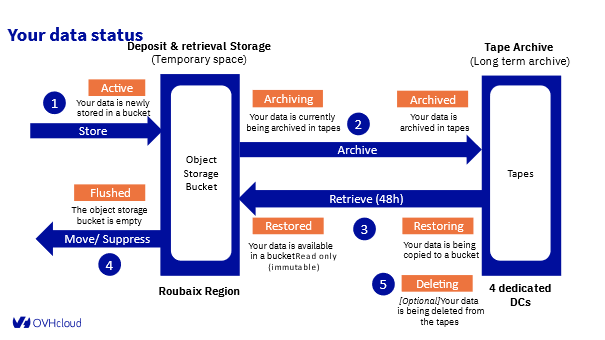
5 steps operation:
- Store (Active): Your data is newly stored in a bucket within the Object Storage Bucket.
- Archive (Archiving):
- Archiving: Your data is currently being archived to tapes.
- Archived: Your data is now archived in tapes, stored in the Tape Archive (long-term archive) across dedicated data centers.
- Retrieve (48h) or Restore:
- Restoring: Your data is being copied to a bucket.
- Restored: Your data is available in a bucket, read-only (immutable), within the Object Storage Bucket.
- Move / Suppress (Flushed): The Object Storage Bucket is now empty.
- Deleting (Optional): Your data is being deleted from the tapes.
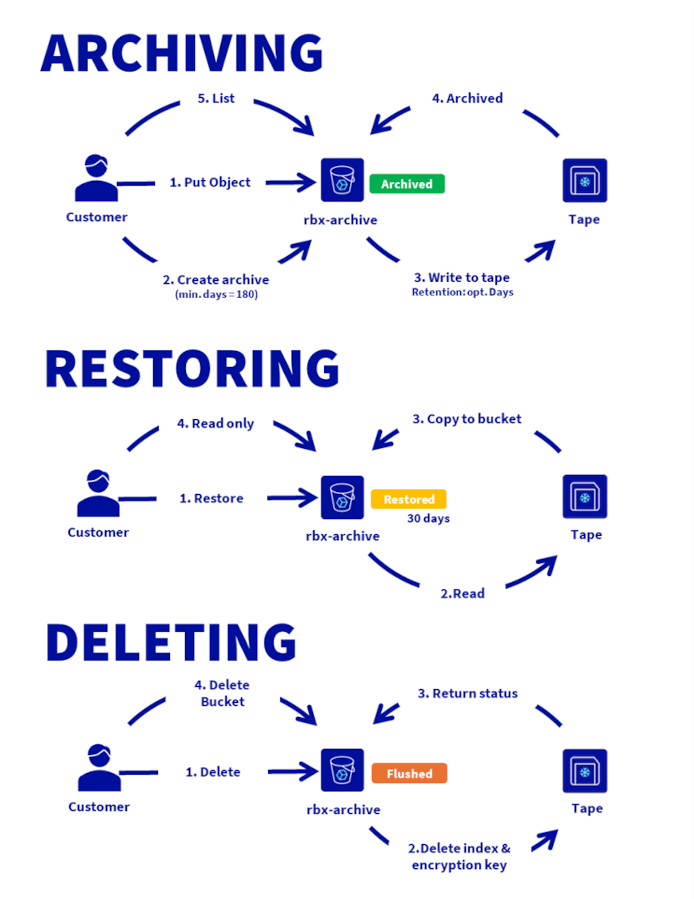
Uploading the data
Create an archive at a bucket level.
Archive and retrieve your data with the methodology of your choice:
- by CLI
- with rClone
- with tools of the market
The bucket limitation is 100TB.
Data lifecycle
During the lifecycle, data is placed at Object Storage level for a deposit or retrieval or stored on magnetic tape for long duration archive.
You can track the different steps of your data by the status of your bucket
| Archive (=bucket) status | Description | Objects permissions | Duration | Data pricing |
|---|---|---|---|---|
None | No Intelligent-Tiering configuration pushed on the bucket yet. | All | unlimited | Standard |
Archiving | Archiving in progress on tapes. | Listing | N/A | Archive |
Archived | Objects archived on tapes only. | Listing | unlimited | Archive |
Restoring | Restoration in progress from tapes. | Listing | <48 hrs | Archive |
Restored | Objects restored and accessible. | Read-only + Listing | 30 days | Archive |
Deleting | Objects deletion from tapes (and disks if restored) in progress. | Listing | <48 hrs | Archive |
Flushed | Bucket is empty and can be removed safely. | Listing (empty bucket) | N/A | Archive |
Network, upload and retrieval performances
Cold Archive is a service based on Object Storage. Performance and limitations (number of buckets, account, maximum bandwidth per connection, number of requests per second on bucket, maximum size per object / mpu / part, etc.) are available here
To upload your data, the maximum bandwidth is 1 Gbps per logical connection and the number of connections that can be used in parallel is unlimited.
Upload duration depends on your internet connection.
A few examples:
- I have a 1 Gbps internet connection, I upload a 1TB archive, it will take 2.2 hours.
- I have a 5 Gbps internet connection, I upload a 1TB archive, it will take 26 minutes.
- I have a 5 Gbps internet connection, I upload a 100TB archive, it will take 1.9 days.
Time to retrieve data
The time it takes to access data depends on its volume. For example, for a retrieval of several hundred TB, the average time is 48 hours. For a volume of a few TB, it can take a few minutes up to a few hours.
RSE, Certifications & Compliance
Compliance
The service is HDS and ISO 27001 certified.
Low carbon consumption
Outside the read and write phase, the cartridges do not consume electricity. This provides more than 95% power savings compared to a similar disk array.
Duration
Magnetic tapes are built to last for decades (as opposed to an average of five years for modern disks).
Security
Using server-side encryption with customer-provided encryption keys (SSE-C) allows you to set your own encryption keys.
When you upload an object, Object Storage uses the encryption key you provide to apply AES-256 encryption to your data. When you retrieve an object, you must provide the same encryption key as part of your request. Object Storage first verifies that the encryption key you provided matches and then decrypts the object before returning the object data to you.
Immutability by WORM
Immutable storage is often mandatory for legal reasons and certification not to change or delete the data after it has been written.
Immutable storage is a means to be protected against malware and attacks.
Cold archive service is WORM (Write Once, Read Many) by design.
Private / public Network
The Object Storage is available through a public endpoint (public IP).
Pricing
Our prices are described here.
The Cold Archive solution is billed based on the archived storage space used (on magnetic tapes) and the deposit space used (Object Storage space) with a granularity of 1 GB. To ensure readability, the price is displayed in GB/month, but the billing granularity is per GB/hour, considering there are an average of 720 hours in a month.
The minimum archiving duration is 180 days. If an archive is deleted within this commitment period, the customer will be charged an additional fee calculated as follows: (180 days minus the number of days the service was used) x storage class price.
It is possible to start archiving a bucket with less than 1 TB of data, but the archiving action will be billed at the price of 1 TB.
Billing is done in arrears, meaning the customer is billed for the storage consumed in the past month.
It is possible to start archiving a container with less than 1 TB of data, but the archiving action will be charged at the price of 1 TB.
Go further
Operate your lifecycle and learn how to create buckets, archive, retrieve data, list metadata, by reading this guide.
All the Object Storage documentation.
Visit our dedicated Discord channel: https://discord.gg/ovhcloud. Ask questions, provide feedback, and interact directly with the team that builds our Storage and Backup services.
If you need training or technical assistance to implement our solutions, contact your sales representative or click on this link to get a quote and ask our Professional Services experts for assistance on your specific use case or project.
Join our community of users.
1: S3 is a trademark of Amazon Technologies, Inc. OVHcloud’s service is not sponsored by, endorsed by, or otherwise affiliated with Amazon Technologies, Inc.


 Object Storage - Endpoints and Object Storage geoavailability
 701
701