

Migrate to OVHcloud Public Cloud Databases
46 viste
 03.09.2025
  Cloud / MANAGED_SERVICES
Objective
This guide provides step-by-step instructions to migrate databases to OVHcloud Database as a Service (DBaaS), using either a basic dump & restore method or live PostgreSQL replication, depending on downtime and performance requirements.
Requirements
- A Public Cloud project in your OVHcloud account
- Access to the OVHcloud API (optional)
OVHcloud Control Panel Access
- Direct link: Public Cloud Projects
- Navigation path:
Public Cloud> Select your project
Instructions
Via basic dump and restore migration
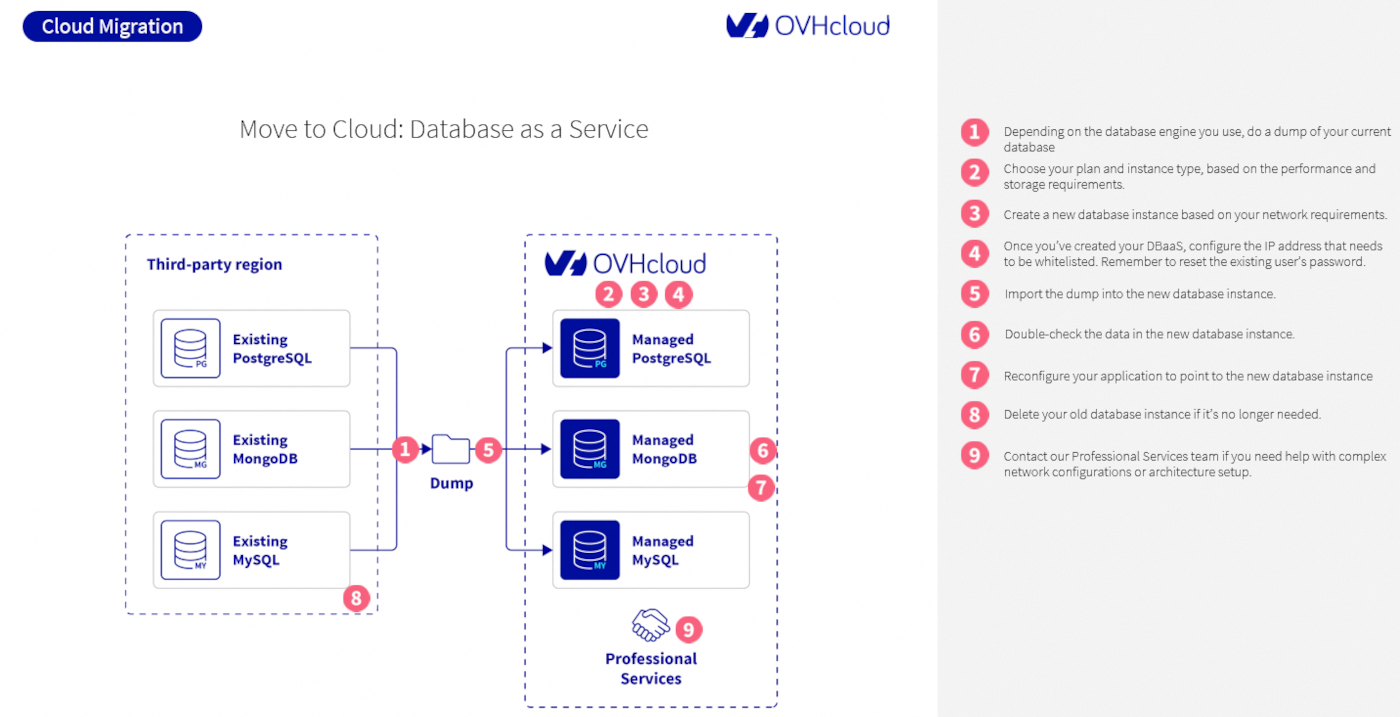
This method requires shutting down your application. Please note that some downtime will occur during the migration.
-
Generate a database dump according to the requirements of your specific engine.
-
Determine the appropriate plan and instance type based on workload performance and storage requirements.
-
Create a new database instance based on your network requirements. Follow this guide.
-
Upon creation of the DBaaS instance, define the IP addresses to be whitelisted and reset the password for existing users.
-
Import the previously generated database dump into the new instance. The exact procedure varies depending on the database engine in use (e.g., PostgreSQL, MySQL, MongoDB). Refer to the engine-specific instructions for correct import commands and options.
-
Thoroughly review the contents of the new database instance to confirm that the imported data matches the source database.
-
Modify the application configuration to ensure it connects to the newly created database instance.
-
Decommission the previous database instance once it is confirmed that it is no longer in use.
-
Reach out to our Professional Services team for assistance with complex network configurations or architecture setup.
Via Live or hot migration with PostgreSQL
Currently, live/hot migration is supported only for OVHcloud PostgreSQL databases. This method allows you to asynchronously subscribe to an existing external database and create a new instance that mirrors its data using logical replication.
Before initiating replication, ensure that the existing database schema has been created in the new instance.
For detailed instructions on setting up logical replication, refer to this Aiven guide.
If your setup involves complex configurations or specific requirements, contact our Professional Services team for assistance.
We want your feedback!
We would love to help answer questions and appreciate any feedback you may have.
If you need training or technical assistance to implement our solutions, contact your sales representative or click on this link to get a quote and ask our Professional Services experts for a custom analysis of your project.
Are you on Discord? Connect to our channel at https://discord.gg/ovhcloud and interact directly with the team that builds our databases service!


 Migrate from a Single AZ to a 3-AZ region for Public Cloud Databases
 84
84