AI Endpoints - Build a JavaScript Chatbot with LangChain

Database di conoscenze

AI Endpoints - Build a JavaScript Chatbot with LangChain


Icons/System/eye-open Created with Sketch. 77 viste 19.12.2025 AI Endpoints

Introduction

LangChain is a leading framework for building applications powered by Large Language Models (LLMs). While it's well-known for Python, LangChain also provides support for JavaScript/TypeScript—ideal for frontend and fullstack applications.

In this tutorial, we'll show you how to build a simple command-line chatbot using LangChain and OVHcloud AI Endpoints, first in blocking mode, and then with streaming for real-time responses.

Objective

This tutorial demonstrates how to:

  • Set up a Node.js chatbot using LangChain JS
  • Connect to OVHcloud AI Endpoints to access LLMs
  • Support both standard and streaming response modes

Requirements

Instructions

Set up the environment

You will need to declare the following environment variables:

_OVH_AI_ENDPOINTS_ACCESS_TOKEN=<ai-endpoints-api-token>
_OVH_AI_ENDPOINTS_MODEL_NAME=Mistral-7B-Instruct-v0.3 # (or any other model you want to use)
_OVH_AI_ENDPOINTS_URL=https://oai.endpoints.kepler.ai.cloud.ovh.net/v1

Make sure to replace the token value (OVH_AI_ENDPOINTS_ACCESS_TOKEN) by yours. If you do not have one yet, follow the instructions in the AI Endpoints - Getting Started guide.

Project setup

The first step is to get the necessary dependencies. To do this, create a package.json with the following content:

{
  "name": "js-langchain-chatbot",
  "version": "1.0.0",
  "type": "module",
  "description": "Chatbot example with LangChain and AI Endpoints",
  "main": "chatbot.js",
  "scripts": {
    "start": "node chatbot.js"
  },
  "author": "OVHcloud",
  "license": "Apache-2.0",
  "dependencies": {
    "@langchain/mistralai": "^0.0.22",
    "@langchain/openai": "^0.0.34",
    "commander": "^12.1.0",
    "langchain": "^0.2.2"
  }
}

Then run:

npm install

Create the blocking chatbot

Create a new file named chatbot.js and paste the following code:

import { ChatMistralAI } from "@langchain/mistralai";
import { ChatPromptTemplate } from "@langchain/core/prompts";
import { Command } from 'commander';

/**
 * Function to do a chat completion request to the LLM given a user question.
 * @param question (String) the question to ask to the LLM.
 */
async function chatCompletion(question) {
  const promptTemplate = ChatPromptTemplate.fromMessages([
    ["system", "You are Nestor, a virtual assistant. Answer to the question."],
    ["human", "{question}"]
  ]);

  // Use Mixtral-8x22B as LLM
  const model = new ChatMistralAI({
    modelName: process.env.OVH_AI_ENDPOINTS_MODEL_NAME,
    model: process.env.OVH_AI_ENDPOINTS_MODEL_NAME,
    apiKey: process.env.OVH_AI_ENDPOINTS_ACCESS_TOKEN,
    endpoint: process.env.OVH_AI_ENDPOINTS_URL,
    maxTokens: 1500,
    streaming: false,
    verbose: false,
  });

  // Chain the model to the prompt to "apply it"
  const chain = promptTemplate.pipe(model);
  const response = await chain.invoke({ question: question });

  console.log(response.content);
}


/**
 * Main entry of the CLI.
 * Parameter --question is used to pass the question to the LLM.
 **/
const program = new Command();

program
  .option('--question <value>', 'Overwriting value.', '"What is the meaning of life?"')
  .parse(process.argv);

const options = program.opts();
chatCompletion(options.question);

You can test your new assistant with the following command:

node chatbot.js --question "What is OVHcloud?"

Which will give you an output similar to:

OVHcloud is a global cloud computing company that offers a wide range of services including web hosting, 
virtual private servers, cloud storage, and dedicated servers. 
It was founded in 1999 and is headquartered in Roubaix, France. 
OVHcloud operates its own data centers and network infrastructure, providing services to customers around the world. 
The company offers a variety of cloud solutions, including public, 
private, and hybrid cloud options, as well as dedicated servers, web hosting, and other managed services. 
OVHcloud is known for its high-performance, scalable, and secure cloud infrastructure.

Enable streaming mode

As usual, you certainly want a real chatbot with conversational style. To do that, let’s add a streaming feature with the following code:

import { ChatMistralAI } from "@langchain/mistralai";
import { ChatPromptTemplate } from "@langchain/core/prompts";
import { Command } from 'commander';
import { setTimeout } from "timers/promises";

/**
 * Function to do a chat completion request to the LLM given a user question.
 * @param question (String) the question to ask to the LLM.
 */
async function chatCompletion(question) {
  const promptTemplate = ChatPromptTemplate.fromMessages([
    ["system", "You are Nestor, a virtual assistant. Answer to the question."],
    ["human", "{question}"]
  ]);

  // Use Mixtral-8x22B as LLM
  const model = new ChatMistralAI({
    modelName: process.env.OVH_AI_ENDPOINTS_MODEL_NAME,
    model: process.env.OVH_AI_ENDPOINTS_MODEL_NAME,
    apiKey: process.env.OVH_AI_ENDPOINTS_ACCESS_TOKEN,
    endpoint: process.env.OVH_AI_ENDPOINTS_URL,
    maxTokens: 1500,
    streaming: true,
    verbose: false,
  });

  // Chain the model to the prompt to "apply it"
  const chain = promptTemplate.pipe(model);
  const stream = await chain.stream({ question: question });

  for await (const chunk of stream) {
    // Timeout to simulate a human answering the question
    await setTimeout(150);
    process.stdout.write(chunk.content);
  }
}

/**
 * Main entry of the CLI.
 * Parameter --question is used to pass the question to the LLM.
 **/
const program = new Command();

program
  .option('--question <value>', 'Overwriting value.', '"What is the meaning of life?"')
  .parse(process.argv);

const options = program.opts();
chatCompletion(options.question);

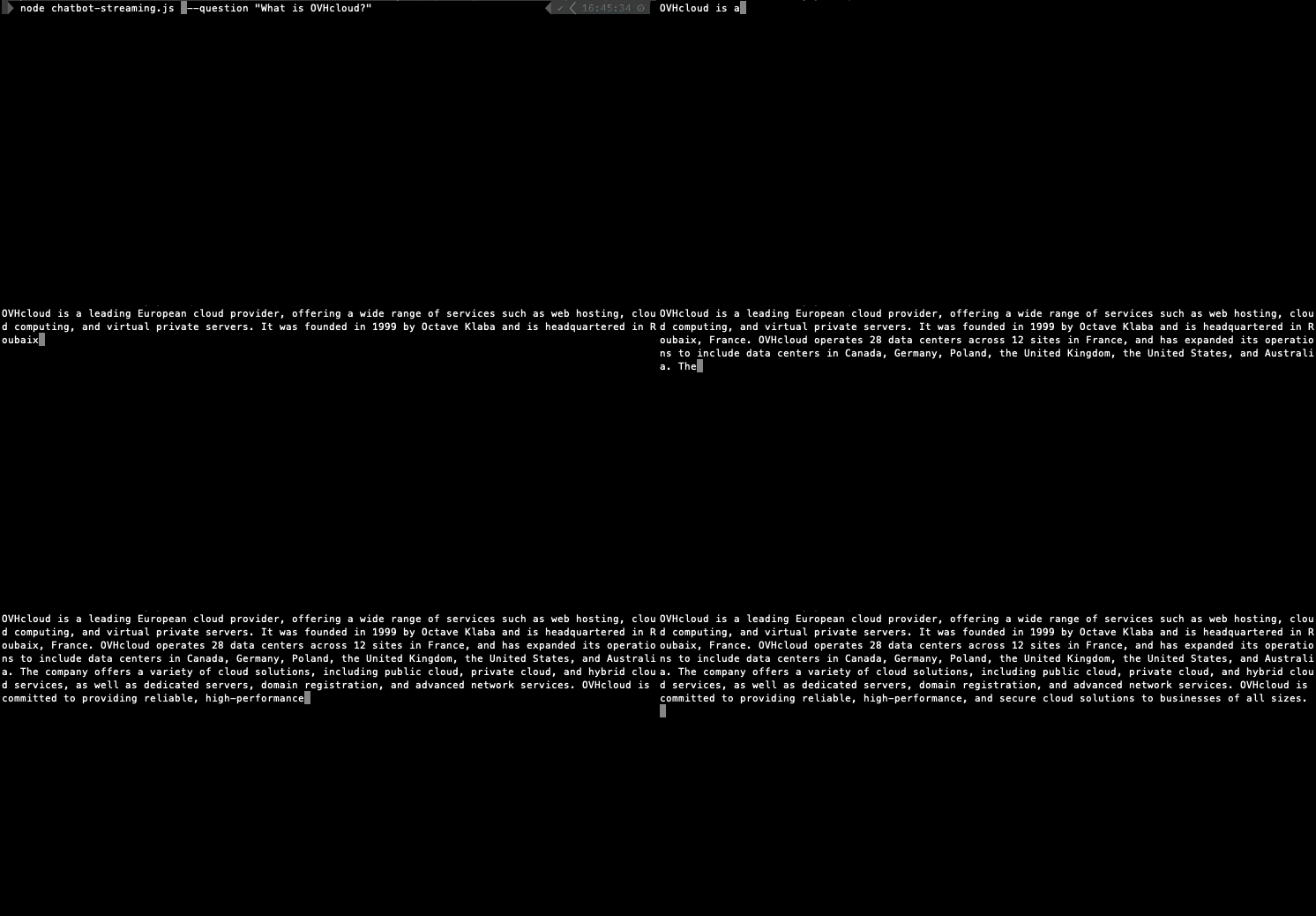
Run your streaming chatbot with:

node chatbot-streaming.js --question "What is OVHcloud?"

image

You’ll see the assistant’s response appear in real time ⏳💬

Conclusion

With just a few lines of JavaScript and LangChain, you now have a chatbot powered by the OVHcloud AI Endpoints. You can easily switch between blocking and streaming modes, giving your users a responsive chat experience.

Going further

You can then build and deploy a web app in the cloud, making your interface accessible to everyone. To do so, refer to the following articles and tutorials:

If you need training or technical assistance to implement our solutions, contact your sales representative or click on this link to get a quote and ask our Professional Services experts for a custom analysis of your project.

Feedback

Please feel free to send us your questions, feedback, and suggestions regarding AI Endpoints and its features:

  • In the #ai-endpoints channel of the OVHcloud Discord server, where you can engage with the community and OVHcloud team members.

Articoli correlati