

Cluster status
1292 vues
 22.12.2020
  Cloud / NAS-HA
Using web interface
First, connect to the Cloud Disk Array manager. Under 'Platforms and services' select your Ceph cluster. You will see two differents parts: cluster details and cluster health.
Cluster details
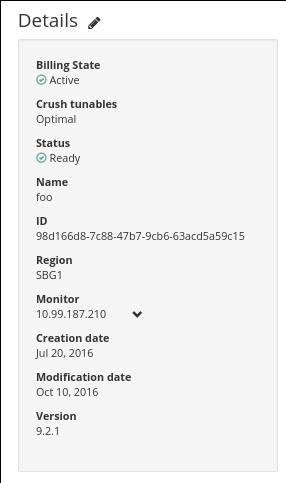
Additional explanations:
| Field | Description |
|---|---|
| Label | Name given to you cluster |
| Region | We currently deliver Ceph clusters on Strasbourg, Gravelines and Beauharnois. |
| Version | We currently deliver clusters up to version 9.2.1 (official Ceph releases) |
| Tunable | It's the algorithm used to place datas. |
| Status | Installed means that all tasks requested are done. |
| State | Active |
| Monitors | IP that you have to use to reach your monitors. |
| Create date | Creation date of your cluster |
| Update date | Date of the last task applied to your cluster |
Cluster health
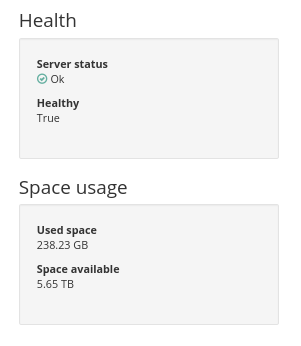
Additional explanations:
| Field | Description |
|---|---|
| Status | HEALTH_OK means that every objects are at the right place and have 3 replicates. HEALTH_WARN means that some objects are missplaced (like after a growth) or that some object are not replicated three times. In this case cluster is recovering |
| Healthy | Boolean indicating if everything is ok with Ceph cluster or not |
| Availables bytes | Free bytes available in the cluster (before replication) |
| Used bytes | Bytes currently used in the cluster (after replication) |
| Space usage [%] | Percentage of used bytes in relation to total bytes |
| Cluster active tasks | List of user-initiated tasks that are currently being processed for this cluster |
Using API
Get Ceph cluster details with a simple HTTP call.
Get Ceph cluster health:
Go further
Visit our dedicated Discord channel: https://discord.gg/ovhcloud. Ask questions, provide feedback and interact directly with the team that builds our Storage and Backup services.
If you need training or technical assistance to implement our solutions, contact your sales representative or click on this link to get a quote and ask our Professional Services experts for assisting you on your specific use case of your project.
Join our community of users on https://community.ovh.com/en/.


 Storage Benchmarking
 1923
1923