

Alerting - Using ElastAlert 2 with Logs Data Platform
291 vues
 07.08.2024
  Cloud / Logs Data Platform
Objective
ElastAlert 2 is an alerting framework originally designed by Yelp. It is able to detect anomalies, spikes, or other patterns of interest. It is production-ready and is a well known standard of alerting in the Elasticsearch/OpenSearch ecosystem. Their motto is: "If you can see it in your dashboards, ElastAlert 2 can alert on it." In this document you will learn how to deploy this component on Logs Data Platform thanks to its compatibility with OpenSearch through aliases and indexes. Logs Data Platform also allows you to host ElastAlert meta-indices on Logs Data Platform.
Requirements
Note that in order to complete this tutorial, you should have at least:
- Activated your Logs Data Platform account.
- A machine on which you will deploy ElastAlert.
- Some data on an alias or an index.
OVHcloud Control Panel Access
- Direct link: Logs Data Platform
- Navigation path:
Identity, Security & Operations>Logs Data Platform> Select the platform concerned
Preparation
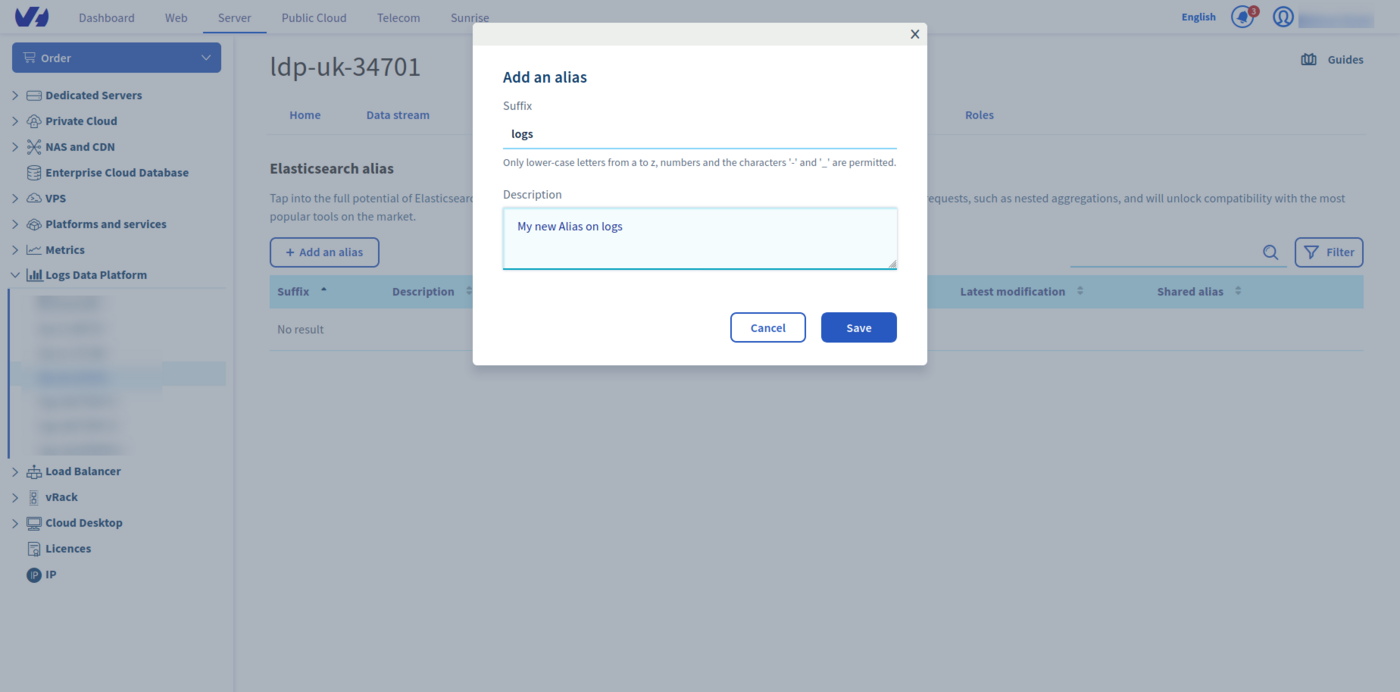
In order to deploy ElastAlert, it is important that you have data for which you can see alerts. If you only have Graylog stream, you can use aliases to enable the OpenSearch API on your stream data. Here is how:
- In the
Aliastab, click theAdd an aliasbutton. - Choose a name and define a description for your alias.
- Save the entry by clicking the
Savebutton. - Once the alias has been created. Use the ... menu on the right side and select the
Attach content to the aliasoption. - Define there the data streams you want to associate to your alias.
- That's it.
If you only have indices, you can use them directly in the ElastAlert configuration.
Instructions
ElastAlert configuration consists of three steps:
- Installing ElastAlert and its metadata indices.
- Configuring the main configuration file.
- Configuring the alert rules.
Installation
Installing ElastAlert can be done in different ways as described in their documentation. You can either use the docker image or install the python 3 packages. You must check that your Python version is the one compatible with ElastAlert. Check the documentation to verify which version of Python is compatible. Be sure also to meet all the requirements before attempting the installation.
You can either install the latest released version of ElastAlert 2 using pip:
or you can first clone the ElastAlert2 repository for the most recent changes:
And then install the module:
If there is any error about any missing packages, install them manually. For example:
The next step is to configure ElastAlert meta-indices using the provided tool elastalert-create-index. ElastAlert needs 5 indices to operate:
- The generic index containing all active alerts.
- The status index containing the queries run to trigger the alerts.
- The error index with all the errors encountered.
- The silence index indicating if a recurring alert should be triggered or silenced.
- The past index with all the alerts triggered and closed.
The following command will create the indices on Logs Data Platform directly from OpenSearch API.
You should pay attention to the following points:
- The
<ldp-cluster>must be the one assigned to you (find on the Home page of the LDP Manager). <username>is the username used to connect to the API or to the Logs Data Platform interfaces (Graylog or OpenSearch Dashboards).<password>is the associated password. You can use tokens in place of the username/password couple for your credentials.- The
--indexis the most important here since you must follow the index naming convention of Logs Data Platform. Use the presented form<username>-i-as a base name for your meta-indices.<suffix>can be personalized to any alphanumeric characters.
This command will prompt you with different questions:
This will then create 5 indices and place the mapping on them. All you need after is to create the ElastAlert configuration file and some rules.
ElastAlert configuration file.
Create a configuration directory (for example /opt/elastalert/) and a rule directory before continuing (like /opt/elastalert/rules). This rule directory will be used in the configuration below. Without further delay here is a sample config.yml file you can use for your configuration in your configuration directory:
You can find all the available options here.
- rules_folder is where ElastAlert will load rule configuration files from. It will attempt to load every .yaml file in the folder. Without any valid rules in this folder, ElastAlert will not start.
- run_every is how often ElastAlert will query OpenSearch.
- buffer_time is the size of the query window, stretching backwards from the time each query is run.
- es_host is the address of an OpenSearch cluster where ElastAlert will store data about its state, queries run, alerts, and errors. Each rule may also use a different OpenSearch host to query against.
- es_port is the port corresponding to es_host.
- use_ssl: whether or not to connect to es_host using TLS. TLS is mandatory in our platform.
- verify_certs whether or not to verify TLS certificates. Our platform uses certificates validated by most operating systems and browsers.
- es_username is the username used to connect to OpenSearch APIs.
- es_password is the password used to connect to OpenSearch APIs. Remember that you can use tokens in place of these credentials.
- writeback_index is the name of the index in which ElastAlert will store data. Use the same name you used to configure indices with
elastalert-create-index. - alert_time_limit is the retry window for failed alerts.
Rules configuration
In this example, we will create a frequency.yml rule which will send a email if the field user with the value Oles appears more than 3 times in less than 4 hours and use the debug logger debug.
We won't detail all the parameters since most of them are self-explanatory. However, please pay attention to the index parameter. This index or alias is the one containing the logs or documents you want to be alerted from.
It's also important to customize the timestamp parameters according to the timestamp of your logs or documents. Here we customize a custom timestamp on the timestamp_field timestamp with the format used in the logs pipeline %Y-%m-%d %H:%M:%S.%f. Because this format can have more than 3 extra numbers, we need to truncate them using the timestamp_format_expr option. Note that Elastalert does not support nanoseconds, this is why the option timestamp_to_datetime_format_expr cuts the timestamp string to 23 characters, so it can be parsed.
Launch ElastAlert
To launch ElastAlert, use the following command:
config.yml is the main configuration file described earlier. The --debug option is here to ensure everything is working correctly. You can deactivate it in production when ElastAlert is fully configured.
To test your alert you can use the following curl command sending logs to our OpenSearch endpoint:
If you send this event more than 3 times, the elastalert process will print the triggered alert.
ElastAlert has a lot of integrations for alerting including Email, JIRA, OpsGenie, SNS, HipChat, Slack, MS Teams, PagerDuty, Zabbix, custom commands and many more.
Go further
- Getting Started: Quick Start
- Documentation: Guides
- Community hub: https://community.ovh.com
- Create an account: Try it!


 Using Grafana with Logs Data Platform
 271
271