

Using RBAC to handle limited access to an OVHcloud Managed Kubernetes cluster
187 visualizaciones
 07.06.2023
  Cloud / Managed Kubernetes Service
Objective
When a Kubernetes cluster is created, with the OVHcloud Control Panel, the API or the Terraform provider, you can retrieve its kubeconfig file in order to access your cluster through the kubectl Command Line Interface (CLI).
This kubeconfig file is used to configure access to a cluster.
By default, this kubeconfig file allows you to have access to everything in the cluster.
In your company, you may have several teams, several kinds of people with different rights. You may need to control and limit the access to your Kubernetes clusters depending on users and their roles.
At OVHcloud, we like to provide you with the best products and services. For us, security is important. This tutorial aims at helping you creating a customized kubeconfig file with different accesses to your OVHcloud Managed Kubernetes cluster.
In this tutorial, you will:
- learn what is RBAC
- generate a customized
kubeconfigfile with limited access
RBAC
RBAC (Role-Based Access Control) is a method to regulate access to resources based on the roles of individual users.
This method alllows you to control what your users can do for which kind of resources in your cluster.
RBAC introduces 4 Kubernetes objects:
- Role (sets permissions with a given namespace)
- ClusterRole (same as Role but cluster-wide, for all namespaces)
- RoleBinding (grants permissions defined in a Role to a User, a Group (a set of users) or a ServiceAccount within a namespace)
- ClusterRoleBinding (same as RoleBinding but for all namespaces)
When you create a Role or a ClusterRole, several operations (verbs) are allowed:
- create
- get
- delete
- list
- update
- watch
- ...
By default in Kubernetes, every namespace contains a ServiceAccount linked to a ClusterRole that allows you to do all the operations you want on all the resources in this namespace. Creating new ServiceAccount, Role/ClusterRole and RoleBinding/ClusterRoleBinding will allow you to control the access to a Kubernetes cluster.
Requirements
This tutorial presupposes that you already have a working OVHcloud Managed Kubernetes cluster and some basic knowledge of how to operate it.
Additionally, follow the deploying a Hello World application documentation in order to have an example application running on your cluster.
At this point, you should have a running Kubernetes cluster with hello-world deployment and pod such as below:
The idea is to have a different namespace than the default one and several resources running into it.
Instructions
In this tutorial we want to create a kubeconfig file that allows someone to access only the hello-app namespace and to have only read rights on Pods resources in this namespace.
So, what do we want?
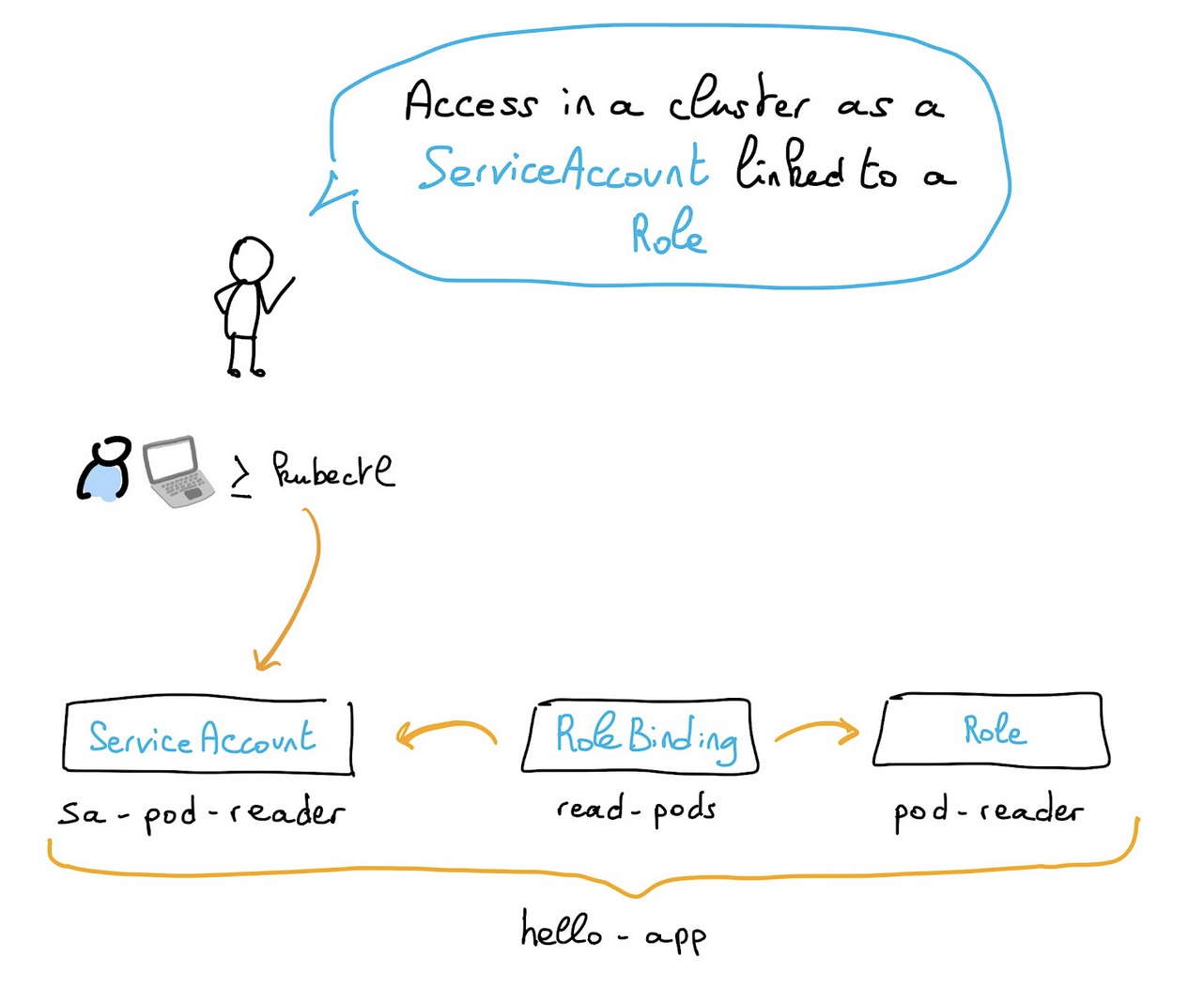
For this given use case, we need to create several resources:
- a
ServiceAcount - a
Role - a
RoleBindingbetween theRoleand theServiceAccount
It is possible to create the resources listed above in YAML but in this tutorial we will show you how to create them directly with the kubectl CLI.
Create a ServiceAccount in the hello-app namespace:
Create a Role pod-reader that allows users to perform get, watch and list (read-only actions) on Pods:
Create a RoleBinding that grants the pod-reader Role to sa-pod-reader ServiceAccount within the hello-app namespace:
Now it's time to create the kubeconfig file for the newly created ServiceAccount with the grants you asked, and obtain a kubeconfig file for this ServiceAccount:
Now you can use this restricted kubeconfig file to access your cluster and even test it directly in the kubectl command with the --kubeconfig option.
Try to list the namespaces in your cluster:
You should obtain a result like this:
As you can see, you executed the kubectl command as the ServiceAccount you created with limited access.
The behaviour is normal because with this kubeconfig file you don't have the rights to do this operation.
Instead, list the pods in the hello-app namespace:
As you can see, the new kubeconfig file has a restricted access to your Kubernetes cluster.
Depending on your use cases you will have to play with the ServiceAcccount, Role, ClusterRole, RoleBinding and ClusterRoleBinding resources.
For more information, take a look at the Using RBAC Authorization official documentation. You can also use an OIDC provider to authenticate your users and automatically asign them roles.
Go further
-
If you need training or technical assistance to implement our solutions, contact your sales representative or click on this link to get a quote and ask our Professional Services experts for assisting you on your specific use case of your project.
-
Join our community of users on https://community.ovh.com/en/.


 Encrypt your Secret for OVHcloud Managed Kubernetes with Sealed Secrets (Kubeseal)
 266
266