SAP HANA cluster with SLES on VMware on OVHcloud

Bases de conocimiento

SAP HANA cluster with SLES on VMware on OVHcloud


Icons/System/eye-open Created with Sketch. 185 visualizaciones 04.12.2023 Cloud / SAP HANA on Private Cloud

Objective

This guide provides instructions for configuring a SAP HANA cluster with SLES using the services Corosync and Pacemaker.

This implementation reduces the Recovery Time Objective (RTO), in case of a virtual machine or ESXi host outage in the same OVHcloud location.
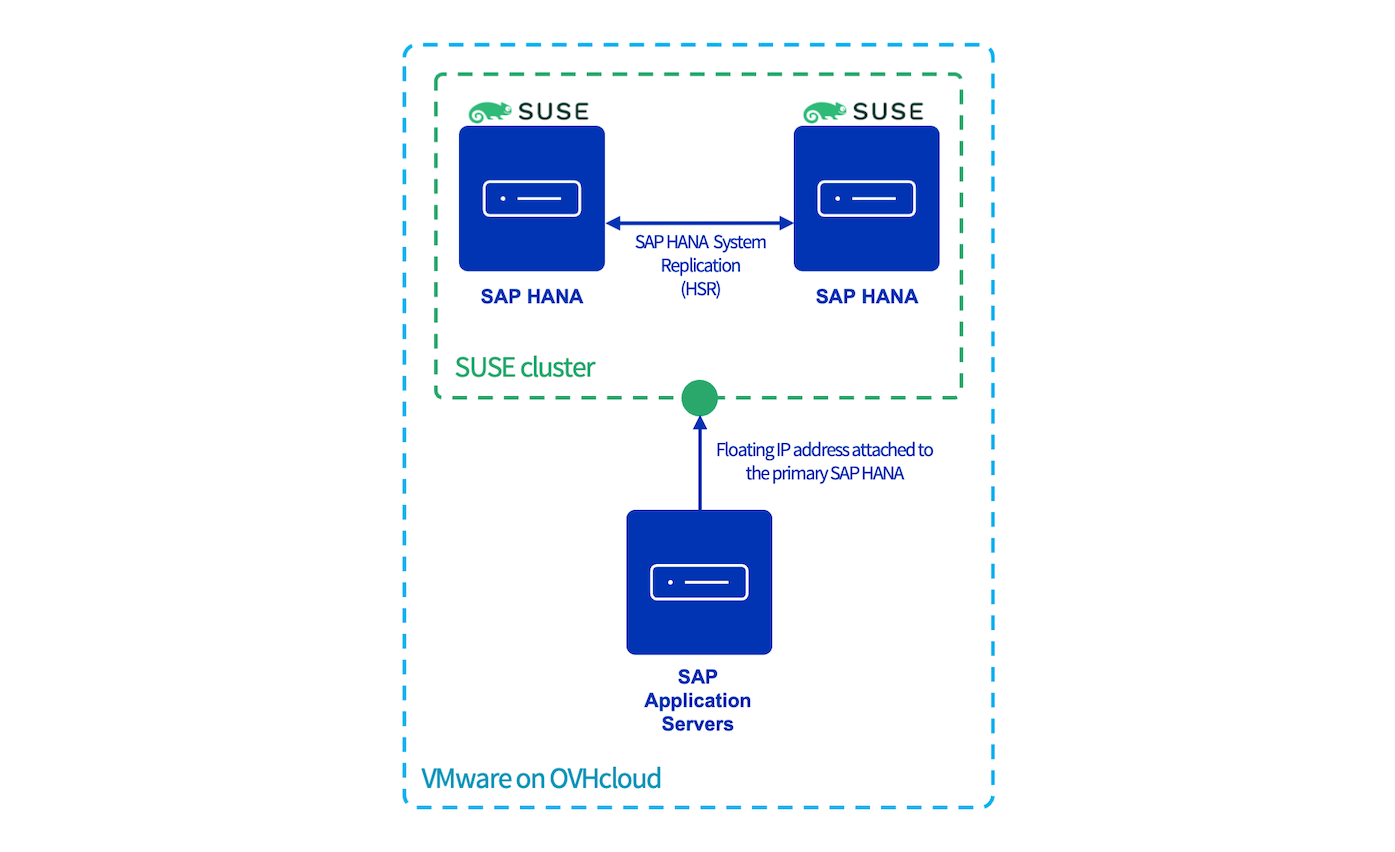
schema

Requirements

Instructions

In all console blocks:

  • The primary SAP HANA node is named node1 and the secondary SAP HANA node is named node2.
  • <SID> is the SAP HANA SID.
  • <NI> is the SAP HANA instance number.

The availability of the SAP HANA database might be impacted during this configuration. Please take all precautions before starting this guide.

vSphere user creation

To allow the Corosync service to get information from your SAP HANA nodes, you have to configure a user which has access to the vSphere interface.

We recommend creating a dedicated user with limited permissions to interact with vSphere.

This dedicated user needs only the "Read only" right to the datacenter on which the SAP HANA virtual machines are hosted. To know how to create this dedicated user, please refer to our guide on changing user rights.

SUSE packages

Several packages, including Corosync and Pacemaker binaries, have to be installed on both SAP HANA nodes.

These packages are only available with the SUSE Linux Enterprise High Availability extension. Ensure that it is activated before continuing:

SUSEConnect --list-extensions | grep "SUSE Linux Enterprise High Availability Extension 15 SP4 x86_64"
  • Expected result:
SUSE Linux Enterprise High Availability Extension 15 SP4 x86_64 (Activated)

With any other result, please run the following command in which <ADDITIONAL REGCODE> is a registry code provided by SUSE in your customer portal.

SUSEConnect -p sle-ha/15.4/x86_64 -r <ADDITIONAL REGCODE>

Execute the following commands to install the needed packages:

zypper install -y -t pattern ha_sles
zypper install -y SAPHanaSR SAPHanaSR-doc

SAP HANA preparation

Backup

If you execute this configuration on new SAP HANA virtual machines, trigger a backup for the SYSTEMDB and the TENANTDB before continuing on the future primary node. These backups are mandatory to enable the SAP HANA System Replication (HSR).

Python Hook SAPHanaSR

The SAP HANA HA/SR provider hook improves SAP HANA failure detection.

1. Stop SAP HANA services on both SAP HANA nodes:

sapcontrol -nr <NI> -function Stop

2. Add this block in the global.ini file on both SAP HANA nodes:

[ha_dr_provider_SAPHanaSR]
provider = SAPHanaSR
path = /usr/share/SAPHanaSR
execution_order = 1

[trace]
ha_dr_saphanasr = info

System Replication

1. Start SAP HANA services on the primary SAP HANA node:

sapcontrol -nr <NI> -function Start

2. As the (sid)adm SAP HANA user, enable the SAP HANA System Replication (HSR) on the primary node which will be the source of the replication:

hdbnsutil -sr_enable --name=node1

The --name option is mandatory and is used to define the SAP HANA node in the replication system.

3. To authorise the secondary SAP HANA node to be registered on the primary SAP HANA node, you must transfer two files from the primary to the secondary SAP HANA node:

  • /usr/sap/<SID>/SYS/global/security/rsecssfs/data/SSFS_<SID>.DAT
  • /usr/sap/<SID>/SYS/global/security/rsecssfs/key/SSFS_<SID>.KEY
scp /usr/sap/<SID>/SYS/global/security/rsecssfs/data/SSFS_<SID>.DAT node2:/usr/sap/<SID>/SYS/global/security/rsecssfs/data/SSFS_<SID>.DAT
scp /usr/sap/<SID>/SYS/global/security/rsecssfs/key/SSFS_<SID>.KEY node2:/usr/sap/<SID>/SYS/global/security/rsecssfs/key/SSFS_<SID>.KEY

4. Once these files have been transferred to the secondary SAP HANA node, you can register the secondary SAP HANA node to the primary SAP HANA node:

hdbnsutil -sr_register --name=node2 \
--remoteHost=node1 --remoteInstance=<instance_number> \
--replicationMode=[sync|syncmem|async] \
--operationMode=[delta_datashipping|logreplay|logreplay_readaccess]

To know the differences between each replication mode and operation mode, read the SAP documentation.

In the context of this guide, as both SAP HANA nodes are hosted on the same OVHcloud location and the goal is to reduce the Recovery Time Objective (RTO), we recommend using the following parameters:

ParameterValue
replicationModesync
operationModelogreplay

5. Start the SAP HANA services on the secondary node. The startup also starts the replication from the primary SAP HANA node to the secondary SAP HANA node:

sapcontrol -nr <NI> -function Start

On the primary SAP HANA node, you can follow the initialisation of the replication with the following commands:

cdpy && python systemReplicationStatus.py
|Database   |Host  |Port    |Service Name |Volume ID |Site ID |Site Name |Secondary |Secondary   |Secondary |Secondary |Secondary     |Replication |Replication |Replication    |Secondary    |
|           |      |        |             |          |        |          |Host      |Port        |Site ID   |Site Name |Active Status |Mode        |Status      |Status Details |Fully Synced |
|---------- |----- |------- |------------ |--------- |------- |--------- |--------- |----------- |--------- |--------- |------------- |----------- |----------- |-------------- |------------ |
|SYSTEMDB   |node1 |3<NI>01 |nameserver   |        1 |      1 |node1     |node2     |    3<NI>01 |        2 |node2     |YES           |SYNC        |ACTIVE      |               |        True |
|<SID>      |node1 |3<NI>07 |xsengine     |        2 |      1 |node1     |node2     |    3<NI>07 |        2 |node2     |YES           |SYNC        |ACTIVE      |               |        True |
|<SID>      |node1 |3<NI>03 |indexserver  |        3 |      1 |node1     |node2     |    3<NI>03 |        2 |node2     |YES           |SYNC        |ACTIVE      |               |        True |

status system replication site "2": ACTIVE
overall system replication status: ACTIVE

Local System Replication State
~~~~~~~~~~~~~~~~~~~~~~~~~~~~~~

mode: PRIMARY
site id: 1
site name: node1

The replication can take some time, depending on the size of your data in the SAP HANA database. Once the replication has finished its initialisation, the system replication status must be ACTIVE.

Corosync

In this chapter, all commands must be executed as root.

1. On the primary SAP HANA node, generate the /etc/corosync/authkey file:

corosync-keygen

This file is a private key which ensures the authenticity and the privacy of the messages exchanged between the cluster nodes.

2. Create the /etc/corosync/corosync.conf file on the primary SAP HANA node and add the following configuration (replace ip_address_node1 and ip_address_node2 with your IP addresses):

totem {
  version: 2
  token: 5000
  token_retransmits_before_loss_const: 6
  secauth: on
  crypto_hash: sha1
  crypto_cipher: aes256
  clear_node_high_bit: yes
  transport: udpu
}
logging {
  fileline: off
  to_logfile: yes
  to_syslog: yes
  logfile: /var/log/cluster/corosync.log
  debug: off
  timestamp: on
  logger_subsys {
    subsys: QUORUM
    debug: off
  }
}
nodelist {
  node {
    ring0_addr: <ip_address_node1>
    nodeid: 1
  }
  node {
    ring0_addr: <ip_address_node2>
    nodeid: 2
  }
}
quorum {
  provider: corosync_votequorum
  expected_votes: 2
  two_node: 1
}

To discover all parameters in this configuration, please refer to the corosync.conf.5 manual page with the command man corosync.conf.5.

3. Transfer these files to the secondary SAP HANA node to share the same configuration and private key :

scp /etc/corosync/authkey node2:/etc/corosync/authkey
scp /etc/corosync/corosync.conf node2:/etc/corosync/corosync.conf

Pacemaker

1. Start the Corosync and Pacemaker services on both nodes:

service pacemaker start
service corosync start

2. We advise delaying the start of the Corosync service during the startup of the virtual machine.

a. Edit the Corosync service on both nodes:

systemctl edit corosync.service

b. Insert these lines between line number 3 and 6:

[Service]
ExecStartPre=/bin/sleep 60

c. Reload the configuration:

systemctl daemon-reload

d. If the configuration has been correctly loaded, the line -override.conf appears in the Corosync service status:

service corosync status
* corosync.service - Corosync Cluster Engine
    Loaded: loaded (/usr/lib/systemd/system/corosync.service; enabled; vendor preset: disabled)
    Drop-In: /etc/systemd/system/corosync.service.d
            `-override.conf
    Active: active (running) since Fri 2023-02-17 14:29:40 CEST; 1h 3min ago

e. Ensure that the Corosync and Pacemaker services start automatically during the startup of your virtual machine:

systemctl enable pacemaker.service
systemctl enable corosync.service
systemctl enable corosync-notifyd.service

3. On the primary SAP HANA node, set the general properties of your SAP HANA SUSE cluster:

crm configure property stonith-enabled="true"
crm configure property stonith-action="off"
crm configure property stonith-timeout="150s"
crm configure property have-watchdog="false"
crm configure rsc_defaults resource-stickness="1000"
crm configure rsc_defaults migration-threshold="5000"
crm configure op_defaults timeout="600"

4. On the primary SAP HANA node, set the cluster in maintenance mode:

crm configure property maintenance-mode=true

Stonith resource

The following actions must be done on the primary SAP HANA node.

The stonith resource checks the health of the virtual machines via vSphere and can decide to shut down the virtual machine.

The login and password are the credentials created in the vSphere user creation chapter.

crm configure primitive stonith stonith:fence_vmware_rest \
    params ip=<pcc-xx-xx-xx-xx.ovh.com> login=<user> passwd="<password>" ssl=1 pcmk_reboot_timeout=900 power_timeout=60 \
    op monitor interval=3600 timeout=120 \
    op stop timeout=20s interval=0s \
    op start timeout=20s interval=0s
  • Expected result:
crm status
Cluster Summary:
  * Stack: corosync
  * Current DC: node1 (version 2.1.2+20211124.ada5c3b36-150400.4.9.2-2.1.2+20211124.ada5c3b36) - partition with quorum
  * Last updated: Fri Feb 17 14:35:47 2023
  * Last change:  Fri Feb 17 14:35:03 2023 by root via crm_attribute on node1
  * 2 nodes configured
  * 1 resource instances configured

              *** Resource management is DISABLED ***
  The cluster will not attempt to start, stop or recover services

Node List:
  * Online: [ node1 node2 ]

Full List of Resources:
  * stonith (stonith:fence_vmware_rest):     Stopped (unmanaged)

Floating IP address resource

The res_vip_<SID>_HDB<NI> resource manages and monitors the floating IP address which will be the point of entry for all communications with the primary SAP HANA node.

  • <floating_ip_address> is the floating IP address which will be used by the cluster.
  • If you have several network cards, you can specify a network card by adding the parameter nic.
crm configure primitive res_vip_<SID>_HDB<NI> ocf:heartbeat:IPaddr2 \
    params ip="<floating_ip_address>" \
    op monitor interval="10s" timeout="20s" depth="0"
  • Expected result :
crm status
Cluster Summary:
  * Stack: corosync
  * Current DC: node1 (version 2.1.2+20211124.ada5c3b36-150400.4.9.2-2.1.2+20211124.ada5c3b36) - partition with quorum
  * Last updated: Fri Feb 17 14:36:32 2023
  * Last change:  Fri Feb 17 14:36:05 2023 by root via crm_attribute on node1
  * 2 nodes configured
  * 2 resource instances configured

              *** Resource management is DISABLED ***
  The cluster will not attempt to start, stop or recover services

Node List:
  * Online: [ node1 node2 ]

Full List of Resources:
  * stonith (stonith:fence_vmware_rest):     Stopped (unmanaged)
  * res_vip_<SID>_HDB<NI>   (ocf::heartbeat:IPaddr2):    Stopped (unmanaged)

SAP HANA resources

1. The resource rsc_SAPHana_<SID>_HDB<NI> manages and monitors the SAP HANA services on both SAP HANA nodes.

crm configure primitive rsc_SAPHana_<SID>_HDB<NI> ocf:suse:SAPHana \
    op start interval="0" timeout="3600" \
    op stop interval="0" timeout="3600" \
    op promote interval="0" timeout="3600" \
    op demote interval="0" timeout="320" \
    op monitor interval="60" role="Master" timeout="700" \
    op monitor interval="61" role="Slave" timeout="700" \
    params SID="<SID>" InstanceNumber="<NI>" PREFER_SITE_TAKEOVER="true" \
    DUPLICATE_PRIMARY_TIMEOUT="7200" AUTOMATED_REGISTER="false"

crm configure clone msl_SAPHana_<SID>_HDB<NI> rsc_SAPHana_<SID>_HDB<NI> \
    clone-max="2" clone-node-max="1"

To discover all parameters for this resource, please refer to the ocf_suse_SAPHana manual page with the command man ocf_suse_SAPHana.

2. The resource rsc_SAPHanaTopology_<SID>_HDB<NI> monitors the SAP HANA replication.

crm configure primitive rsc_SAPHanaTopology_<SID>_HDB<NI> ocf:suse:SAPHanaTopology \
    op monitor interval="10" timeout="600"  \
    op start interval="0" timeout="600" \
    op stop interval="0" timeout="300" \
    params SID="<SID>" InstanceNumber="00"

crm configure clone cln_SAPHanaTopology_<SID>_HDB<NI> rsc_SAPHanaTopology_<SID>_HDB<NI> \
    meta clone-node-max="1" interleave="true"

crm configure colocation col_SAPHana_vip_<SID>_HDB<NI> 2000: res_vip_<SID>_HDB<NI>:started \
    msl_SAPHana_<SID>_HDB<NI>:Master

crm configure order ord_SAPHana_<SID>_HDB<NI> Optional: cln_SAPHanaTopology_<SID>_HDB<NI> \
    msl_SAPHana_<SID>_HDB<NI>
  • Expected result:
crm status
Cluster Summary:
  * Stack: corosync
  * Current DC: node1 (version 2.1.2+20211124.ada5c3b36-150400.4.9.2-2.1.2+20211124.ada5c3b36) - partition with quorum
  * Last updated: Fri Feb 17 14:39:35 2023
  * Last change:  Fri Feb 17 14:39:29 2023 by hacluster via crmd on node2
  * 2 nodes configured
  * 6 resource instances configured

Node List:
  * Online: [ node1 node2 ]

Full List of Resources:
  * stonith (stonith:fence_vmware_rest):     Started node1
  * res_vip_<SID>_HDB<NI>   (ocf::heartbeat:IPaddr2):    Started node1
  * Clone Set: msl_SAPHana_<SID>_HDB<NI> [rsc_SAPHana_<SID>_HDB<NI>] (promotable, unmanaged):
    * rsc_SAPHana_<SID>_HDB<NI> (ocf::suse:SAPHana):     Slave node2 (unmanaged)
    * rsc_SAPHana_<SID>_HDB<NI> (ocf::suse:SAPHana):     Slave node1 (unmanaged)
  * Clone Set: cln_SAPHanaTopology_<SID>_HDB<NI> [rsc_SAPHanaTopology_<SID>_HDB<NI>] (unmanaged):
    * rsc_SAPHanaTopology_<SID>_HDB<NI> (ocf::suse:SAPHanaTopology):     Started node2 (unmanaged)
    * rsc_SAPHanaTopology_<SID>_HDB<NI> (ocf::suse:SAPHanaTopology):     Started node1 (unmanaged)

To discover all parameters for this resource, please refer to the ocf_suse_SAPHanaTopology manual page with the command man ocf_suse_SAPHanaTopology.

If the resource rsc_SAPHana_<SID>_HDB<NI> is shown as failed even though SAP HANA services run fine, execute the following command to refresh the status: crm resource refresh

3. To avoid an unexpected behaviour, we advise you to unmanage rsc_SAPHana_<SID>_HDB<NI> and rsc_SAPHanaTopology_<SID>_HDB<NI> resources.

crm resource unmanage rsc_SAPHana_<SID>_HDB<NI>
crm resource unmanage rsc_SAPHanaTopology_<SID>_HDB<NI>

4. Exit the maintenance mode:

crm configure property maintenance-mode=false
'is-managed' conflicts with 'maintenance' in msl_SAPHana_<SID>_HDB<NI>. Remove it (y/n)? n
'is-managed' conflicts with 'maintenance' in cln_SAPHanaTopology_<SID>_HDB<NI>. Remove it (y/n)? n

5. Refresh the cluster on the primary SAP HANA node:

crm resource refresh

6. Manage the resources previously unmanaged at the step 3:

crm resource manage rsc_SAPHana_<SID>_HDB<NI> && crm resource manage rsc_SAPHanaTopology_<SID>_HDB<NI>
  • Expected result after several seconds:
crm status
Cluster Summary:
  * Stack: corosync
  * Current DC: node1 (version 2.1.2+20211124.ada5c3b36-150400.4.9.2-2.1.2+20211124.ada5c3b36) - partition with quorum
  * Last updated: Fri Feb 17 14:40:35 2023
  * Last change:  Fri Feb 17 14:40:29 2023 by hacluster via crmd on node2
  * 2 nodes configured
  * 6 resource instances configured

Node List:
  * Online: [ node1 node2 ]

Full List of Resources:
  * stonith (stonith:fence_vmware_rest):     Started node1
  * res_vip_<SID>_HDB<NI>   (ocf::heartbeat:IPaddr2):    Started node1
  * Clone Set: msl_SAPHana_<SID>_HDB<NI> [rsc_SAPHana_<SID>_HDB<NI>] (promotable):
    * Masters: [ node1 ]
    * Slaves: [ node2 ]
  * Clone Set: cln_SAPHanaTopology_<SID>_HDB<NI> [rsc_SAPHanaTopology_<SID>_HDB<NI>]:
    * Started: [ node1 node2 ]

On the network interface, the floating IP address is attached:

ip a
1: lo: <LOOPBACK,UP,LOWER_UP> mtu 65536 qdisc noqueue state UNKNOWN group default qlen 1000
    link/loopback 00:00:00:00:00:00 brd 00:00:00:00:00:00
    inet 127.0.0.1/8 scope host lo
      valid_lft forever preferred_lft forever
2: eth0: <BROADCAST,MULTICAST,UP,LOWER_UP> mtu 1500 qdisc mq state UP group default qlen 1000
    link/ether 00:50:56:a8:b7:17 brd ff:ff:ff:ff:ff:ff
    altname enp11s0
    altname ens192
    inet <ip_address> brd <broadcast_ip_address> scope global eth0
      valid_lft forever preferred_lft forever
    inet <floating_ip_address> brd <broadcast_ip_address> scope global secondary eth0
      valid_lft forever preferred_lft forever

7. Create the /etc/sudoers.d/SAPHanaSR-srHook file and add the following content on both SAP HANA nodes:

  • To get the name of siteA and siteB, execute the command crm status -A1 | grep site.
  • <sid> is the SAP HANA SID in lowercase.
# SAPHanaSR-ScaleUp entries for writing srHook cluster attribute
Cmnd_Alias SOK_SITEA   = /usr/sbin/crm_attribute -n hana_<sid>_site_srHook_<siteA> -v SOK   -t crm_config -s SAPHanaSR
Cmnd_Alias SFAIL_SITEA = /usr/sbin/crm_attribute -n hana_<sid>_site_srHook_<siteA> -v SFAIL -t crm_config -s SAPHanaSR
Cmnd_Alias SOK_SITEB   = /usr/sbin/crm_attribute -n hana_<sid>_site_srHook_<siteB> -v SOK   -t crm_config -s SAPHanaSR
Cmnd_Alias SFAIL_SITEB = /usr/sbin/crm_attribute -n hana_<sid>_site_srHook_<siteB> -v SFAIL -t crm_config -s SAPHanaSR
<sid>adm ALL=(ALL) NOPASSWD: SOK_SITEA, SFAIL_SITEA, SOK_SITEB, SFAIL_SITEB

Test failover

To validate the configuration and its behaviour, we recommend running a failover test.

You can simulate the loss of a SAP HANA node in different ways:

  • Stopping the virtual machine on vSphere
  • Stopping the virtual machine with OS command
  • Stopping the SAP HANA services with OS command
  • Shutting down the network card
  • Simulating the loss of one ESXi host with the OVHcloud API
  • Setting in standby the primary SAP HANA node in the cluster

Loss of the primary SAP HANA node

In this case, the expected behaviour is the switch of all resources hosted on the primary SAP HANA node to the secondary SAP HANA node which will become the new primary SAP HANA node.

The node1 is seen as the Master and the node2 as the Slave.

All resources are correctly managed and monitored by the cluster.

Cluster Summary:
  * Stack: corosync
  * Current DC: node1 (version 2.1.2+20211124.ada5c3b36-150400.4.9.2-2.1.2+20211124.ada5c3b36) - partition with quorum
  * Last updated: Fri Feb 17 14:39:35 2023
  * Last change:  Fri Feb 17 14:39:29 2023 by hacluster via crmd on node2
  * 2 nodes configured
  * 6 resource instances configured

Node List:
  * Online: [ node1 node2 ]

Full List of Resources:
  * stonith (stonith:fence_vmware_rest):     Started node1
  * res_vip_<SID>_HDB<NI>   (ocf::heartbeat:IPaddr2):    Started node1
  * Clone Set: msl_SAPHana_<SID>_HDB<NI> [rsc_SAPHana_<SID>_HDB<NI>] (promotable):
    * Masters: [ node1 ]
    * Slaves: [ node2 ]
  * Clone Set: cln_SAPHanaTopology_<SID>_HDB<NI> [rsc_SAPHanaTopology_<SID>_HDB<NI>]:
    * Started: [ node1 node2 ]

The cluster detects the loss of the node1 which was the Master and triggers the takeover to the node2.

The takeover can take several minutes, depending on the size of your SAP HANA database.

Cluster Summary:
  * Stack: corosync
  * Current DC: node2 (version 2.1.2+20211124.ada5c3b36-150400.4.9.2-2.1.2+20211124.ada5c3b36) - partition with quorum
  * Last updated: Fri Feb 17 14:41:32 2023
  * Last change:  Fri Feb 17 14:40:50 2023 by root via crm_attribute on node2
  * 2 nodes configured
  * 6 resource instances configured

Node List:
  * Online: [ node2 ]
  * OFFLINE: [ node1 ]

Full List of Resources:
  * stonith  (stonith:fence_vmware_rest):     Started node2
  * res_vip_<SID>_HDB<NI>    (ocf::heartbeat:IPaddr2):    Started node2
  * Clone Set: msl_SAPHana_<SID>_HDB<NI> [rsc_SAPHana_<SID>_HDB<NI>] (promotable):
    * rsc_SAPHana_<SID>_HDB<NI>  (ocf::suse:SAPHana):     Promoting node2
    * Stopped: [ node1 ]
  * Clone Set: cln_SAPHanaTopology_<SID>_HDB<NI> [rsc_SAPHanaTopology_<SID>_HDB<NI>]:
    * Started: [ node2 ]
    * Stopped: [ node1 ]

The node2 is now the new Master and the node1 is still seen as offline.

Once the issue is fixed on the node1, you have to register the node1 to the node2 and start the SAP HANA services to restore the cluster to a normal situation.

Cluster Summary:
  * Stack: corosync
  * Current DC: node1 (version 2.1.2+20211124.ada5c3b36-150400.4.9.2-2.1.2+20211124.ada5c3b36) - partition with quorum
  * Last updated: Fri Feb 17 14:43:35 2023
  * Last change:  Fri Feb 17 14:42:58 2023 by root via crm_attribute on node2
  * 2 nodes configured
  * 6 resource instances configured

Node List:
  * Online: [ node2 ]
  * OFFLINE: [ node1 ]

Full List of Resources:
  * stonith  (stonith:fence_vmware_rest):     Started node2
  * res_vip_<SID>_HDB<NI>    (ocf::heartbeat:IPaddr2):    Started node2
  * Clone Set: msl_SAPHana_<SID>_HDB<NI> [rsc_SAPHana_<SID>_HDB<NI>] (promotable):
    * Masters: [ node2 ]
    * Stopped: [ node1 ]
  * Clone Set: cln_SAPHanaTopology_<SID>_HDB<NI> [rsc_SAPHanaTopology_<SID>_HDB<NI>]:
    * Started: [ node2 ]
    * Stopped: [ node1 ]

Loss of the secondary SAP HANA node

In this case, the expected behaviour is only the detection of the loss of the secondary SAP HANA node, no action must be done by the cluster.

The node1 is seen as the Master and the node2 as the Slave.

All resources are correctly managed and monitored by the cluster.

Cluster Summary:
  * Stack: corosync
  * Current DC: node1 (version 2.1.2+20211124.ada5c3b36-150400.4.9.2-2.1.2+20211124.ada5c3b36) - partition with quorum
  * Last updated: Fri Feb 17 14:50:33 2023
  * Last change:  Fri Feb 17 14:42:58 2023 by hacluster via crmd on node2
  * 2 nodes configured
  * 6 resource instances configured

Node List:
  * Online: [ node1 node2 ]

Full List of Resources:
  * stonith (stonith:fence_vmware_rest):     Started node1
  * res_vip_<SID>_HDB<NI>   (ocf::heartbeat:IPaddr2):    Started node1
  * Clone Set: msl_SAPHana_<SID>_HDB<NI> [rsc_SAPHana_<SID>_HDB<NI>] (promotable):
    * Masters: [ node1 ]
    * Slaves: [ node2 ]
  * Clone Set: cln_SAPHanaTopology_<SID>_HDB<NI> [rsc_SAPHanaTopology_<SID>_HDB<NI>]:
    * Started: [ node1 node2 ]

The node2 is seen as offline and as the node was the Slave, no action has been taken by the cluster.

Once the issue is fixed on the node2, start the SAP HANA services to restore the cluster to a normal situation.

Cluster Summary:
  * Stack: corosync
  * Current DC: node1 (version 2.1.2+20211124.ada5c3b36-150400.4.9.2-2.1.2+20211124.ada5c3b36) - partition with quorum
  * Last updated: Fri Feb 17 14:54:21 2023
  * Last change:  Fri Feb 17 14:49:35 2023 by root via crm_attribute on node1
  * 2 nodes configured
  * 6 resource instances configured

Node List:
  * Online: [ node1 ]
  * OFFLINE: [ node2 ]

Full List of Resources:
  * stonith  (stonith:fence_vmware_rest):     Started node1
  * res_vip_<SID>_HDB<NI>    (ocf::heartbeat:IPaddr2):    Started node1
  * Clone Set: msl_SAPHana_<SID>_HDB<NI> [rsc_SAPHana_<SID>_HDB<NI>] (promotable):
    * Masters: [ node1 ]
    * Stopped: [ node2 ]
  * Clone Set: cln_SAPHanaTopology_<SID>_HDB<NI> [rsc_SAPHanaTopology_<SID>_HDB<NI>]:
    * Started: [ node1 ]
    * Stopped: [ node2 ]

Go further

If you need training or technical assistance to implement our solutions, contact your sales representative or click on this link to get a quote and ask our Professional Services experts for assisting you on your specific use case of your project.

Join our community of users on https://community.ovh.com/en/.

Artículos relacionados