

Object Storage - Bucket ACL
401 visualizaciones
 06.03.2026
  Cloud / Object Storage S3
Overview
By default, all resources (buckets, objects) and sub-resources (lifecycle configuration, website configuration, etc.) are private in Object Storage. Only the resource owner, i.e., the user account that creates it, has full control.
Access to private resources can be granted via access policies.
Access policies can be categorized broadly into two types:
- user-based
- resource-based: bucket policies and ACLs are policies that are attached directly to specific resources
User based
Access policies attached to a specific user are called user policies. A user policy is evaluated using Object Storage IAM permissions and applies only to the specific user it is attached to.
Resource based
ACL
An ACL is a list of permissions granted to identified grantees. ACLs are typically used to grant basic read/write permissions to other accounts.
ACLs can either be attached at bucket level or at individual object level.
Although ACLs are the legacy way to manage permissions, they are still relevant and not deprecated. However based on the situation, you might want to use policies to apply fine grained control of your resources.
Bucket policy
Akin to user policies, a bucket policy controls permissions for a bucket and the objects in it. The difference is that whereas user policies control permissions for a specific user to a list of resources, a bucket policy controls permissions to a specific bucket and its objects for a list of users.
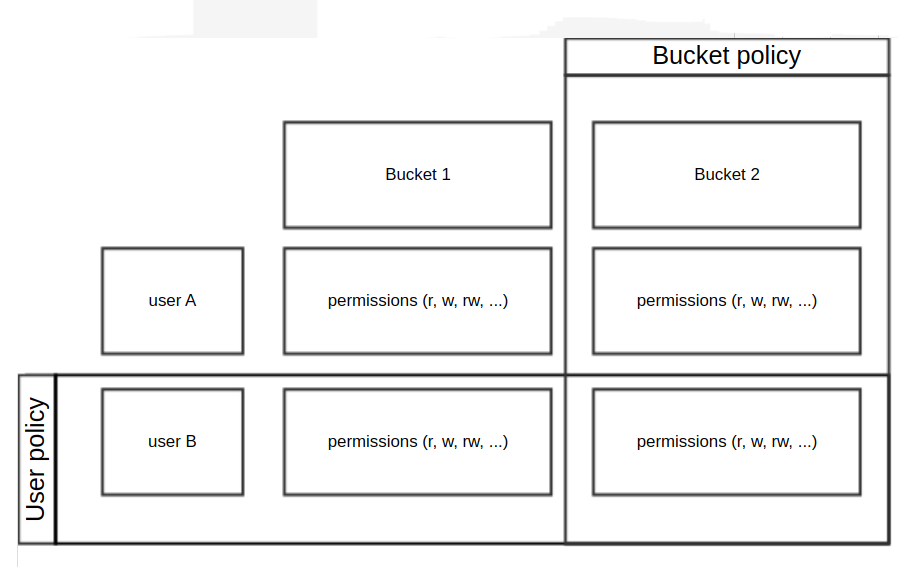
Bucket policies are a feature that is not yet available for Object Storage.
Manage permissions with ACLs
Supported grantees
OVHcloud Object Storage supports two types of grantees:
- Public Cloud account users
- Predefined groups
Public Cloud account
Public Cloud account users are identified by a canonical user id. When you grant access rights, the canonical user id is specified by id=<value> where <value> equals <project_name>:<user_name>.
Example: if you have a Public Cloud project named my_project and you have created a user named storage-user then you get id=my_project:storage-user
Predefined groups
Supported predefined user groups are the following and are identified by a URI:
- log delivery group: this group contains the applicative users used by OVHcloud services to write server access logs inside buckets (read our Server Access Logging guide for more information)
- authenticated users group: this group contains all the OVHcloud Public Cloud account users
- all users group: this group is the default group that contains all users in the world and is equivalent to anonymous users
Permissions
The managed permissions are listed below. Note that depending on the level (bucket or object), not all permissions can apply.
| Permission | Bucket level | Object level |
|---|---|---|
| READ | allows to list all objects in the bucket | allows to read an object and its metadata |
| WRITE | allows creation/deletion/overwrites of objects in the bucket | n/a |
| READ_ACP | allows read of the bucket ACL | allows read of the object ACL |
| WRITE_ACP | allows creation/deletion/overwrites of the bucket ACL | allows creation/deletion/overwrites of the object ACL |
| FULL_CONTROL | shorthand for READ, WRITE, READ_ACP, WRITE_ACP on the bucket | shorthand for READ, READ_ACP, WRITE_ACP on the object |
Predefined ACLs
Predefined ACLs have a predefined set of grantees and permissions and are a convenient shorthand for the most common use cases.
| ACL | Description | Bucket | Object | Comment |
|---|---|---|---|---|
| private | default behavior, owner has FULL_CONTROL | x | x | |
| public-read | owner has FULL_CONTROL AllUsers group has READ | x | x | |
| public-read-write | owner has FULL_CONTROL AllUsers group has READ, WRITE | x | x | |
| authenticated-read | owner has FULL_CONTROL AuthenticatedUsers group has READ | x | x | |
| bucket-owner-read | object owner has FULL_CONTROL bucket owner has READ | x | currently not managed yet | |
| bucket-owner-full-control | object owner and bucket owner both have FULL_CONTROL | x | currently not managed yet | |
| log-delivery-write | LogDelivery group has WRITE, READ_ACP | x |
Instructions
Set ACL on a bucket
You can set the ACL on a bucket at its creation or afterwards, by calling the put-bucket-acl endpoint.
Example:
In this example, we created a bucket named <bucket_name> using a predefined ACL public-read.
To verify that the ACLs are set correctly, you can use the following command to return the ACL:
To change the ACL, you can call the put-bucket-acl endpoint by using the AWS CLI:
Here, we change the ACL to give account user "user-yyyyyyyyyy" the permission to write in the bucket.
Again, to verify that ACL are set correctly:
Set ACL on an object
Similar to bucket level, you can set the ACL on an object at its creation or afterwards.
Example:
In this example, we created an object named <object_key> and we gave FULL_CONTROL on that object to the account user <user_name>.
To verify that the ACLs are set correctly, you can use the following command to return the ACL:
To change the ACL, you can call the put-object-acl endpoint by using the AWS CLI:
Here, we changed our mind and decided to only give the account user <user_name> the permission to read instead of full control.
Again, to verify that ACL are set correctly, use the following command:
Best practices
When to use ACLs?
At object level
As mentioned before, ACLs can be attached at object level.
You might consider the following scenarios to use object ACL.
- the bucket owner and the object owner are not the same: in a scenario where the bucket owner has granted another account to write objects inside the bucket, access to those objects must be granted through ACLs
- permissions vary from individual object to individual object
At bucket level
We stongly advise you to use policies instead for a better and more fine grained access control over the bucket and its objects. However, for very basic permission control needs, you might consider using bucket ACLs to grant permissions to the objects and ACLs related to the bucket.
When to use bucket policies?
You might consider using bucket policies if you want to set cross-account permissions over the resources related to a specific bucket.
When to use user policy?
You might consider using user policies if you want to set cross-resource permissions for a specific account.
Important
ACLs and policies can be combined. However the principle of least privilege will always be applied and can be summerized as "allow only if there is an explicit allow and no explicit deny, else, deny all"
Go further
If you need training or technical assistance to implement our solutions, contact your sales representative or click on this link to get a quote and ask our Professional Services experts for assisting you on your specific use case of your project.
Join our community of users.


 Object Storage - Hosting a static website in an Object Storage bucket
 515
515