How to use Rancher CLI

Bases de conocimiento

How to use Rancher CLI


Icons/System/eye-open Created with Sketch. 108 visualizaciones 11.09.2024 Managed Rancher Service (MRS)

Objective

Managed Rancher Service by OVHcloud provides a powerful platform for orchestrating Kubernetes clusters seamlessly. In this tutorial we will discover that in addition to the Rancher UI you can handle your Kubernetes clusters through the Rancher CLI.

Requirements

Instructions

Rancher CLI

The Rancher CLI (Command Line Interface) is a unified tool that you can use to interact with an OVHcloud Managed Rancher Service (MRS). With this tool, you can operate MRS using a command line rather than the UI.

Downoad and install Rancher CLI

To download the Rancher CLI, log in your Managed Rancher Service UI and click on the About link at the bottom of the navigation sidebar menu:
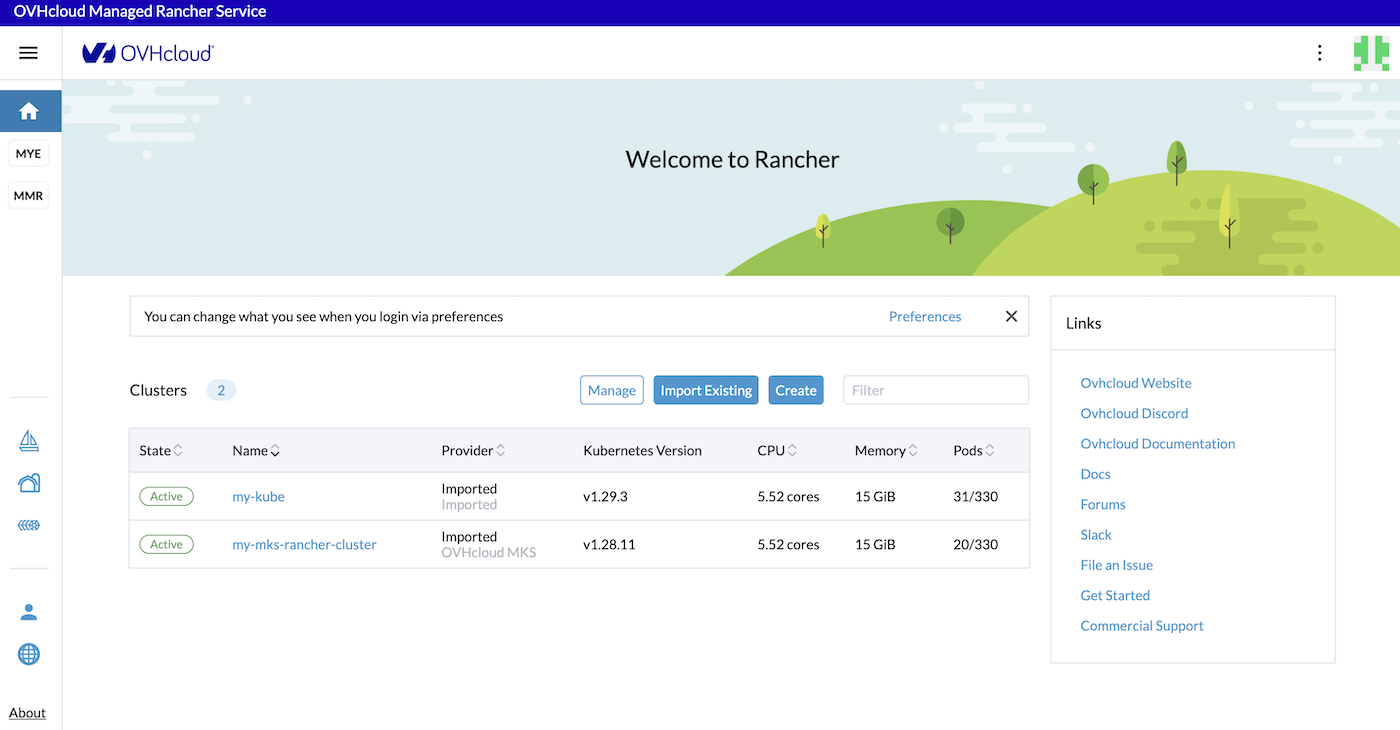
OVHcloud Managed Rancher Service UI

Under the CLI Downloads section, click to download the binaries for your OS (macOS, Linux or Windows), untar the package and copy the rancher binary in your PATH.

You can download the binaries directly in the Rancher CLI GitHub repository.

Generate an API Key to use the Rancher CLI

To use the Rancher CLI and login to our OVHcloud MRS, you need to create an API Key.

On the top right, click on your avatar and then on the Account & API Keys button menu.

OVHcloud Managed Rancher Service UI

The Account and API Keys page is displayed.
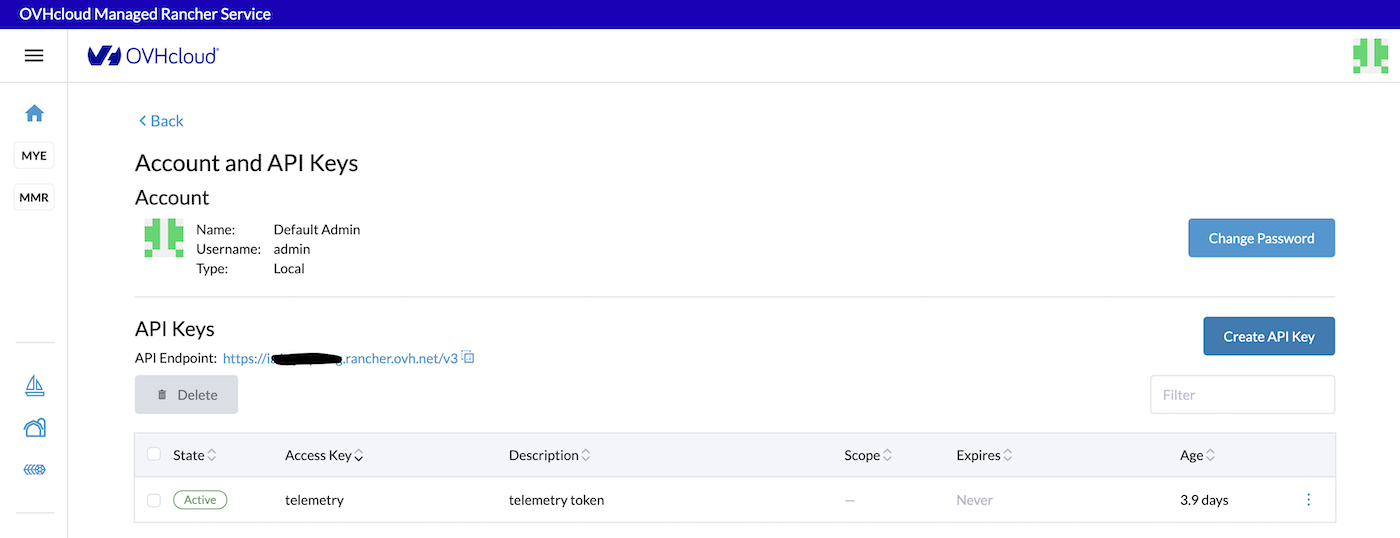
OVHcloud Managed Rancher Service UI

Click on the Create API Key button to create an API key.

Define a description that will identify your API Key (CLI for example), keep the scope value to No Scope by default and define the expiration date.
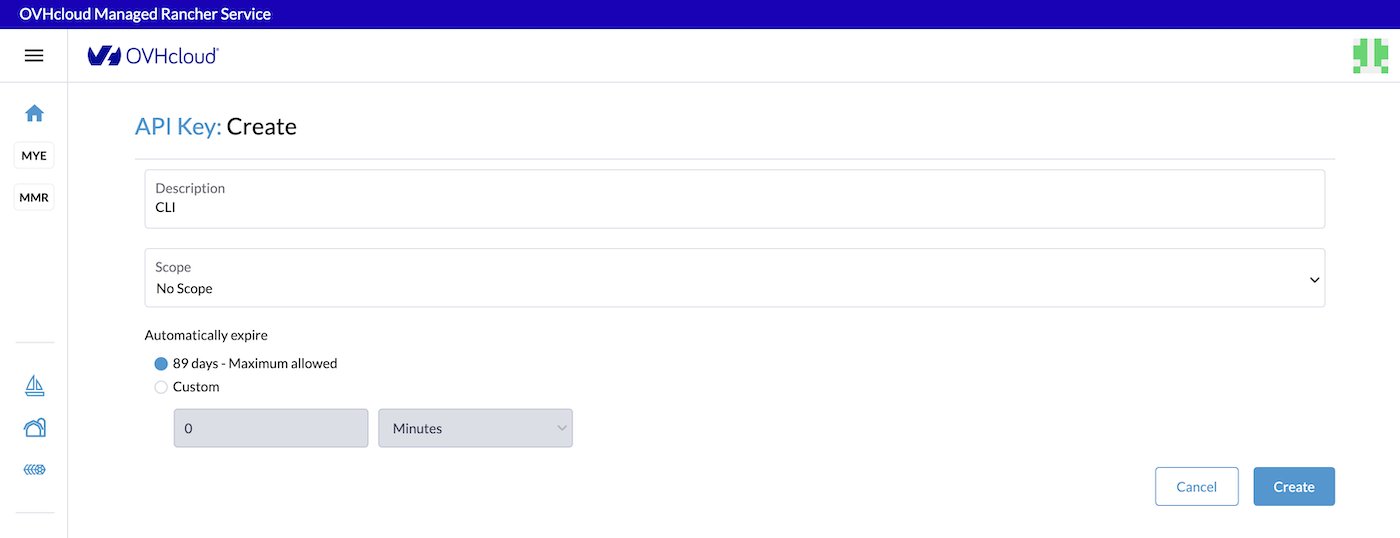
OVHcloud Managed Rancher Service UI

You can change the scope to allow the Rancher CLI to access only one of your Kubernetes clusters if you wish.

Then click on the Create button.

A new API Key has been created. Copy and paste in a password manager the Access Key, the Secret Key and the Bearer Token.

Using the Rancher CLI

Login with the CLI to your MRS:

rancher login <MRS_URL> --token <BEARER_TOKEN>

You should have the following result:

rancher login https://xxxxxx.xxxx.rancher.ovh.net --token token-phbts:qhsdfuqsdfuhdsqfdqshfdsqhkfhsqdkjfhkqsj

NUMBER    CLUSTER NAME             PROJECT ID             PROJECT NAME   PROJECT DESCRIPTION
1         my-mks-rancher-cluster   c-gcqnf:p-lt2z4        Default        Default project created for the cluster
2         my-mks-rancher-cluster   c-gcqnf:p-t4tcj        System         System project created for the cluster
3         my-kube                  c-m-2brxmwcz:p-dcpvf   Default        Default project created for the cluster
4         my-kube                  c-m-2brxmwcz:p-vcwrr   System         System project created for the cluster
Select a Project:1
INFO[0044] Saving config to /Users/avache/.rancher/cli2.json

Now you are authenticated in your MRS, you can display the list of Kubernetes clusters:

rancher clusters

CURRENT   ID             STATE     NAME                     PROVIDER   NODES     CPU         RAM             PODS
*         c-gcqnf        active    my-mks-rancher-cluster   Unknown    3         1.38/5.52   0.97/14.72 GB   20/330
          c-m-2brxmwcz   active    my-kube                  Imported   3         2.11/5.52   1.44/15.09 GB   31/330

As you can see, in our example, we have one MKS cluster and one existing cluster we imported before.

Select one of the Kubernetes clusters:

rancher context switch

NUMBER    CLUSTER NAME             PROJECT ID             PROJECT NAME   PROJECT DESCRIPTION
1         my-mks-rancher-cluster   c-gcqnf:p-lt2z4        Default        Default project created for the cluster
2         my-mks-rancher-cluster   c-gcqnf:p-t4tcj        System         System project created for the cluster
3         my-kube                  c-m-2brxmwcz:p-dcpvf   Default        Default project created for the cluster
4         my-kube                  c-m-2brxmwcz:p-vcwrr   System         System project created for the cluster
Select a Project:3
INFO[0004] Setting new context to project Default
INFO[0004] Saving config to /Users/avache/.rancher/cli2.json

By choosing 3, you switched in the my-kube cluster.

List the pods in the my_kube cluster directly through the Rancher CLI:

rancher kubectl get pod -A

NAMESPACE             NAME                                           READY   STATUS    RESTARTS        AGE
cattle-fleet-system   fleet-agent-f7dc57db7-wx4s5                    1/1     Running   0               3d23h
cattle-system         cattle-cluster-agent-6ccc7dbf48-8phk6          1/1     Running   0               3d23h
cattle-system         cattle-cluster-agent-6ccc7dbf48-kv26f          1/1     Running   0               3d23h
cattle-system         rancher-webhook-fd7599678-tptcd                1/1     Running   0               3d23h
default               hello-world-deployment-c7584d4f5-w98l7         1/1     Running   0               110d
default               nfs-nginx-29r49                                1/1     Running   0               6d1h
default               nfs-nginx-f5j92                                1/1     Running   0               6d1h
default               nfs-nginx-z9qjg                                1/1     Running   0               6d1h
ingress-nginx         ingress-nginx-controller-55474d95c5-7tl7n      1/1     Running   0               110d
kube-system           calico-kube-controllers-66b876699d-j8tsl       1/1     Running   1 (64d ago)     118d
kube-system           canal-j7dtp                                    2/2     Running   0               118d
kube-system           canal-lc5vl                                    2/2     Running   0               118d
kube-system           canal-swrxf                                    2/2     Running   0               118d
kube-system           coredns-5594b5bf54-gh26t                       1/1     Running   0               118d
kube-system           coredns-5594b5bf54-tqnvc                       1/1     Running   0               118d
kube-system           csi-nfs-node-88zds                             3/3     Running   0               6d1h
kube-system           csi-nfs-node-b4kf7                             3/3     Running   0               6d1h
kube-system           csi-nfs-node-rqz25                             3/3     Running   0               6d1h
kube-system           csi-nfs2-controller-74f4559bc4-rmjhb           4/4     Running   2 (4d21h ago)   6d1h
kube-system           kube-dns-autoscaler-9f54dfbf4-btmm6            1/1     Running   0               118d
kube-system           kube-proxy-9p6t8                               1/1     Running   0               118d
kube-system           kube-proxy-jk77j                               1/1     Running   0               118d
kube-system           kube-proxy-tjvnf                               1/1     Running   0               118d
kube-system           metrics-server-5876b4d5bf-jr9z6                1/1     Running   0               118d
kube-system           ovhcloud-apiserver-proxy-8w656                 1/1     Running   0               118d
kube-system           ovhcloud-apiserver-proxy-btdn4                 1/1     Running   0               118d
kube-system           ovhcloud-apiserver-proxy-rbclj                 1/1     Running   0               118d
kube-system           ovhcloud-konnectivity-agent-7d9b9dfddd-9s4vk   1/1     Running   0               118d
kube-system           ovhcloud-konnectivity-agent-7d9b9dfddd-nhhp7   1/1     Running   0               118d
trivy-system          trivy-operator-84b86599cb-tzmg4                1/1     Running   0               110d
velero                velero-55f979c9c-hmb7v                         1/1     Running   0               43d

Go further

  • If you want to know more about the Rancher CLI and all its commands, read the Rancher CLI documentation.

  • To have an overview of OVHcloud Managed Rancher Service, you can go to the OVHcloud Managed Rancher Service page.

  • If you need training or technical assistance to implement our solutions, contact your sales representative or click on this link to get a quote and ask our Professional Services experts for assisting you on your specific use case of your project.

  • Our team remains available on our dedicated Discord Channel, do not hesitate to join and reach us : https://discord.gg/ovhcloud. Ask questions, provide feedback and interact directly with the team that builds our Container and Orchestration services.

  • Join our community of users.

Artículos relacionados