

Cómo crear una política IAM que permita al usuario conectarse al área de cliente de OVHcloud (EN)
206 visualizaciones
 02.10.2024
  IAM
IAM
Objective
This guide explains how to provide a user with the minimum rights to allow them to log in to the OVHcloud Control Panel.
Requirements
- You have an OVHcloud account.
- You know how to manage account users.
- You know how to configure policies for IAM.
Acceso al área de cliente de OVHcloud
- Enlace directo: IAM Policies
- Ruta de navegación:
Identidad, seguridad y operaciones>Políticas
Instructions
To be able to log in to the OVHcloud Control Panel, a user should have at least this set of rights on the account resource:
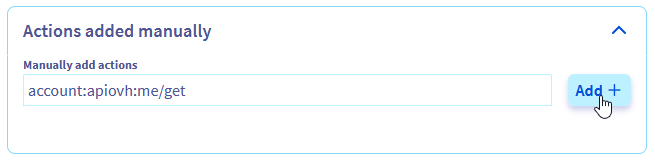
- account:apiovh:me/get
- account:apiovh:me/supportLevel/get
- account:apiovh:me/certificates/get
- account:apiovh:me/tag/get
With these rights, a user will be able to log in to the OVHcloud Control Panel. To be able to perform any actions inside the Control Panel however, additional rights have to be assigned through IAM.
Using UI
Using the UI, you can set up a policy with the following configuration:
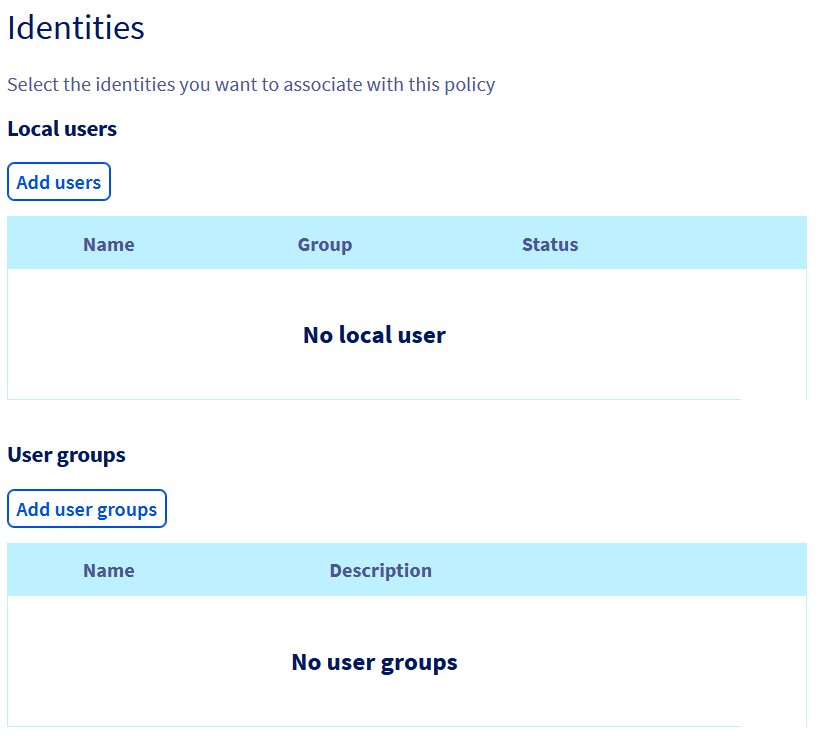
Add the identites you want to give access to.
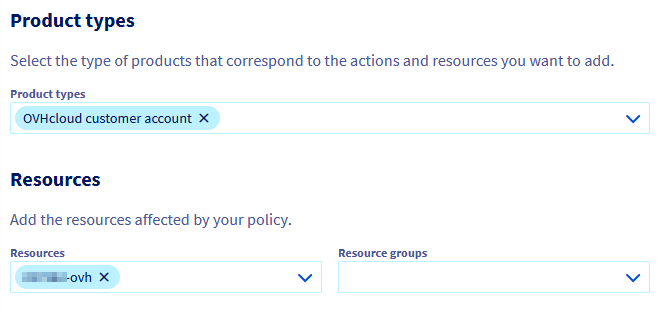
Add a resourceType "OVHcloud customer account" and add your account as a resource.
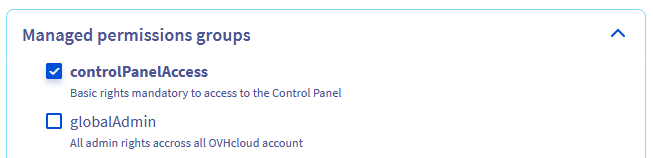
Then you can either use the managed permissions group controlPanelAccess
Or add the 4 rights listed above as an action.
You can now link your users to this policy to give them the right to log in to the OVHcloud Control Panel.
Using API
Using the API, you can set up a policy according to the following example:
Go further
Join our community of users.


 Cómo utilizar las políticas IAM desde el área de cliente
 562
562