

VMware on OVHcloud maintenance operations
696 Ansichten
 02.06.2025
  Cloud / VMware
If you require training or technical assistance in implementing our solutions, please contact your Technical Account Manager or visit this page to get a quote and request a custom analysis of your project from our Professional Services team experts.
Objective
This guide will explain the maintenance operations carried out by the OVHcloud teams.
Requirements
- You are the administrative or technical contact for the VMware on OVHcloud solution infrastructure.
- You have access to the OVHcloud Control Panel or the API console for your services.
Instructions
Maintenance operations at OVHcloud are a testament to in-house expertise. It has been improved over the years to guarantee the reliability and performance of the equipment.
How to access Hosted Private Cloud operations
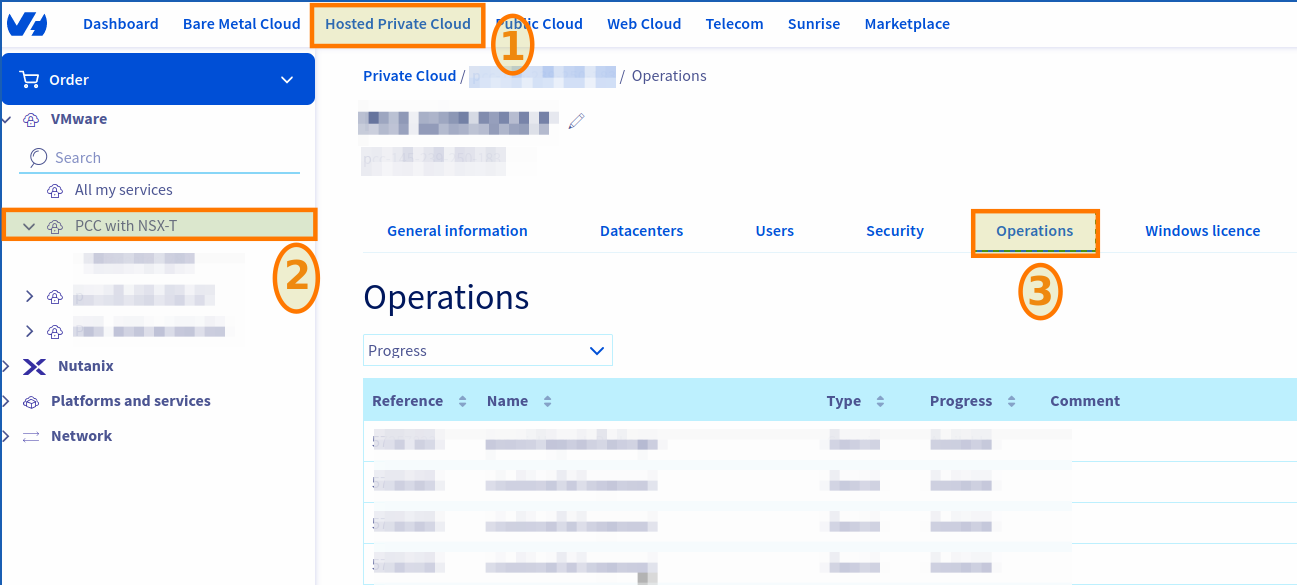
Log in to your OVHcloud Control Panel with an administrator account, and click on the Hosted Private Cloud tab.
Select your infrastructure under VMware then click on the Operations tab.
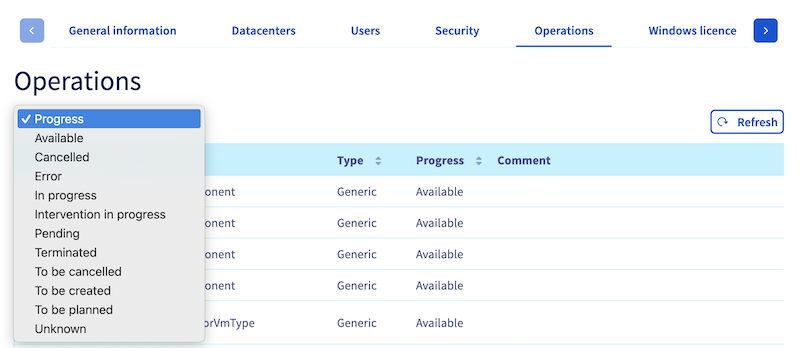
To see the operations in progress or refresh the old operations, use the Refresh button located in the top right-hand corner of the operations table.
You can change the processing date of an operation in progress by clicking on the ... button to the right of an operation, then on Modify the processing date.
For more information on rescheduling a maintenance operation, please read our guide on Rescheduling a maintenance operation on your Hosted Private Cloud.
You can also filter operations by status via the dropdown menu above the table on the left.
How to access the details of maintenance operations
Via the OVHcloud Control Panel
The OVHcloud Control Panel operation section has 11 sections.
Here is an example of an export of VMware Hosted Private Cloud Control Panel operations on OVHcloud:
| Reference | Name | Type | Progress | Comment | Affected services | Created by | Created By | Processing | End | Updated |
|---|---|---|---|---|---|---|---|---|---|---|
| 44XXXXXX | provisionVcsaSolo | Generic | Completed | Infrastructure management provisions for customer | Task: 44XXXXXX | Information unavailable | Information unavailable | May XX, 2023 6:37:51 p.m. | XX May 2023 6:37:XX | XX May 2023 6:37:58 PM |
An operation referencing ID is always added on each operation, along with an assigned name, type, progress, comment, service, and processing dates.
Of course, for each OVHcloud service (Bare Metal Cloud, Public Cloud, etc.) these names and references may change.
Via the OVHcloud API
Read the Getting started with OVHcloud APIs guide to get familiar with using OVHcloud APIv6.
Run the following API call to get the list of operations:
Parameters:
serviceName: Your Dedicated Cloud reference in the formpcc-XXX-XXX-XXX-XXX.
Return example (the return scheme may vary and be quite long depending on the size of your infrastructure):
To get the details of each robot, run the following API call:
Parameters:
serviceName: Your Dedicated Cloud reference in the formpcc-XXX-XXX-XXX-XXX.name: The name of the robot, e.g.maintenanceUpdateAntivirusConfiguration.
Return :
Details of Hosted Private Cloud maintenance operations
All maintenance operations listed below can be rescheduled.
windowsUpdateOnPcc
| Purpose | Reason | Preventive instructions | Impact | Estimated duration | Frequency |
|---|---|---|---|---|---|
| Windows update on virtual machines in the control plane managed by OVHcloud. | Security update. | None | Maintenance performed only if Veeam and/or Zerto options are subscribed to Control Plane which is unavailable during the maintenance timeout. | 00H30 for Veeam. 00H30 for Zerto. | Monthly |
upgradeSwitch
| Purpose | Reason | Preventive instructions | Impact | Estimated duration | Frequency |
|---|---|---|---|---|---|
| Upgrade (software) of the switches to the latest version validated by the OVHcloud network department. | - OVHcloud Arista lifecycle. - Security patches. | Verifying if the host is dual-attached. | Switch from TOR (on Top of Rack) A (switch A) to TOR (on Top of Rack) B (switch B). | 01H30 | Based on the publisher lifecycle |
maintenanceGenericUpgradePackages
| Purpose | Reason | Preventive instructions | Impact | Estimated duration | Frequency |
|---|---|---|---|---|---|
| Operating system upgrade on control plane virtual machines managed by OVHcloud. | OVHcloud Security Patches lifecycle. | None | Control plane unavailable1 (management) during maintenance timeout. | 02H00 | Monthly (standard) |
maintenanceRenewAndDeploySslCertificate
| Purpose | Reason | Preventive instructions | Impact | Estimated duration | Frequency |
|---|---|---|---|---|---|
| Checking, ordering and renewing SSL certificates on control plane virtual machines managed by OVHcloud. | Renewal of SSL certificates before the expiry date. | None | Control plane unavailable1 (management) during the maintenance timeout1. | 01H00 | Quarterly (typical) |
redeployVmToLatestVersion
| Purpose | Reason | Preventive instructions | Impact | Estimated duration | Frequency |
|---|---|---|---|---|---|
| Major upgrade of the operating system on control plane virtual machines managed by OVHcloud | OVHcloud security patch lifecycle | None | Control plane unavailable1 (management) during the maintenance window | 02h00 | Based on the publisher lifecycle |
The estimated duration applies to most customers. For large infrastructures, the duration can be significantly longer. It depends on each case and should be evaluated individually.
redeployPrivateGw
| Purpose | Reason | Preventive instructions | Impact | Estimated duration | Frequency |
|---|---|---|---|---|---|
| Redeployment of the Private Gateway on control plane virtual machines managed by OVHcloud. | - Operating system upgrade task. - Redeployment required for incident management. | None | Control plane unavailable1 (management) during the maintenance timeout. | 02H00 | Based on the publisher lifecycle or specific incident context |
maintenanceUpgradeHosts
| Purpose | Reason | Preventive instructions | Impact | Estimated duration | Frequency |
|---|---|---|---|---|---|
| ESXi software upgrade to the latest version offered by OVHcloud. This maintenance can install minor or major versions. | - OVHcloud lifecycle. - Security patches. | During this maintenance, all hosts can be put into maintenance mode and all VMs can be evacuated automatically. The customer must ensure that none of the following configurations prevent these actions: - No ISO media or mounted devices. - Anti-affinity rules. - Any other element that may prevent a virtual machine to move or from being moved. - Third-party products are compliant and compatible with the new ESXi version. | Hosts are set into maintenance mode : all virtual machines are automatically evacuated with vMotion. - Hosts are rebooted. - Before entering maintenance mode and rebooting each host, Control Plane is unavailable1. It becomes available after host reboots. | 00H45 per host | Based on the publisher lifecycle |
maintenanceUpgradeVcenter
| Purpose | Reason | Preventive instructions | Impact | Estimated duration | Frequency |
|---|---|---|---|---|---|
| Upgrade the vCenter Server Appliance software to the latest version offered by OVHcloud. This maintenance can install minor or major versions. Option upgrades can also be triggered (Veeam Managed, zerto) to ensure the compatibility matrix is consistent. | - OVHcloud lifecycle. - Security patches. | Third-party software is compliant with the new version of VCSA. | Control Plane unavailable1 (management) during maintenance timeout | 02H00 (may vary depending on the number of users and time required to apply permissions) | Based on the publisher lifecycle |
maintenanceUpgradeVrops
| Purpose | Reason | Preventive instructions | Impact | Estimated duration | Frequency |
|---|---|---|---|---|---|
| Upgrade (upgrade) of Aria Operations virtual machines (previously called vROps) to the latest version offered by OVHcloud. | - OVHcloud Arista lifecycle. - Security patches. | None | vROps is unavailable during the maintenance timeout. | 01H30 | Based on the publisher lifecycle |
maintenanceUpgradeNsxt
| Purpose | Reason | Preventive instructions | Impact | Estimated duration | Frequency |
|---|---|---|---|---|---|
| Upgrade from the NSX-T version to the latest version offered by OVHcloud. | OVHcloud lifecycle from VMware Security upgrade. | Sufficient resources (compute and storage) available on the customer’s infrastructure to host an NSX Edge (see prerequisites: official VMware NSX documentation). Resilience is ensured on the customer’s infrastructure to host the NSX-T Edge Gateways. | NSX-T control plane unavailable1 during the upgrade operation. Edges vMotion can experience a slight disruption of flows (reconnection required for statefull applications). | 02H30 | Based on the publisher lifecycle |
maintenanceUpgradeVeeamManaged
| Purpose | Reason | Preventive instructions | Impact | Estimated duration | Frequency |
|---|---|---|---|---|---|
| Upgrade of the Veeam control plane virtual machines managed by OVHcloud (backup and replication virtual servers, backup proxy) to the latest version offered by OVHcloud. | Veeam OVHcloud lifecycle. | None | Restoration and backup operations cannot be performed during the maintenance timeout. | 01H00 | Based on the publisher lifecycle |
maintenanceUpgradeZvm
| Purpose | Reason | Preventive instructions | Impact | Estimated duration | Frequency |
|---|---|---|---|---|---|
| Update or migrate Zerto virtual machines (Zerto Virtual Manager, VRA) to the latest version offered by OVHcloud. | Zerto lifecycle management by OVHcloud. | A health check report may be sent if issues are detected before the maintenance, requiring resolution before it can proceed. | - Upgrades: Minimal impact, temporary unavailability of replication and failover. - Migrations: Full service downtime, requiring reinstallation on a new platform. | Upgrades: ~1h per instance. Migrations: Up to 12h per instance. | Based on the publisher lifecycle |
Difference between upgrades and migrations:
- Upgrades involve updating existing Zerto components (e.g., Zerto 9.5 to 9.7) with minimal service disruption (~1 hour).
- Migrations involve transitioning to a new platform (e.g., from Windows-based Zerto to appliance-based Zerto 10u6), resulting in up to 12 hours of complete downtime.
Glossary
1Control Plane Unavailable: Indicates that the vCenter Server Appliance (VCSA) cannot be contacted. Therefore, not all products that need to reach VCSA will work.
This represents the following products/options in Hosted Private Cloud VMware on OVHcloud :
- NSX-T interface.
- vROps interface.
- Managed Veeam (no backup/restore operation).
- Zerto interface (continuous replication).
- Tanzu Kubernetes Grid.
Any other tier products that you can use that require VCSA will also be affected.
Control plane explanations
The control plane is the part of the system responsible for managing and controlling resources in a virtualized environment. Specifically, the control plane is the software layer that manages operations and decisions related to the configuration, resource management, tracking, and orchestration of the virtual machines and associated infrastructure.
- Resource management: It supports the configuration and management of physical (servers, storage, networking) and virtual (virtual machines) resources.
- Orchestration: Coordinates operations between different infrastructure components, making it easy to deploy, migrate and manage virtual machines.
- Monitoring: Collects performance, health and resource usage data for real-time monitoring and reporting.
- Security: Manages security policies, including authentication, authorization, and access control, ensuring the security of virtualized resources.
- Automation: Supports the automation of repetitive tasks, allowing administrators to define automated workflows and policies.
In short, the control plane is the software layer that provides centralized management, coordination, and control.
Go further
For more information on rescheduling a maintenance operation, please read our guide: Rescheduling a maintenance operation on your VMware on OVHcloud Hosted Private Cloud.
Chat on the Discord dedicated channel: https://discord.gg/ovhcloud or join our community of users.


 Verwendung des VMware Update Manager
 1313
1313