

Web Hosting - Activate a Sectigo DV SSL certificate
139 Views
 16.12.2025
  Web / Web Hosting
Objective
With Secure Socket Layer (SSL) certificates, you can encrypt the exchanges made from or to your website. This prevents unauthorized persons and malicious bots from viewing requests to or from your website.
OVHcloud offers several types of SSL certificates for OVHcloud web hosting solutions. They are set out in our guide on "Web Hosting - Managing an SSL certificate". SSL certificates are essential for the security of your website.
There are three types of SSL certificates:
- Domain Validation (DV)
- Organization validation (OV)
- Extended Validation (EV)
The SSL encryption levels are identical between these three certificate types.
The main difference lies in the level of checks that will be carried out by the Certification Authority (CA) that issues the SSL certificate and attests to its authenticity.
For OVHcloud web hosting plans, the certification authority delivering DV SSL certificates is Sectigo.
Once the order of the certificate is completed and sent to our certificate provider/certification authority Sectigo, no order refund is possible.
Find out how to activate a Sectigo DV SSL certificate on an OVHcloud web hosting plan.
Requirements
- You plan to order or have an OVHcloud web hosting plan.
- You manage a domain name for which you have exclusive rights. The domain name must not already be linked to an SSL certificate.
OVHcloud Control Panel Access
- Direct link: Hosting plans
- Navigation path:
Web Cloud>Hosting plans> Select your web hosting plan
Instructions
Sectigo DV SSL certificates offered at OVHcloud are only valid for one of the following two cases on your web hosting plan:
- A single domain name including the www subdomain (e.g.
domain.tldandwww.domain.tld). - One subdomain (e.g.
sub.domain.tld).
If other domain names or subdomains are declared on your web hosting plan, and you also want to assign them an SSL certificate, you can:
- Activate a free Let's Encrypt SSL certificate (if not already the default).
- Activate one or more other paid SSL certificate(s) (Sectigo DV or Sectigo EV).
- Install your own SSL certificate.
Before ordering the Sectigo DV SSL certificate on your web hosting plan, check that the domain/subdomain name covered by your SSL certificate:
- Points to the IP address of your web hosting plan.
- Is declared on one of the websites on your web hosting.
- Does not already have an active SSL certificate.
If you wish to order a Sectigo DV SSL certificate for a domain name (e.g. domain.tld), make sure that its "www" subdomain (e.g. www.domain.tld) also points to the IP address of your web hosting and is correctly declared on one of the websites on your web hosting.
If you order a Sectigo DV SSL certificate without checking that it has been sent, you will need to make a correction at a later date. You will then need to delete the Sectigo DV SSL certificate you have previously subscribed to without being refunded, then order a new one. The goal is for the new Sectigo DV SSL certificate to include both your domain name domain.tld and its its www subdomain www.domain.tld.
As a reminder, if you subscribe to a Sectigo DV SSL certificate directly for a subdomain (example: sub.domain.tld), you are not affected by this situation.
To check if this is the case, please refer to our guides below:
- Hosting multiple websites on your Web Hosting plan
- Web Hosting - List of IP addresses by cluster
- Editing an OVHcloud DNS zone
- Web Hosting - How to configure an SSL certificate, part Disable an SSL certificate on a web hosting plan
Order the Sectigo DV SSL certificate
Click on the tabs below to view each of the 4 steps.
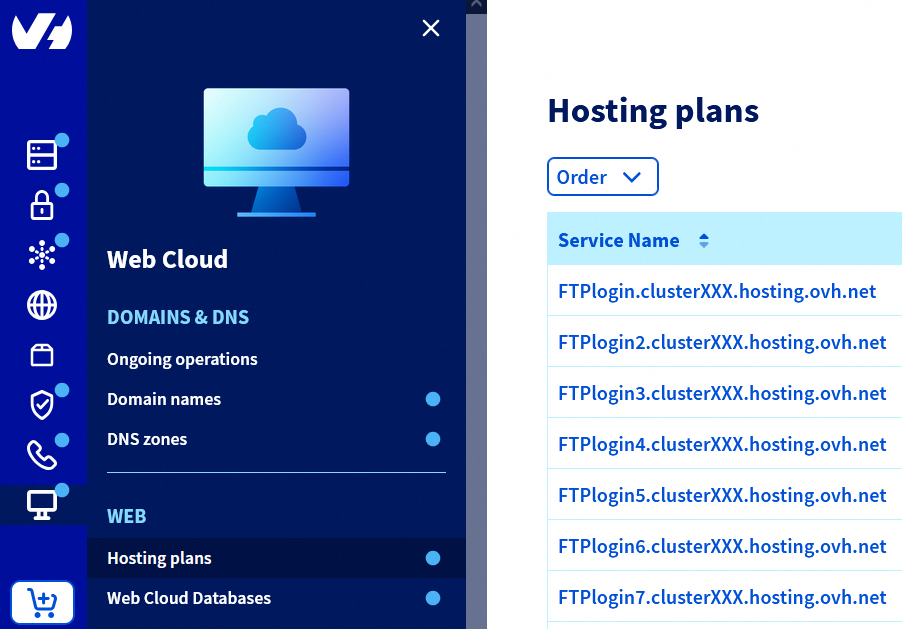
Go to the Hosting plans page, then select the web hosting plan concerned.
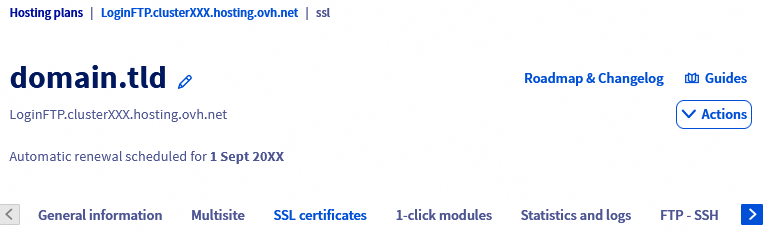
On the page that pops up, click on the SSL certificates tab.
When the content of the tab appears, click Order a Sectigo SSL certificate.

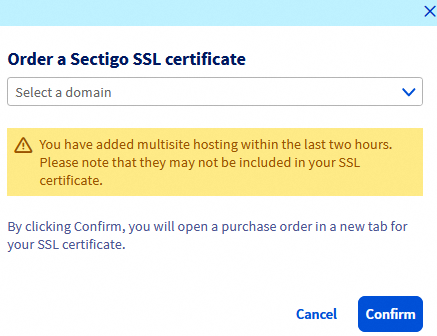
In the new window that opens, select the domain or subdomain concerned using the dropdown menu, then click Confirm to be redirected to the purchase order for your Sectigo DV SSL certificate.
Proceed with the order until you pay in order to validate the request to create the Sectigo DV SSL certificate for your domain name and/or subdomain on your Web Hosting plan.
Once the order has been confirmed, the Sectigo DV SSL certificate request is sent to the Sectigo certification authority.
Therefore, no refund of Sectigo DV SSL is possible.
It may take up to 24 hours to install the Sectigo DV SSL certificate.
Check the activation of the Sectigo DV SSL certificate
To verify that the installation is complete, click on the tabs below to view each of the 3 steps.
Go to the Hosting plans page, then select the web hosting plan concerned.
On the page that pops up, click on the SSL certificates tab.
When the content of the tab appears, check that each domain name and/or subdomain concerned is listed in the table with the certificate type SSL Sectigo.
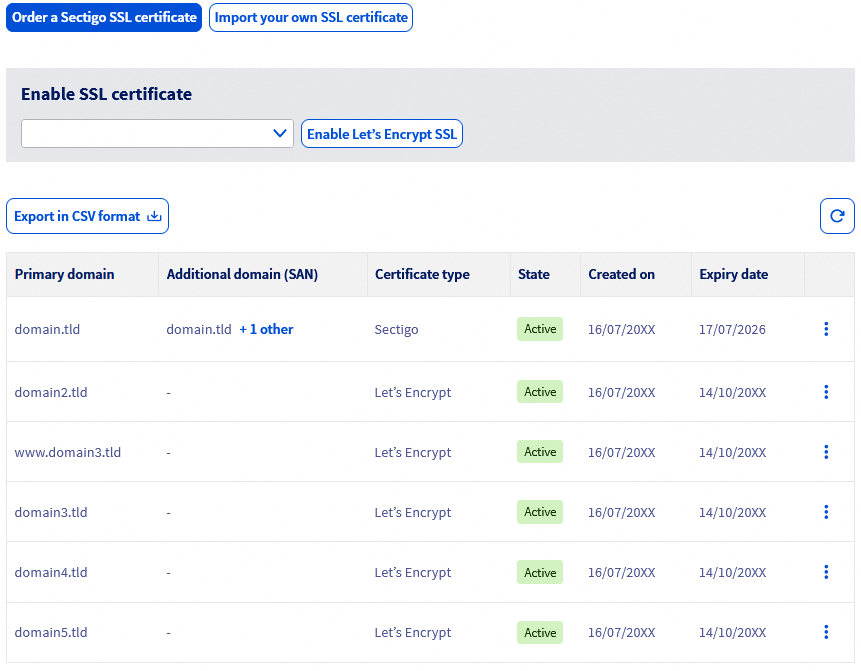
Your Sectigo DV SSL certificate is now installed and active. You can now use it with your web hosting and, for example, enable HTTPS for your website.
Go further
Web Hosting - Managing an SSL certificate
Web Hosting - Switch your website to HTTPS
Common errors related to securing your website with SSL
For specialized services (SEO, development, etc.), contact OVHcloud partners.
If you would like assistance using and configuring your OVHcloud solutions, please refer to our support offers.
Join our community of users.


 Web Hosting - Switching your website to HTTPS
 907
907