

Enterprise File Storage - Restore a volume using the snapshot revert API
162 Views
 15.09.2023
  Cloud / Enterprise File Storage
Objective
In this guide, we will provide an overview of how you can revert a volume to its latest snapshot using the snapshot revert feature.
Learn how to restore your Enterprise File Storage’s volumes using the snapshot revert functionality with the OVHcloud API.
Requirements
- An OVHcloud Enterprise File Storage service with an available volume
- Access to the OVHcloud API
Basics
A volume snapshot is a point-in-time, read-only copy of a volume. Snapshots are created from an existing, operational volume. They cannot exist without it.
Please note that once a volume is restored using a snapshot copy, any subsequent files or snapshots will be lost. When a volume is restored, all data in the volume is replaced with the snapshot’s data. The action is irreversible.
In this guide, a volume is also called “share” as in the OVHcloud API.
Limitations
It's only possible to restore a volume to its latest available snapshot. However, if you want to restore a volume from a previous snapshot, you need to delete snapshots until the snapshot you want to use for the restore is the latest snapshot.
Instructions
Scenario 1: Reverting a volume using a manual snapshot
In this case, you want to restore your volume to its latest manual snapshot, created via the OVHcloud API or the OVHcloud Control Panel.
Requirements for this scenario:
- You already did a manual snapshot. If not, you can create a
manualsnapshot through the OVHcloud API or your OVHcloud control panel. - The manual snapshot has to belong to the volume you want to restore.
1. Identify the latest manual volume snapshot using the following API call:
{serviceName}is the service unique ID{shareId}is the share to restore
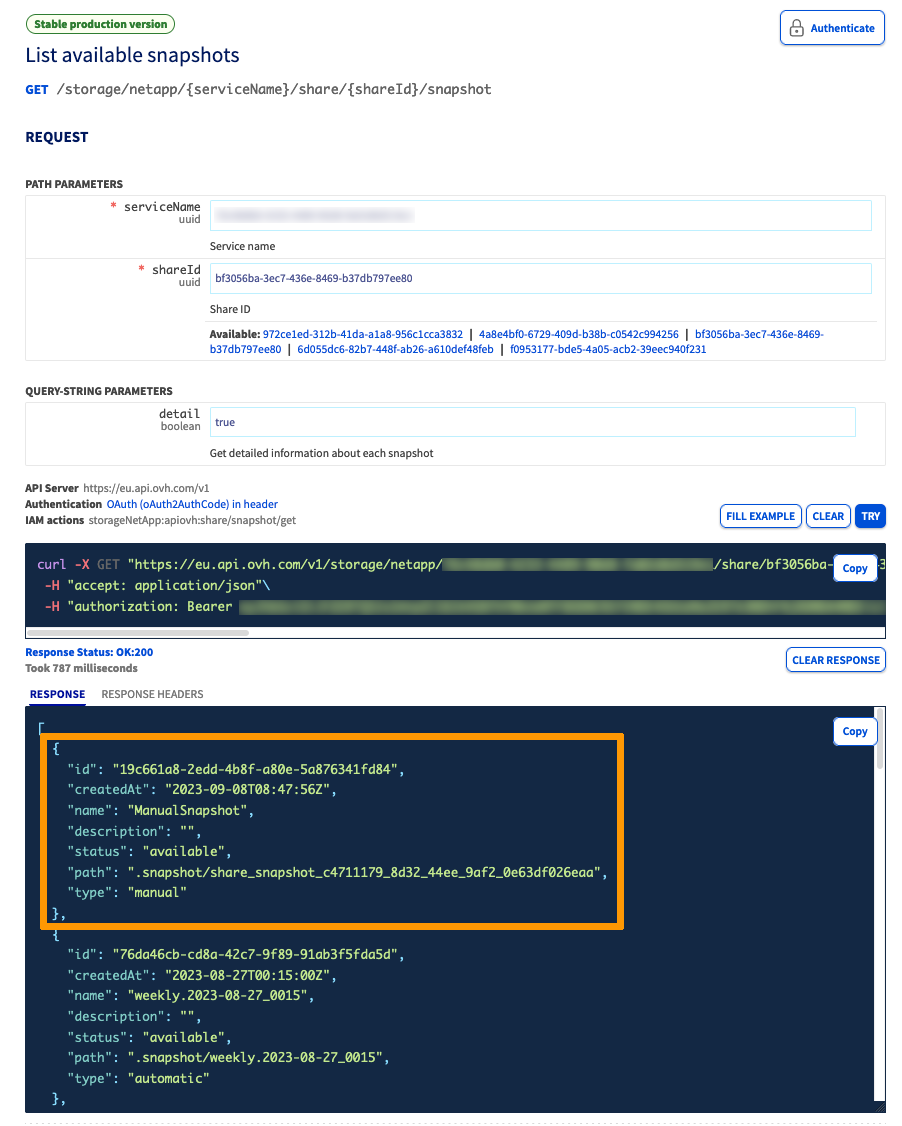
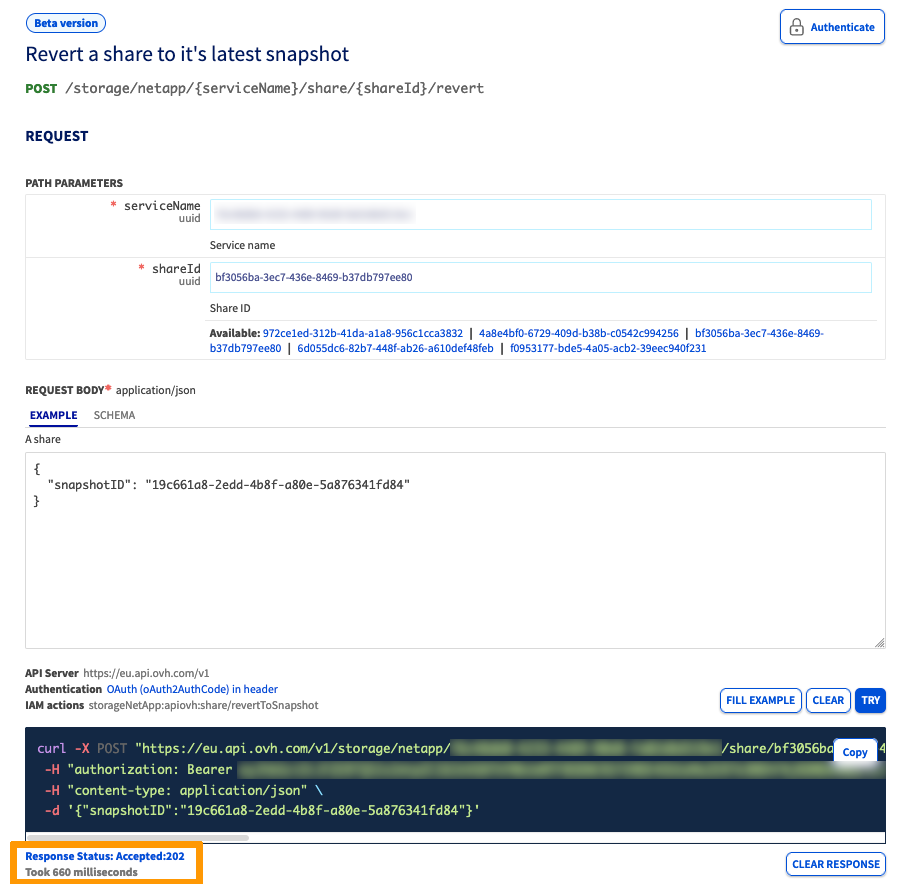
2. Restore your volume to its latest snapshot using the /revert API call:
{serviceName}is the service unique ID{shareId}is the share to restore{snapshotID}is the latest share snapshot
The OVHcloud API will return an HTTP 202 (Accepted) code and no response body.
The volume status will be set to reverting then will go back to available once the volume restoration process is complete. At the same time, the snapshot status will be set to restoring then will go back to available once the volume restoration process is complete.
Scenario 2: Reverting a volume using a snapshot taken via the snapshot policy
In this case, a snapshot policy takes regular (automatic) snapshots of a volume. You want to restore your volume to the latest snapshot taken by the policy.
You will have to hold the latest snapshot taken by the snapshot policy associated to a volume so that its snapshot becomes a manual snapshot. Once the snapshot has the type manual, its associated volume can be restored to it.
Requirements for this scenario:
- You created a snapshot policy and you associated it to the volume to restore.
- This snapshot policy has created at least one snapshot.
Snapshots taken by the snapshot policy have an automatic type. In order for them to be used for volume restoration, they have to be held using the /hold API route. This will prevent them from being rotated by the snapshot policy schedule.
1. Identify the latest automatic volume snapshot using the following API call:
{serviceName}is the service unique ID{shareId}is the share to restore
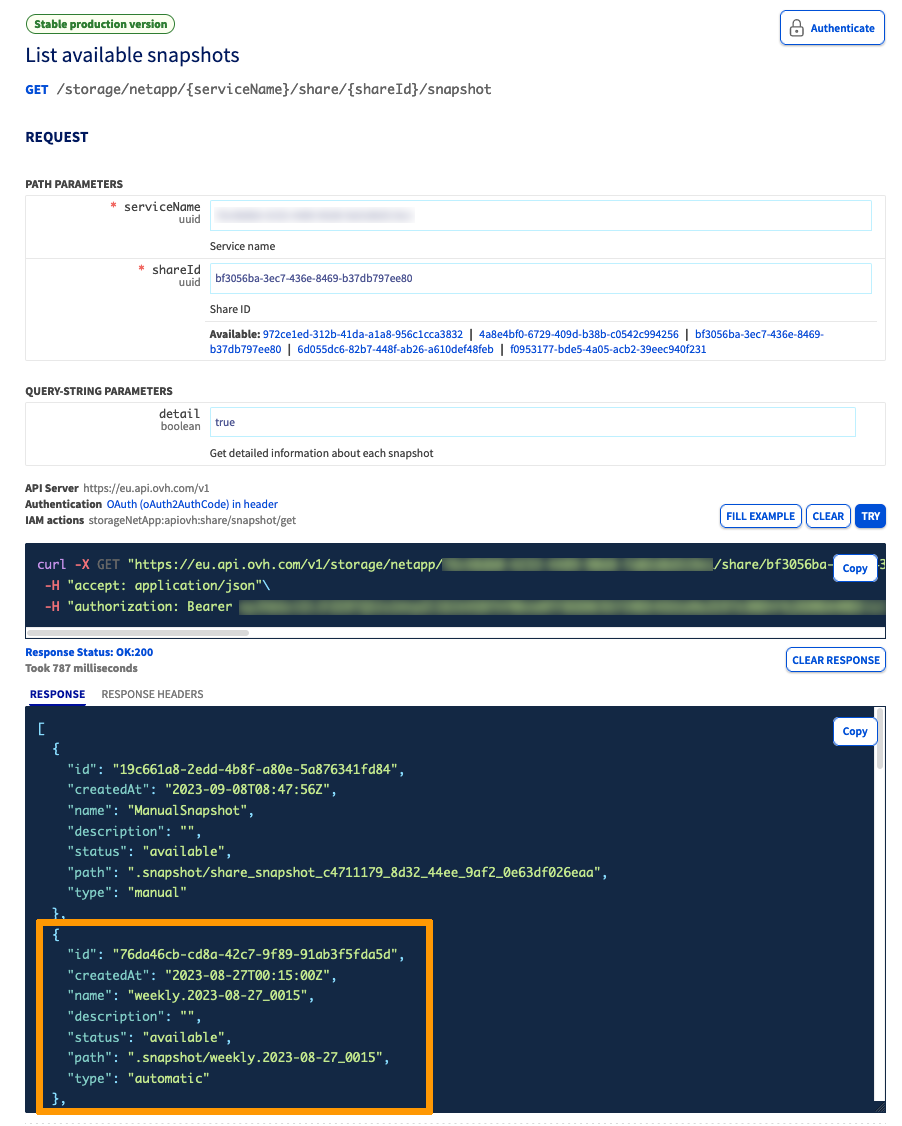
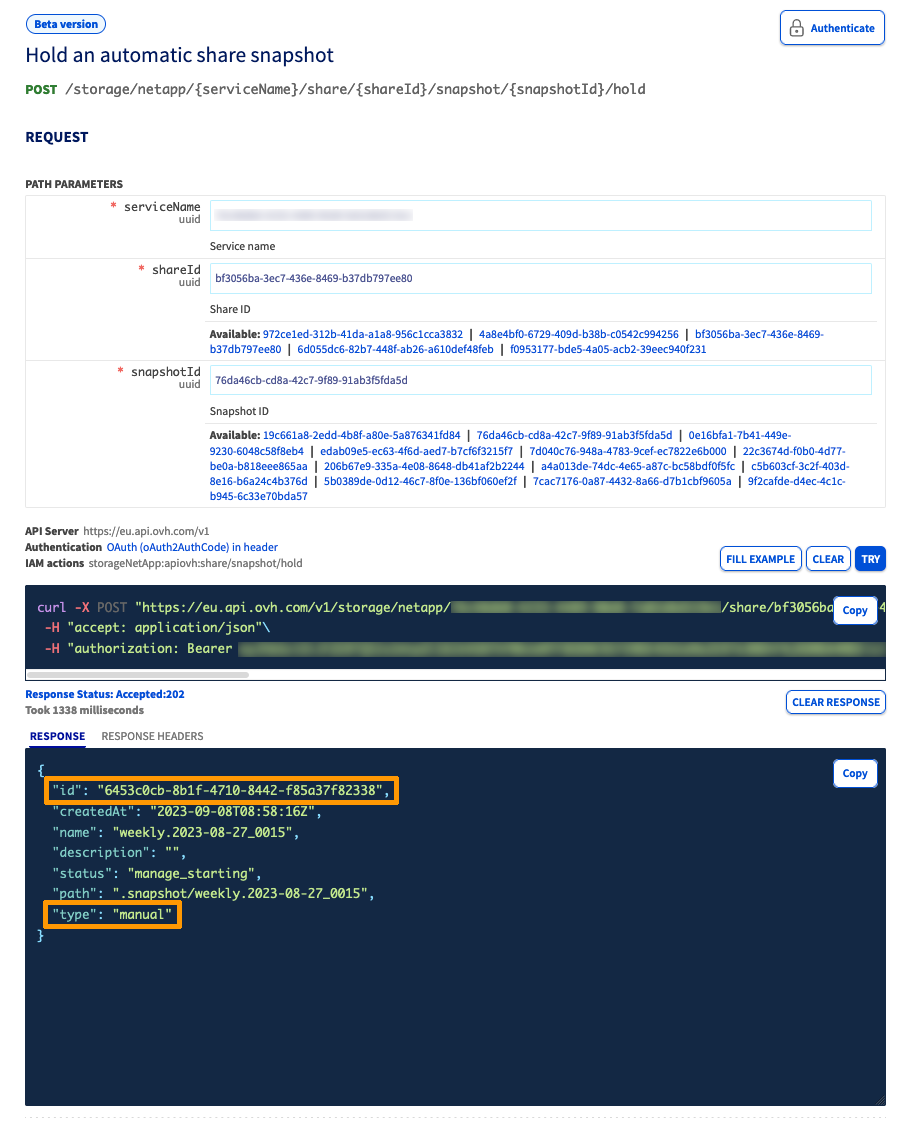
2. Hold the Snapshot using the following API call:
{serviceName}is the service unique ID{shareId}is the share to restore{snapshotID}is the latest automatic snapshot
After the hold operation is performed, the snapshot id and type will change. However, its name, createdAt and path properties will be kept. Please take note of the new id for the following steps.
3. Ensure the newly held snapshot is the latest manual snapshot for the volume.
If other manual snapshots were taken before this snapshot, they will have to be removed.
4. The endpoint used to retrieve the list of volume snapshots from step 1 can be re-used here.
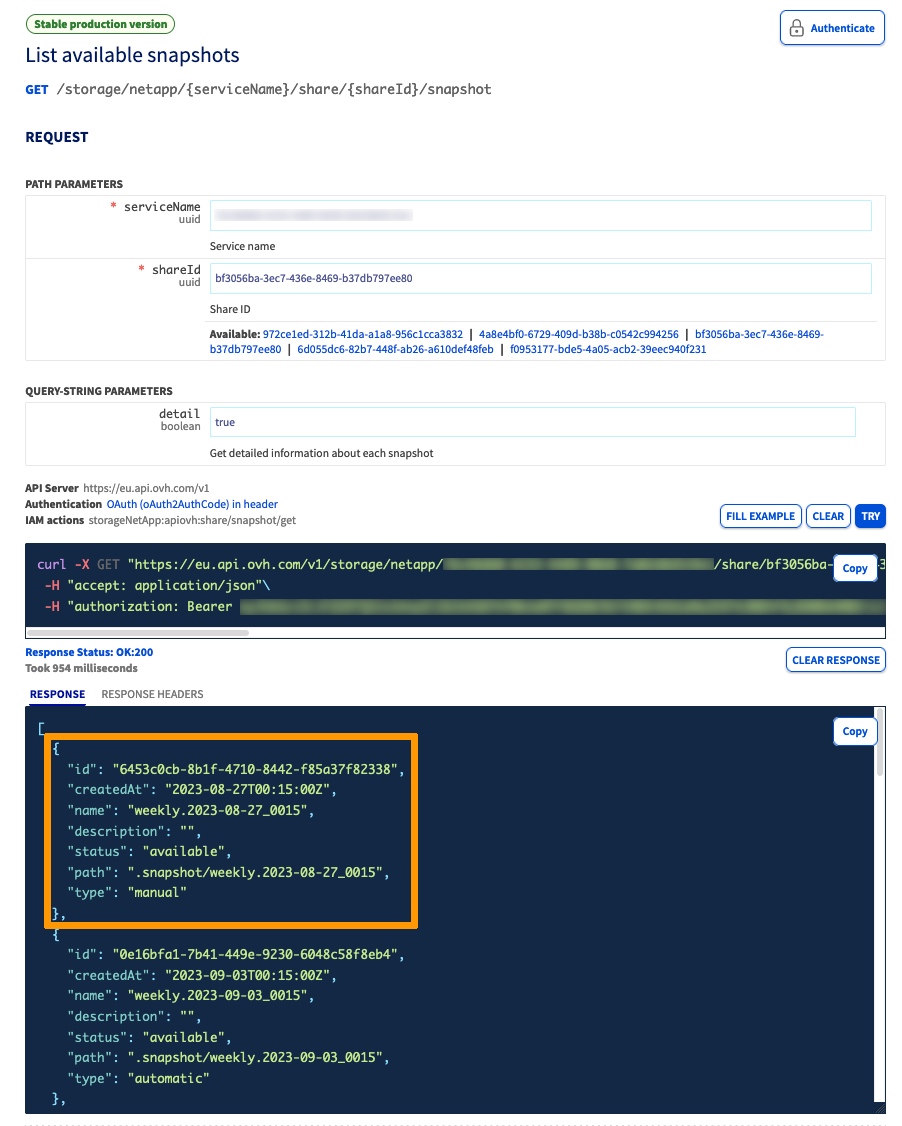
5. Restore the volume to its latest snapshot by calling the /revert API route:
{serviceName}is the Service unique ID{shareId}is the share to restore{snapshotID}is the latest share snapshot
The OVHcloud API will return an HTTP 202 (Accepted) code and no response body.
The volume status will be set to reverting then will go back to available once the volume restoration process is complete. At the same time, the snapshot status will be set to restoring then will go back to available once the volume restoration process is complete.
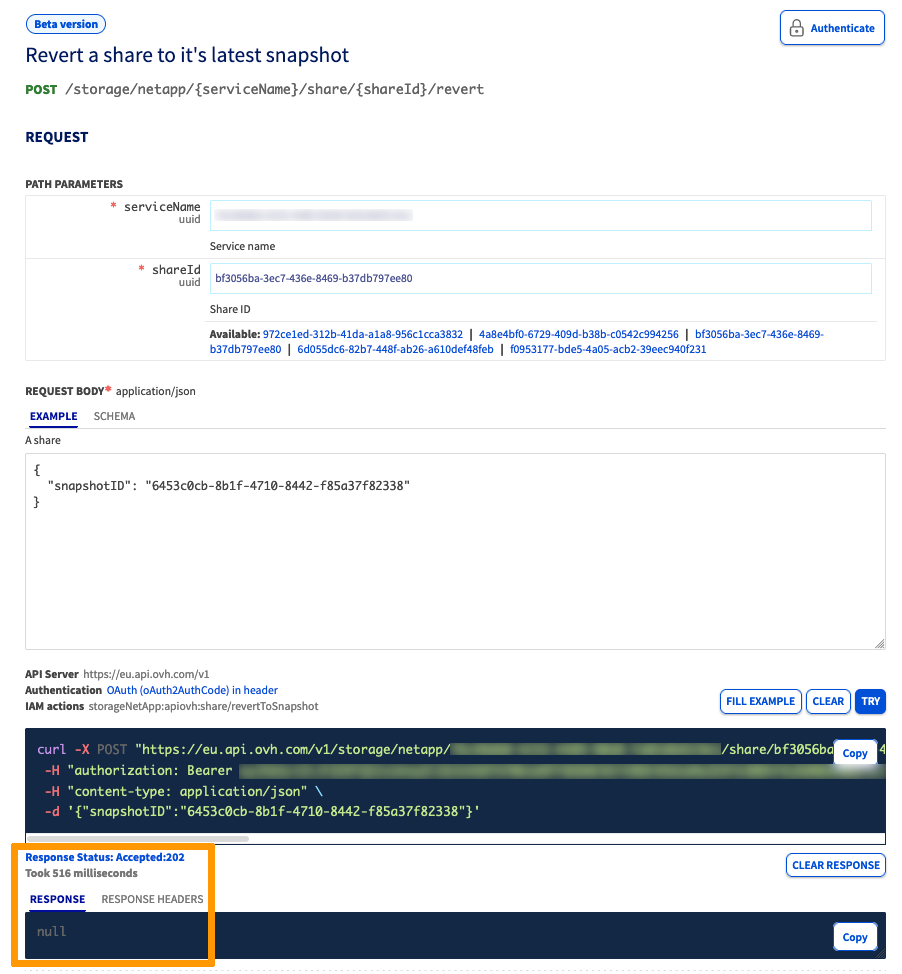
The volume is now restored to the selected snapshot.
Go further
If you need training or technical assistance to implement our solutions, contact your sales representative or click on this link to get a quote and ask our Professional Services experts for assisting you on your specific use case of your project.
Join our community of users on https://community.ovh.com/en/.


 Enterprise File Storage - Managing volumes
 268
268