AI Endpoints - Build a RAG Chatbot with LangChain4j

Knowledge Base

AI Endpoints - Build a RAG Chatbot with LangChain4j


Icons/System/eye-open Created with Sketch. 81 Views 19.12.2025 AI Endpoints

Introduction

In this tutorial, we'll show you how to build a Retrieval Augmented Generation (RAG) chatbot that enhances answers by incorporating your own custom documents into the LLM’s context.

To do this, we will use LangChain4j, Java-based framework inspired by LangChain, designed to simplify the integration of LLMs (Large Language Models) into applications. Note that LangChain4j is not officially maintained by the LangChain team, despite the similar name.

Combined with OVHcloud AI Endpoints which offers both LLM and embedding models, it becomes easy to create advanced, production-ready assistants.

Definition

Retrieval Augmented Generation (RAG): Instead of relying solely on a model's built-in knowledge, RAG injects your data into the prompt to improve relevance.

Here’s how it works:

  • Your documents are converted into vectors using an embedding model.
  • When the user asks a question, it’s also turned into a vector.
  • A similarity search is performed to find the most relevant data chunks.
  • These are fed to the LLM as context, enabling grounded, accurate responses.

Instructions

Set up the environment

In order to use AI Endpoints APIs easily, create a .env file to store environment variables:

OVH_AI_ENDPOINTS_MODEL_NAME=Mistral-7B-Instruct-v0.3
OVH_AI_ENDPOINTS_URL=https://oai.endpoints.kepler.ai.cloud.ovh.net/v1
OVH_AI_ENDPOINTS_EMBEDDING_MODEL_URL=https://bge-m3.endpoints.kepler.ai.cloud.ovh.net/api/text2vec
OVH_AI_ENDPOINTS_ACCESS_TOKEN=<ai-endpoints-api-token>

Make sure to replace the token value (OVH_AI_ENDPOINTS_ACCESS_TOKEN) by yours. If you do not have one yet, follow the instructions in the AI Endpoints - Getting Started guide.

Of course, you can change the environment variable values above to use an other LLM or another embedding model.

Optional: PostgreSQL Configuration

If you want to persist your document embeddings across sessions or share them across services, you can use a PostgreSQL instance with the pgvector extension.

Set the following environment variables to configure your database:

export DATABASE_HOST=your-pgvector-host
export DATABASE_USER=your-pgvector-user
export DATABASE_PASSWORD=your-pgvector-password

However, this step is optional. Indeed, if you are just testing or don’t have a PostgreSQL database available, LangChain4j also supports an in-memory embedding store. This makes it easy to get started without setting up any external infrastructure.

To use the in-memory store, you will just need to replace the embedding store configuration in the code we are going to write later:

EmbeddingStore<TextSegment> embeddingStore = new InMemoryEmbeddingStore<>();

Installing libraries

Then, create a requirements.txt file with the following libraries:

langchain
langchain-mistralai
langchain_community
langchain_chroma
argparse
unstructured
langchainhub
python-dotenv

Then, launch the installation of these dependencies:

pip install -r requirements.txt

Set up project

Update your pom.xml configuration file:

<properties>
  <langchain4j.version>0.33.0</langchain4j.version>
</properties>

<dependencies>
  <dependency>
    <groupId>dev.langchain4j</groupId>
    <artifactId>langchain4j</artifactId>
    <version>${langchain4j.version}</version>
  </dependency>
  <dependency>
    <groupId>dev.langchain4j</groupId>
    <artifactId>langchain4j-ovh-ai</artifactId>
    <version>${langchain4j.version}</version>
  </dependency>
  <dependency>
    <groupId>dev.langchain4j</groupId>
    <artifactId>langchain4j-mistral-ai</artifactId>
    <version>${langchain4j.version}</version>
  </dependency>
  <dependency>
    <groupId>dev.langchain4j</groupId>
    <artifactId>langchain4j-pgvector</artifactId>
    <version>${langchain4j.version}</version>
  </dependency>
</dependencies>

Create the RAGStreamingChatbot class

The full RAG chatbot implementation is available below:

package com.ovhcloud.examples.aiendpoints;

import org.slf4j.Logger;
import org.slf4j.LoggerFactory;
import dev.langchain4j.model.mistralai.MistralAiStreamingChatModel;
import dev.langchain4j.service.AiServices;
import dev.langchain4j.service.TokenStream;


public class RAGStreamingChatbot {
  private static final Logger _LOG = LoggerFactory.getLogger(RAGStreamingChatbot.class);
  private static final String OVH_AI_ENDPOINTS_ACCESS_TOKEN = System.getenv("OVH_AI_ENDPOINTS_ACCESS_TOKEN");
  private static final String OVH_AI_ENDPOINTS_MODEL_NAME = System.getenv("OVH_AI_ENDPOINTS_MODEL_NAME");
  private static final String OVH_AI_ENDPOINTS_URL = System.getenv("OVH_AI_ENDPOINTS_URL"); 
  private static final String OVH_AI_ENDPOINTS_EMBEDDING_MODEL_URL = System.getenv("OVH_AI_ENDPOINTS_EMBEDDING_MODEL_URL"); 

  interface Assistant {
    TokenStream chat(String userMessage);
  }

  public static void main(String[] args) {
    MistralAiStreamingChatModel streamingChatModel = MistralAiStreamingChatModel.builder()
        .apiKey(OVH_AI_ENDPOINTS_ACCESS_TOKEN)
        .modelName(OVH_AI_ENDPOINTS_MODEL_NAME)
        .baseUrl(OVH_AI_ENDPOINTS_URL)
        .maxTokens(512)
        .build();

    Assistant assistant = AiServices
        .builder(Assistant.class)
        .streamingChatLanguageModel(streamingChatModel)
        .build();

    _LOG.info("\n💬: What is AI Endpoints?\n");

    TokenStream tokenStream = assistant.chat("Can you explain me what is AI Endpoints?");
    _LOG.info("🤖: ");
    tokenStream
        .onNext(_LOG::info)
        .onError(Throwable::printStackTrace)
        .start();
  }
}

Note that the chatbot will use the streaming mode, as explained in the Memory Chatbot with LangChain4j tutorial.

Test the chatbot without knowledge base

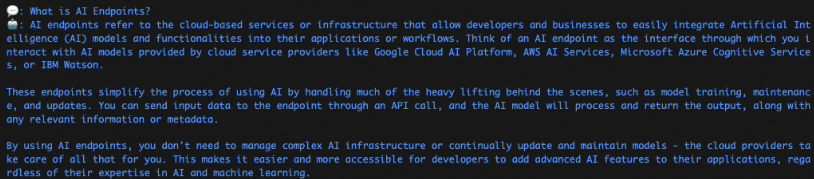
As you can see below, the LLM gives an answer, but not the expected one.
chatbot-without-rag

This is not a surprise, since the model was trained before OVHcloud created AI Endpoints. The model does not know this platform.

That is why we are going to create a knowledge base, to improve the LLM's answers.

Prepare your knowledge base

Create a folder named rag-files, located at src/main/resources/rag-files and place your .txt, .md, or other text-based documents there. These will be converted into embeddings and used during retrieval.

You can find an example file in our public-cloud-examples GitHub repository.

Transform the text in vectors using AI Endpoints

To do this, we are going to create chunks from our document. A chunk is a part of the document that will be transformed in vector.

It’s then used to perform a similarity search. This is a delicate phase, and in this example, the chunking is based on the number of characters. In a more complex use case, you will create chunks based on the meaning of the text.

public class RAGStreamingChatbot {

  // ...

  public static void main(String[] args) {
     // Load the document and split it into chunks
    DocumentParser documentParser = new TextDocumentParser();
    Document document = loadDocument(
            Path.of(ClassLoader.getSystemResource("rag-files/content.txt").toURI()),
            documentParser);
    DocumentSplitter splitter = DocumentSplitters.recursive(300, 0);

    List<TextSegment> segments = splitter.split(document);

    // ...
  }
}

Next, you transform the text in vectors and store them.

If you do not have a PostgreSQL managed instance, you can use the in-memory store as mentioned earlier (only for test purposes).

public class RAGStreamingChatbot {
  // ...

  private static final String DATABASE_HOST = System.getenv("DATABASE_HOST");
  private static final String DATABASE_USER = System.getenv("DATABASE_USER");
  private static final String DATABASE_PASSWORD = System.getenv("DATABASE_PASSWORD");


  public static void main(String[] args) {
    // ...

    EmbeddingStore<TextSegment> embeddingStore = PgVectorEmbeddingStore.builder()
                    .host(DATABASE_HOST)
                    .port(20184)
                    .database("rag_demo")
                    .user(DATABASE_USER)
                    .password(DATABASE_PASSWORD)
                    .table("rag_embeddings")
                    .dimension(768)
                    .createTable(false)
                    .build();

    // If you haven't a PostgreSQL database, you can use an in-memory embedding store
    // EmbeddingStore<TextSegment> embeddingStore = new InMemoryEmbeddingStore<>();

    embeddingStore.addAll(embeddings, segments);
    ContentRetriever contentRetriever = EmbeddingStoreContentRetriever.builder()
        .embeddingStore(embeddingStore)
        .embeddingModel(embeddingModel)
        .maxResults(5)
        .minScore(0.9)
        .build();
    // ...

  }
}

Use this RAG feature for your chatbot

Adding RAG functionality to the chatbot is easy by adding the ContentRetriever to the Assistant in the RAGStreamingChatbot class:

public class RAGStreamingChatbot {
  // ...

  interface Assistant {
    TokenStream chat(String userMessage);
  }

  public static void main(String[] args) {
    // ...

    Assistant assistant = AiServices
        .builder(Assistant.class)
        .streamingChatLanguageModel(streamingChatModel)
        .contentRetriever(contentRetriever)
        .build();
    // ...
  }
}

At this step, you have completed the development of the RAGStreamingChatbot class:

package com.ovhcloud.examples.aiendpoints;

import static dev.langchain4j.data.document.loader.FileSystemDocumentLoader.loadDocument;
import java.util.List;
import org.slf4j.Logger;
import org.slf4j.LoggerFactory;
import dev.langchain4j.data.document.Document;
import dev.langchain4j.data.document.DocumentParser;
import dev.langchain4j.data.document.DocumentSplitter;
import dev.langchain4j.data.document.parser.TextDocumentParser;
import dev.langchain4j.data.document.splitter.DocumentSplitters;
import dev.langchain4j.data.embedding.Embedding;
import dev.langchain4j.data.segment.TextSegment;
import dev.langchain4j.model.embedding.EmbeddingModel;
import dev.langchain4j.model.mistralai.MistralAiStreamingChatModel;
import dev.langchain4j.model.ovhai.OvhAiEmbeddingModel;
import dev.langchain4j.rag.content.retriever.ContentRetriever;
import dev.langchain4j.rag.content.retriever.EmbeddingStoreContentRetriever;
import dev.langchain4j.service.AiServices;
import dev.langchain4j.service.TokenStream;
import dev.langchain4j.store.embedding.EmbeddingStore;
import dev.langchain4j.store.embedding.pgvector.PgVectorEmbeddingStore;

public class RAGStreamingChatbot {
  private static final Logger _LOG = LoggerFactory.getLogger(RAGStreamingChatbot.class);
  private static final String DATABASE_HOST = System.getenv("DATABASE_HOST");
  private static final String DATABASE_USER = System.getenv("DATABASE_USER");
  private static final String DATABASE_PASSWORD = System.getenv("DATABASE_PASSWORD");
  private static final String OVH_AI_ENDPOINTS_ACCESS_TOKEN = System.getenv("OVH_AI_ENDPOINTS_ACCESS_TOKEN");
  private static final String OVH_AI_ENDPOINTS_MODEL_NAME = System.getenv("OVH_AI_ENDPOINTS_MODEL_NAME");
  private static final String OVH_AI_ENDPOINTS_URL = System.getenv("OVH_AI_ENDPOINTS_URL"); 
  private static final String OVH_AI_ENDPOINTS_EMBEDDING_MODEL_URL = System.getenv("OVH_AI_ENDPOINTS_EMBEDDING_MODEL_URL"); 

  interface Assistant {
    TokenStream chat(String userMessage);
  }

  public static void main(String[] args) {
     // Load the document and split it into chunks
    DocumentParser documentParser = new TextDocumentParser();
    Document document = loadDocument(
        RAGStreamingChatbot.class.getResource("/rag-files/content.txt").getFile(),
        documentParser);
    DocumentSplitter splitter = DocumentSplitters.recursive(300, 0);

    List<TextSegment> segments = splitter.split(document);

    // Do the embeddings and store them in an embedding store
    EmbeddingModel embeddingModel = OvhAiEmbeddingModel.builder()
        .apiKey(OVH_AI_ENDPOINTS_ACCESS_TOKEN)
        .baseUrl(OVH_AI_ENDPOINTS_EMBEDDING_MODEL_URL)
        .build();

    List<Embedding> embeddings = embeddingModel.embedAll(segments).content();

    EmbeddingStore<TextSegment> embeddingStore = PgVectorEmbeddingStore.builder()
                    .host(DATABASE_HOST)
                    .port(20184)
                    .database("rag_demo")
                    .user(DATABASE_USER)
                    .password(DATABASE_PASSWORD)
                    .table("rag_embeddings")
                    .dimension(768)
                    .createTable(false)
                    .build();

    // If you haven't a PostgreSQL database, you can use an in-memory embedding store
    // EmbeddingStore<TextSegment> embeddingStore = new InMemoryEmbeddingStore<>();
    embeddingStore.addAll(embeddings, segments);
    ContentRetriever contentRetriever = EmbeddingStoreContentRetriever.builder()
        .embeddingStore(embeddingStore)
        .embeddingModel(embeddingModel)
        .maxResults(5)
        .minScore(0.9)
        .build();

    MistralAiStreamingChatModel streamingChatModel = MistralAiStreamingChatModel.builder()
        .apiKey(OVH_AI_ENDPOINTS_ACCESS_TOKEN)
        .modelName(OVH_AI_ENDPOINTS_MODEL_NAME)
        .baseUrl(OVH_AI_ENDPOINTS_URL)
        .maxTokens(512)
        .build();

    Assistant assistant = AiServices
        .builder(Assistant.class)
        .streamingChatLanguageModel(streamingChatModel)
        .contentRetriever(contentRetriever)
        .build();

    _LOG.info("\n💬: What is AI Endpoints?\n");

    TokenStream tokenStream = assistant.chat("Can you explain me what is AI Endpoints?");
    _LOG.info("🤖: ");
    tokenStream
        .onNext(_LOG::info)
        .onError(Throwable::printStackTrace)
        .start();
  }
}

Thanks to your knowledge base, our new chatbot will answer with relevant information from your custom data source.

chatbot-with-rag

Conclusion

You've now created a Retrieval-Augmented Generation (RAG) chatbot using your own documents and the OVHcloud AI Endpoints platform. LangChain’s integration with Chroma and embedding models makes RAG implementation straightforward and even production-ready.

Going further

If you want to go further and deploy your chatbot in the cloud, making your interface accessible to everyone, refer to the following articles and tutorials:

If you need training or technical assistance to implement our solutions, contact your sales representative or click on this link to get a quote and ask our Professional Services experts for a custom analysis of your project.

Feedback

Please feel free to send us your questions, feedback, and suggestions regarding AI Endpoints and its features:

  • In the #ai-endpoints channel of the OVHcloud Discord server, where you can engage with the community and OVHcloud team members.

Related articles