

Pushing logs from OVHcloud KMS to Logs Data Platform
74 Views
 18.06.2025
  Cloud / Logs Data Platform
Objective
This guide aims to introduce logs generated by OVHcloud KMS and how they are managed from Logs Data Platform.
Requirements
Instructions
Description
OVHcloud KMS has a native integration with Logs Data Platform for logs management.
Logs direct access
KMS logs are available from each KMS Logs tab.
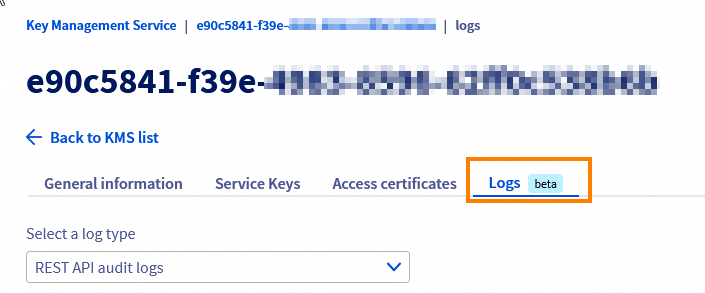
This tab displays all KMS logsin real time. A selector allows to switch display between the two types of logs:
- REST API audit logs.
- KMIP audit logs.
Logs access through LDP
From the Logs tab, you can subscribe to an LDP data stream.
Once the subscription is enabled, all the logs will be pushed to Logs Data Platform to archive generated logs and perform advanced searches, create alerts and visualisations.
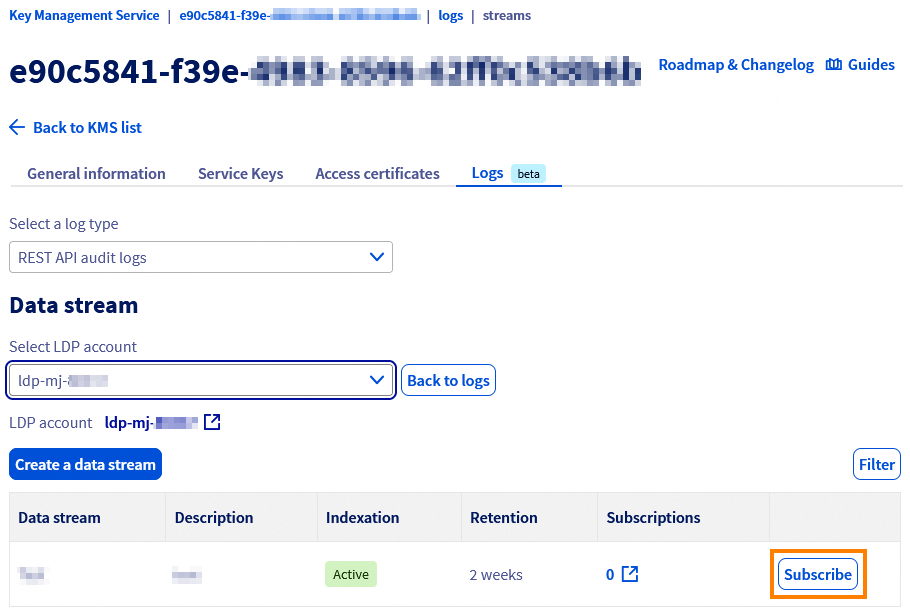
For more information, please refer to our guide "Quick start for Logs Data Platform".
Available logs details
KMS logs contain the following information:
- REST API
Logs are displayed with this format:
Example:
Elements that can be pushed to Logs Data Platform:
| Field | Description |
|---|---|
| domain_id | OKMS domain ID |
| request_id | request ID |
| type | |
| log_level | Log priority level |
| client_ip | IP of the client making the request |
| tls_cert_id | Authentication certificate ID used |
| res_urn | target resource URN |
| region | OKMS domain region |
| iam_operation | IAM action evalutated |
| iam_identities | IAM identity used for rights evaluation |
| http_path | Request path |
| http_status | HTTP answer status |
| http_method | Request method |
| err_category | Error category |
- KMIP
Logs are displayed with this format:
Example:
Elements that can be pushed to Logs Data Platform:
| Field | Description |
|---|---|
| domain_id | OKMS domain ID |
| request_id | Request ID |
| log_level | Log priority level |
| client_ip | IP of the client making the request |
| tls_cert_id | Authentication certificate ID used |
| res_urn | Target resource URN |
| region | OKMS domain region |
| iam_operation | IAM action evalutated |
| iam_identities | IAM identity used for rights evaluation |
| kmip_operation | KMIP operation used |
| kmip_reason | Standard KMIP error code |
Go further
Join our community of users.


 OKMS Architecture overview
 348
348