

Update the flavor of Analytics
81 Views
 03.02.2025
  Common
Objective
Learn how to adjust the flavor of your cluster according to your needs.
How to upgrade your flavor
This option is available through the OVHcloud API and the Control Panel.
Requirements
- Access to the OVHcloud Control Panel or to the API
- A Public Cloud project in your OVHcloud account
Instructions
To adjust the flavor of your cluster, log in to the OVHcloud Control Panel and open your Public Cloud project. Click Data Analysis or Data Streaming in the left navigation bar, then select your engine instance.
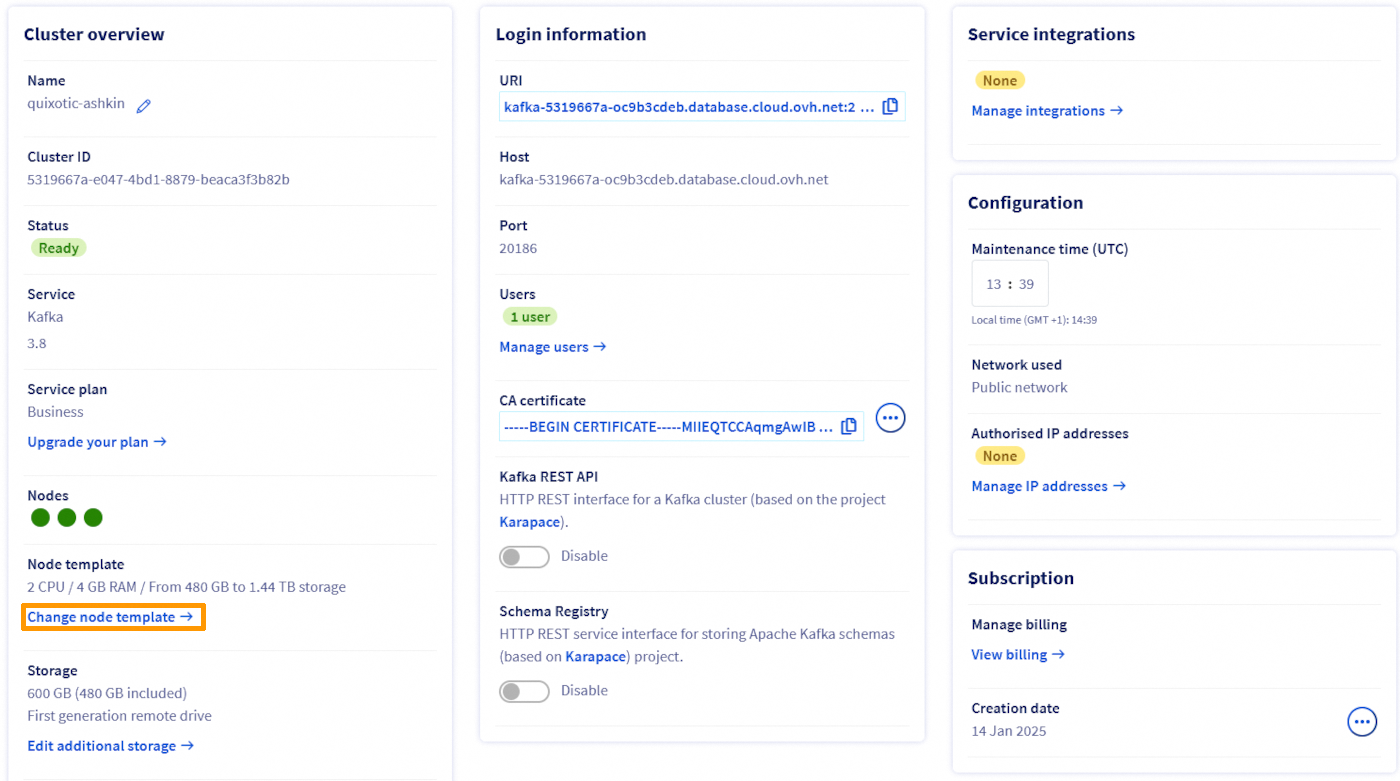
Click Change node template and adjust the flavor of your cluster.

How to downgrade your flavor
This option is currently available via the OVHcloud API.
Requirements
- Access to the OVHcloud API (create your credentials by consulting this guide)
- A Public Cloud project in your OVHcloud account
Instructions
In order to be able to downgrade your flavor, you must have a threshold of 20% between your current disk space used (base storage + additional storage) and the maximum storage space allowed for the flavor.
For instance, if you have an OpenSearch cluster with db1-15 as flavor and less than 384 GB (80% of 480GB) of disk space used, you can decrease the flavor to db1-7 on that endpoint:
We want your feedback!
We would love to help answer questions and appreciate any feedback you may have.
If you need training or technical assistance to implement our solutions, contact your sales representative or click on this link to get a quote and ask our Professional Services experts for a custom analysis of your project.
Are you on Discord? Connect to our channel at https://discord.gg/ovhcloud and interact directly with the team that builds our Analytics service!
Join our community of users.


 Configure the advanced parameters for Analytics
 108
108