

How to cancel your OVHcloud services
978 Views
 28.04.2025
  Managing billing, payments and services
Objective
You want to cancel one or more OVHcloud services. This guide will show you how to cancel your subscription via the My offers and services page.
-First read the section "What happens when an OVHcloud service is cancelled?". -Follow the steps described in the section "How do I cancel my subscription?".
What happens when an OVHcloud service is cancelled?
The “termination” of an OVHcloud service implies that it will be permanently discontinued at the end of the current subscription (with an exception, however, for domain names). You can cancel your service or stop a cancellation request up to 24 hours before the subscription end date.
If this is an email solution, a server or a web hosting plan, all of the data concerned will be deleted without any possibility of recovery.
If it is a domain name, it will be recirculated and can be ordered by other customers.
Before cancelling a service, you must be certain:
- The operation will concern a service that you no longer want to use.
- That you have a functional solution to replace it.
- That you have backed up all of the data concerned.
Domain name cancellation
Following your termination and the end of the current subscription, your generic domain name (.com, .org, .net, etc.) will remain reserved for a "grace period" (approximately 7 days) and will then receive the "redemption" status (approximately 35 to 40 additional days). This means that only you will be able to renew it during these periods. For more details, please read the FAQ at the bottom of our guide “How to renew my OVHcloud services”.
Requirements
- You must be the "administrative contact" of the service to be cancelled (for more information, see this guide).
- Your OVHcloud services to be cancelled are active (not suspended due to payment default).
OVHcloud Control Panel Access
- Direct link: My offers and services
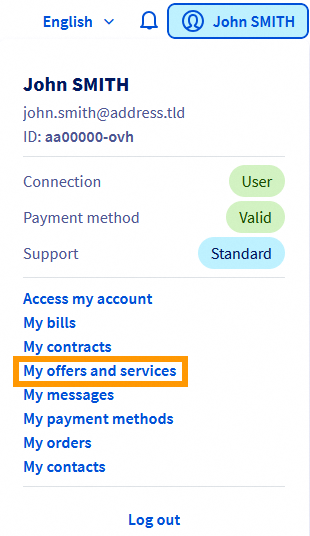
- Navigation path: Click your name in the top right >
My offers and services
Instructions
The cancellation procedure is identical for the majority of OVHcloud services.
However, there are special cases that are detailed below in this guide.
How do I cancel my subscription?
To cancel your service subscription, open the My offers and services page.
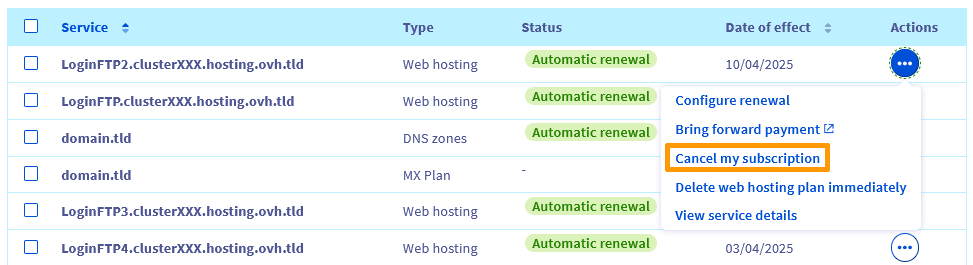
Next, click the ... button to the right of the service you want to cancel, then Cancel my subscription.
Specify the reasons for your termination request, then click Confirm.
Learning your opinion is essential for us in order to develop our services to suit your needs and expectations.
Please tell us more about your personal experience with OVHcloud by filling in the cancellation form. We thank you in advance for your contribution to the improvement of our products.
Your service will be cancelled on the date of effect listed in the “Manage my solutions and services” table. If you do not see the status “Cancellation scheduled”, please refresh the page.

Special cases
MX Plan email
Most MX Plan services are linked to a web hosting plan. If this is the case and you would like to delete this email option, follow the instructions in this guide.
Warning: Deleting an MX Plan will permanently delete all of the data associated with it, and will not result in any refunds.
If your MX Plan email solution was ordered independently of any hosting plan, follow the procedure detailed above.
Managed Bare Metal
To cancel your Managed Bare Metal solution, follow the instructions in this guide.
VMware on OVHcloud
To cancel your VMware on OVHcloud, follow the instructions in this guide.
Public Cloud
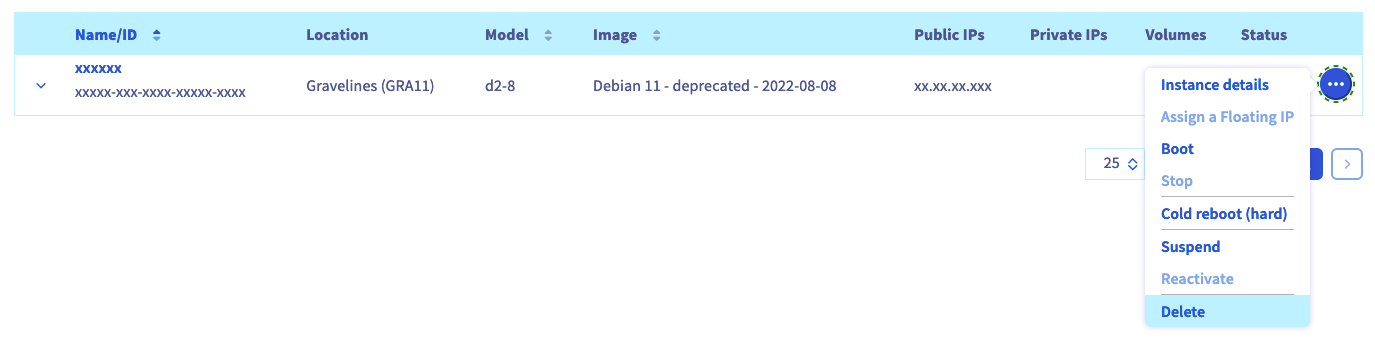
Each Public Cloud service can be deleted from the Public Cloud tab in the Control Panel.
Select a service on the left, click on the ... button to the right of the service concerned, then on Delete, as in the example below for an instance:
OVHcloud Public Cloud is based on the principle of Pay-as-you-go (you can find more details on our page information on Public Cloud billing method). At the end of the month, you only pay for the actual resource usage time.
You can also view your current resource usage in the OVHcloud Control Panel, and receive email alerts if your resource usage is projected to exceed a certain threshold.
How do I stop my subscription cancellation?
You can revoke a cancellation request up to 24 hours before the subscription end date.
To abort a cancellation request, open the My offers and services page.
Next, click the ... button to the right of the service for which a cancellation request is being made, then Stop cancellation of service

Finally, click Confirm cancellation.
A termination of a cancellation procedure is effective immediately. Please refresh the “Manage my solutions and services” page if you still see the “Cancellation scheduled” status.
FAQ
I cannot cancel a service. What should I do?
If you are unable to cancel a service (the Cancel my subscription button is not available), it may be one of the specific cases detailed previously in this guide.
Also check that the following conditions are met:
- You must be the “administrative contact” for the service. For more information, see this guide.
- The service is in automatic renewal. If your service is in manual renewal, it will be suspended on its expiry date, then deleted after a few days.
- The service is not suspended, mainly because of a bill that has not been settled. Check that you are up to date in the payments and renewals of your services.
If you are still unable to cancel your service, contact our support teams by opening a ticket from the Help Centre.
How do I cancel all my services?
You must terminate each service individually. You cannot cancel several services at once, or request a global cancellation from our customer support teams.
How do I delete my OVHcloud account?
Closing your OVHcloud customer account and deleting your personal data is only possible if:
- You no longer have any services listed in the “My solutions & services” section. Otherwise, you will need to request their termination and wait for their deletion.
- You do not have any invoices awaiting payment. Otherwise, you will need to pay for them by clicking the
Pay immediatelybutton in the bulk actions section of the “My bills” page. - You have no pending orders. Check it on this page.
- Your prepaid account has no credit balance. Check it on this page.
If the above conditions are met, you can request to delete your OVHcloud account and the related data by following these steps:
- Log in to the OVHcloud Help Centre.
- Click the
Create ticketbutton. - Select the reason
Manage your OVHcloud customer account. - Specify
I want to close my OVHcloud accountand follow the steps described.
Go further
Managing renewal for OVHcloud services
Join our community of users.


 GDPR - How to immediately delete your OVHcloud services
 16
16