

Backup Agent - Deletion Procedure
17 Views
 03.02.2026
  Backup Agent
Objective
This guide explains how to delete different elements of your Backup Agent service: agents, vaults, and tenants.
Requirements
- An active Backup Agent service.
OVHcloud Control Panel Access
- Direct link: Backup Agent
- Navigation path:
Bare Metal Cloud>Backup Agent
Instructions
Delete an agent
Behavior according to the agent's usage:
- If the agent has not been used to transfer data : It can be deleted immediately. It will be disabled first, then deleted.
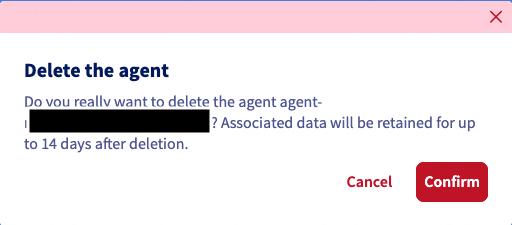
- If data has been transferred : We apply a suspension of the agent in the "Disabled" status for 14 days, allowing time for immutable data to be deleted.
Once your agent is suspended, you can no longer create a new agent on the same server. You must wait until the first agent is deleted.
Go to the Agents section and click on the delete button for the relevant agent.
Confirm the agent deletion in the window that appears.
Delete a vault
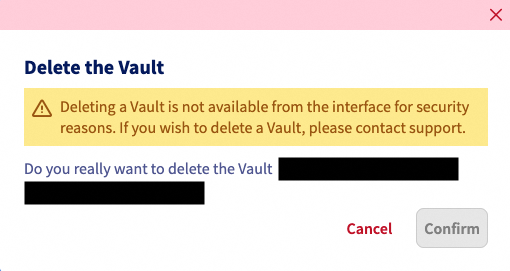
A vault cannot be deleted if it contains data. If you wish to delete a vault, you must contact support, who will perform checks with you before initiating the deletion.
Go to the Vaults section and click on the delete button for the relevant vault.
Confirm the deletion in the window that appears.
Delete a tenant
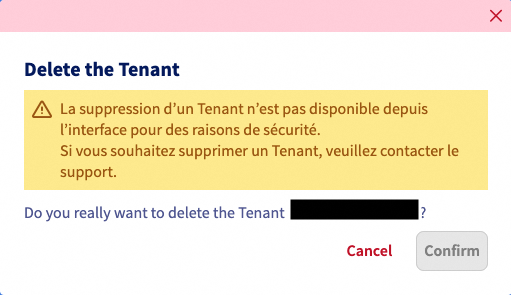
At the moment, a tenant cannot be deleted autonomously. If you wish to delete a tenant, you must contact support. We will process your request.
Select your tenant and click on the delete button.
Confirm the deletion in the window that appears.
Go further
Join our community of users.


 Backup Agent - Billing
 25
25