

Object Storage - How to connect Object Storage buckets with other resources in a vRack
398 Ansichten
 09.10.2025
  Cloud / Object Storage S3
Objective
This guide explains how to use Object Storage together with resources in a Private Network.
Requirements
- An Object Storage bucket
- A vRack Private Network service
- A Public Cloud Gateway
- Resources to connect (Public Cloud instances, Managed Kubernetes, Bare Metal servers, etc.)
Instructions
Context
Your use case may require a secure connection between a private network and your Object Storage bucket. Our vRack Private Network & Public Cloud Gateway services will help meeting your specific requirements both in terms of security and performance.
This also allows you to interconnect Object Storage buckets with your resources attached via a vRack Private Network (see the architecture diagram below).
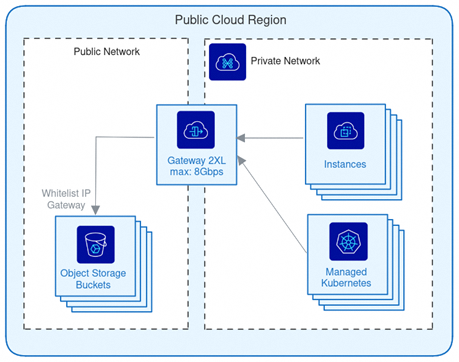
Creating a vRack Private Network and Public Cloud Gateway
In order to create and configure both a Public Cloud Gateway and a vRack Private Network, please follow the instructions in our documentation: Creating a private network with Gateway. This guide explains how to:
- Select and create the appropriate Gateway both in terms of performance and geo-availability.
- Attach an existing or newly created vRack Private Network to it.
Gateway IPs whitelisting
Once the Gateway has been created and associated to a vRack Private Network, the next step is to whitelist a set of IPs from your Object Storage. To do so, there are multiple ways:
- Using Object Storage Bucket Policies: The feature is not yet implemented but will be available soon.
- Using Object Storage User Policies where you can explicitly whitelist IP ranges that can work with Object Storage resources
User Policies implementation
First as a quick reminder, here is how today user permissions are evaluated:
- if exists, evaluate user policy, else fallback to ACLs
- check for an explicit deny: if there is an explicit deny, then deny permission, else, check for an explicit allow
- check for an explicit allow: if there is an explicit allow, then allow permission
- if there is no explicit deny nor explicit allow, then fallback to ACLs
- fallback to ACLs
This evaluation process will be subject to change with the upcoming implementation of bucket policies.
Due to the current authorization process, OVHcloud Object Storage does not support implicit deny when the user is the bucket owner. As a result, the bucket owner's default FULL_CONTROL ACL takes precedence, allowing access even if no explicit permission is defined in the policy file.
As a consequence, we recommend creating new users (not the bucket owner itself) to set this policy and avoid mismatch or confusion. Last but not least, the policy needs to be associated to each user accessing the resources.
In our scenario, we will allow all operations to specific IPs by whitelisting them with the following policy statement:
To set this new policy to your S3 user, please follow the different steps shared in the Object Storage - Identity and access management guide, and finalise the interconnection between your Object Storage resources and those within your vRack private network.
Go further
If you need training or technical assistance to implement our solutions, contact your sales representative or click on this link to get a quote and ask our Professional Services experts for assisting you on your specific use case of your project.
Join our community of users.


 Object Storage - How to connect Object Storage buckets with other resources in a vRack
 116
116