

Object Storage - Manage an Object Storage bucket with Terraform
5185 Views
 06.03.2026
  Cloud / Object Storage S3
Objective
This tutorial shows you how to use the Object Storage - S31-compatible API with Terraform. Terraform is an open-source tool for orchestrating the provisioning of resources.
Requirements
- Installation of the Terraform CLI
- Access to the OVHcloud API (create your login by consulting this guide)
- A Public Cloud project in your OVHcloud account.
- OVHcloud provides a Terraform provider which is available in the official Terraform registry. You must have installed a version >= 2.0. You can follow this guide How to use Terraform on the OVHcloud Public Cloud.
Getting information about your API tokens
The “OVH provider” must be configured with a set of credentials:
- an
application_key - an
application_secret - a
consumer_key
Why?
Because, behind the scenes, the OVH Terraform provider makes requests to the OVHcloud APIs.
To retrieve this necessary information, please follow the tutorial First steps with the OVHcloud APIs.
Once you've successfully generated your OVHcloud tokens, keep them. You'll need to set them in the next few minutes.
The last piece of information you'll need is the service_name: this is the ID of your Public Cloud project.
How do I get it?
In the Public Cloud section, you can retrieve your service name ID using the Copy to clipboard button.
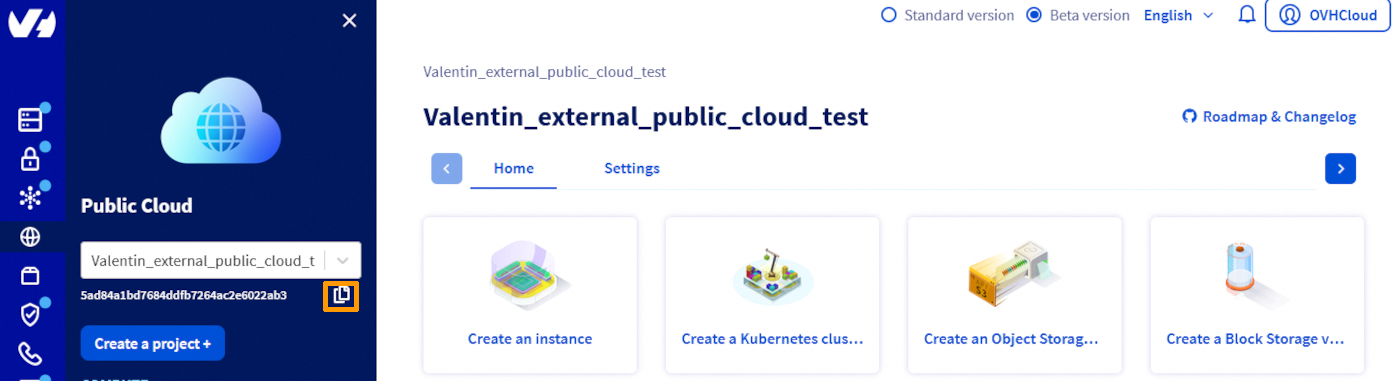
You can also use this information in Terraform resource definition files.
Instructions
If you would like to access the provider's documentation on Object Storage, click here
Configuration
First, create a provider.tf file with the minimum version, the European endpoint (“ovh-eu”) and the keys you obtained in this guide.
Terraform:
Here, we've defined the ovh-eu endpoint because we want to call the OVHcloud Europe API, but other endpoints exist, depending on your needs:
ovh-eufor the OVHcloud Europe APIovh-usfor the OVHcloud US APIovh-cafor the OVHcloud North America API
Create a bucket
You can create a file named object_storage_simple.tf and write the following:
You can create your resource by entering the following command:
Delete a bucket
You can delete your bucket and all the objects it contains by entering the following command:
This process may fail if the bucket contains locked objects. In this case, you'll need to delete these objects manually before you can run the command again.
Go further
If you need training or technical assistance to implement our solutions, contact your sales representative or click on this link to get a quote and ask our Professional Services experts for assisting you on your specific use case of your project.
Join our community of users.
1: S3 is a trademark of Amazon Technologies, Inc. OVHcloud’s service is not sponsored by, endorsed by, or otherwise affiliated with Amazon Technologies, Inc.


 Object Storage - Use Object Storage with Rclone
 2028
2028