

Object Storage – Use Object Storage with Pure Storage Flashblade
346 Views
 08.07.2025
  Cloud / Object Storage S3
Objective
This guide aims to help you configure and use OVHcloud Object Storage as a replication target for Pure Storage Flashblade unified storage platform.
Learn how you can easily configure, manage and start replicating Pure Storage FlashBlade S31-compatible objects to OVHcloud Object Storage.
Requirements
- An OVHcloud Object Storage container/bucket.
- A user with the required access rights on the bucket.
- Your Object Storage credentials (
access_keyandsecret_access_key).
See our Getting started with Object Storage guide.
OVHcloud Control Panel Access
- Direct link: Public Cloud Projects
- Navigation path:
Public Cloud> Select your project
Instructions
Create an S3-compatible Target Connection
1. Sign in to the PureStorage FlashBlade GUI.
2. Go to the Storage section and then Array.
3. Click the + button next to S3 Target Connections to create a Target Connections cloud object storage.
4. Name the connection (for example OVHCLOUD_OBJECT_STORAGE) and add the associated OVHcloud Object Storage endpoints in the Address field.
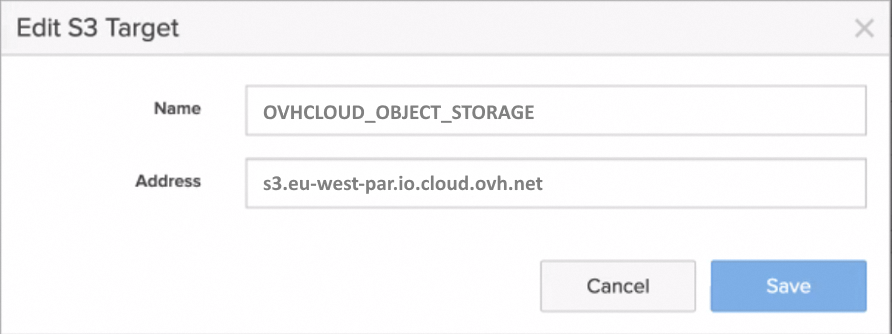
The list of all OVHcloud Object Storage endpoints can be found here.
Add Remote Cloud Object Storage Credentials
5. Go to the Protection section and then click on Object Replica Links.
6. Click the + button to add remote credentials for object replication.
7. Select OVHCLOUD_OBJECT_STORAGE for Remote Array.
8. Add the name of your connection (for example OVHcloud_credentials), and add your Access and Secret keys from the OVHcloud Control Panel.
9. Confirm by clicking on Create and your remote credentials will be created.
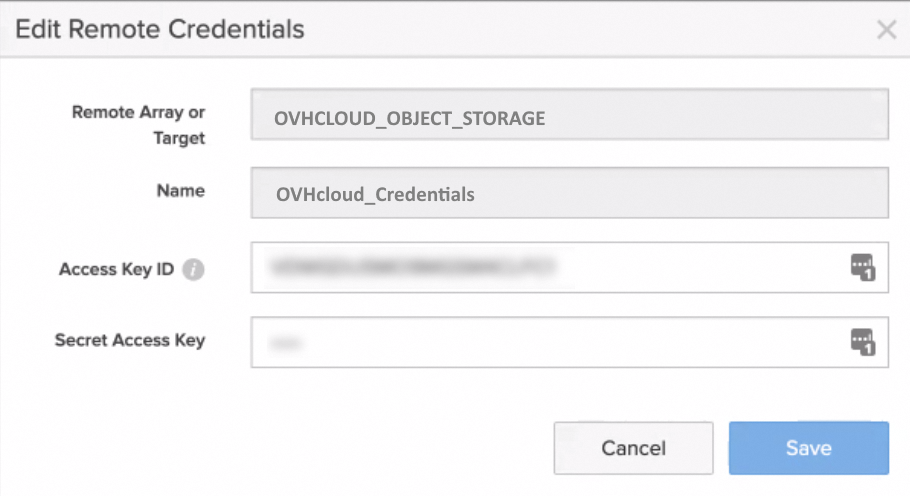
Create a bucket that will be replicated to OVHcloud Object Storage
10. If not already done, go to the Storage section, then Object Storage and finally Accounts to create the account.
11. Configure the different parameters: account name, quota limit and bucket default quota limit to create the account.
12. Click the Buckets section and select the account name.
13. Enter a bucket name OVHcloud-source-2025 and click on Create.
Setup the Bucket Replication to OVHcloud Object Storage
14. Go to Protection > Object Replication and Bucket Replication Link.
15. Click the + button to create a bucket replica link.
16. Select the bucket you just created.
17. Select OVHCLOUD_OBJECT_STORAGE for Remote Array.
18. Add the name of your OVHcloud Object Storage bucket: OVHcloud-dest-2025.
19. Add your remote credentials: OVHcloud_credentials. The bucket replica link will be created.
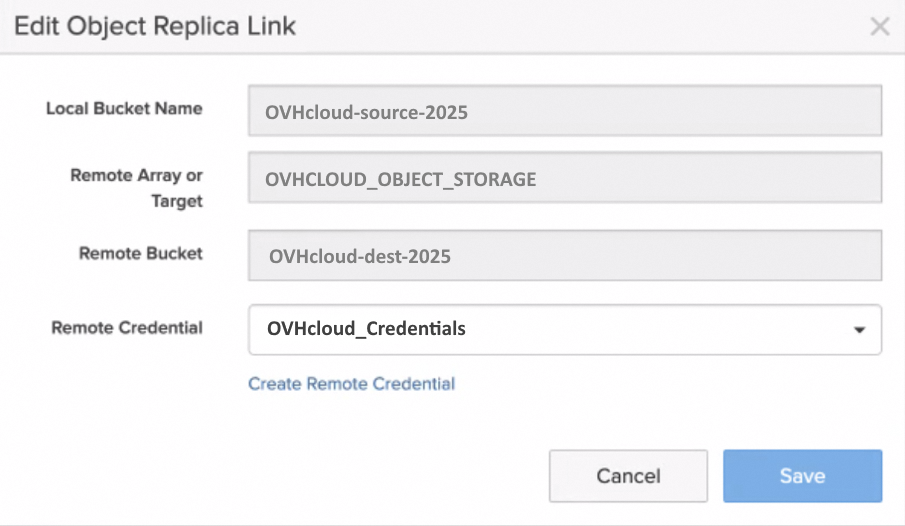
20. You can now test and validate the bucket replication from Pure Storage Flashblade platform to OVHcloud Object Storage.
Go further
Join our community of users.
1: S3 is a trademark of Amazon Technologies, Inc. OVHcloud’s service is not sponsored by, endorsed by, or otherwise affiliated with Amazon Technologies, Inc.


 Object Storage - Use Object Storage with Rclone
 2070
2070