

Cloud Archive Swift - Managing your archives with Rsync
2197 Views
 08.12.2020
  Cloud / Object Storage S3
Objective
OVHcloud Public Cloud Archive is a storage solution that is managed primarily through the OpenStack API. However, we have developed a gateway which makes it possible to connect to your PCA container with Rsync.
This guide provides all the necessary information to enable a connection to your stored data using Rsync.
Requirements
Rsync
Rsync is an open source utility that provides fast incremental file transfer.
Precompiled binaries are available in most modern OS distributions, so you should first check if you can install an Rsync package via your standard package-install tools for your OS.
OpenStack ID
You can generate your OpenStack login and password using this guide.
TenantName
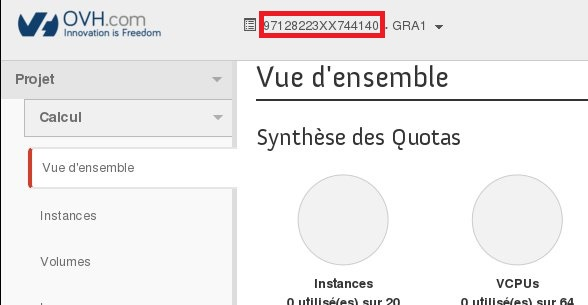
The TenantName corresponds to the name of your Horizon Project. To get the TenantName, you need to connect to the OpenStack web interface: https://horizon.cloud.ovh.net/.
Once logged in, the TenantName is visible at the top of page.
Instructions
Connection details
- Host Name: gateways.storage.{region}.cloud.ovh.net
- User Name: pca
- Password: {TenantName}.{Username_Openstack}.{Password_Openstack}
- Port: 22
Uploading data
Command line example if you have created a PCA container in the GRA region:
Downloading data
OVHcloud Public Cloud Archive provides data storage at low cost, in exchange for higher latency in the retrieval process. To access your archive, an unsealing request must be received with the container and archive names it relates to.
Once your archive has been unsealed, you can download it within 24 hours with unlimited throughput and access frequency. After this retrieval period, the archive will be sealed again.
Additional information: Rsync options
Since Rsync server has been patched to work with Swift API, those options will be enforced on the server side to match Object Storage backend behaviour:
--inplace: Instead of the default method of creating a new copy of the file and moving it into place when it is complete, Rsync instead writes the updated data directly to the destination file.
Additionally, only a subset of options are allowed on the client side:
-a, --archive: Activate archive mode.
-r, --recursive: Copy directories recursively.
-v, --verbose: Increases the amount of information you are given during the transfer.
--del, --delete: Delete extraneous files from the destination directory.
-P, --progress: Print information showing the transfer progress.
Go further
If you need training or technical assistance to implement our solutions, contact your sales representative or click on [this link]((https://www.ovhcloud.com/en/professional-services/) to get a quote and ask our Professional Services experts for assisting you on your specific use case of your project.
Join our community of users.


 Cloud Archive Swift - Managing your archives with Rsync
 786
786