

Resize the storage of Public Cloud Databases
964 Views
 30.12.2024
  Cloud / MANAGED_SERVICES
Objective
Learn how to adjust the storage space of your cluster according to your needs.
This feature is only available for engines that use storage space.
How to increase or decrease storage
You can increase or decrease the storage of your service at any time using either the OVHcloud API or the Control Panel.
When changing the storage space of your service, the system checks that at least 20% of you total storage space will remain free after the resize operation. As a consequence, you might not be able to perform a storage space decrease if the new size you request is too close to your current disk space usage.
How to adjust the storage space using the Control Panel
Requirements
- A Public Cloud project in your OVHcloud account
OVHcloud Control Panel Access
- Direct link: Public Cloud Projects
- Navigation path:
Public Cloud> Select your project
Instructions
Click Databases in the left navigation bar, select your engine instance then click the Configuration tab.
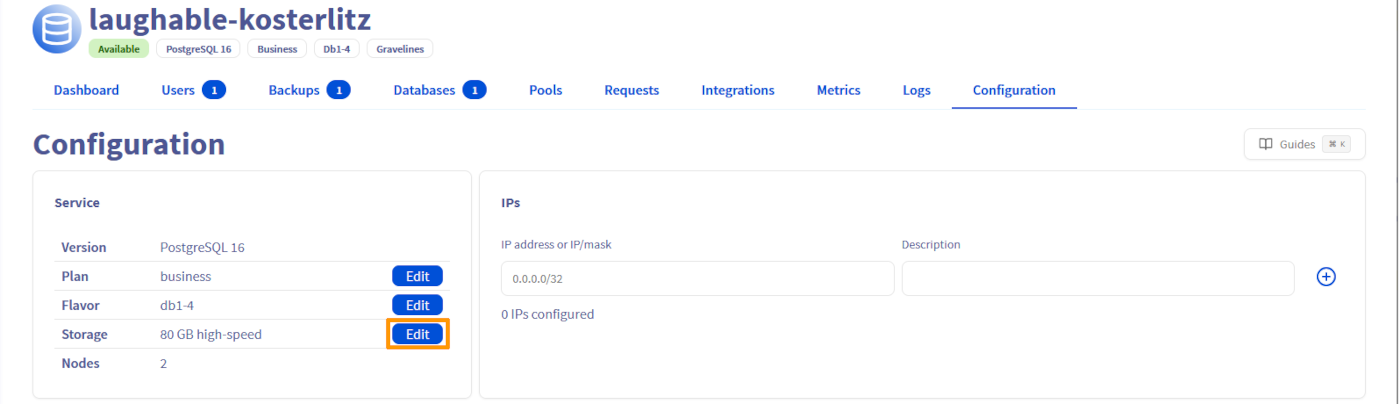
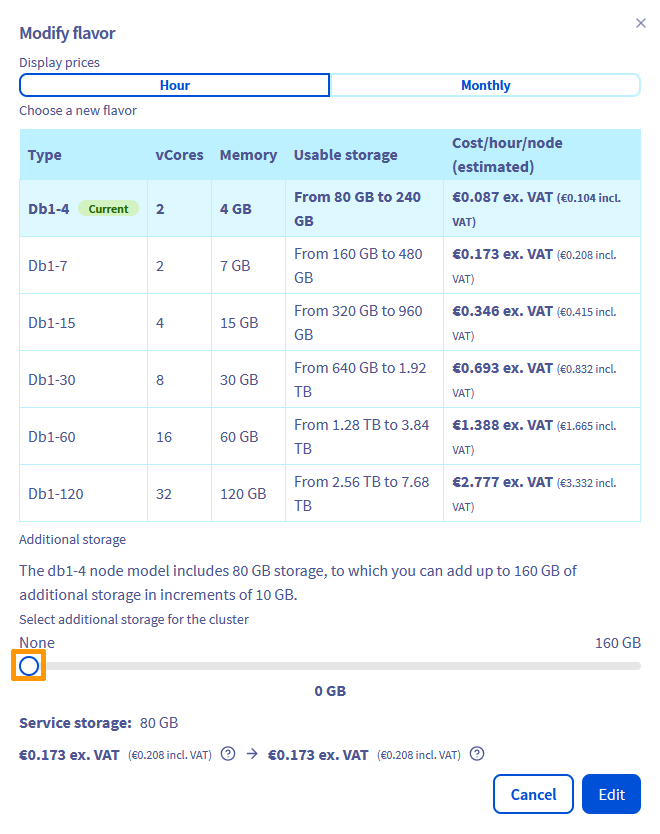
Click Edit on the "Storage" line and adjust the storage space of your cluster. Use the slider to either increase or decrease the storage space.
How to adjust the storage space using the API
Requirements
- Access to the OVHcloud API (create your credentials by consulting this guide)
- A Public Cloud project in your OVHcloud account
Instructions
As an example, for MongoDB services, you can perform a storage space increase or decrease using this endpoint:
Other engines using a storage space provide similar endpoints, e.g.:
We want your feedback!
We would love to help answer questions and appreciate any feedback you may have.
If you need training or technical assistance to implement our solutions, contact your sales representative or click on this link to get a quote and ask our Professional Services experts for a custom analysis of your project.
Are you on Discord? Connect to our channel at https://discord.gg/ovhcloud and interact directly with the team that builds our databases service!


 Configure the advanced parameters for Public Cloud Databases
 779
779