

Public Cloud Instances - Switching from hourly to monthly billing
3950 Ansichten
 05.09.2025
  Cloud / Instances
Objective
When you create a Public Cloud instance, you can choose to be billed at either an hourly or monthly rate (except for third-generation Public Cloud instances, which are billed on an hourly basis by default and do not offer the monthly option when you create the instance). Hourly-rate instances are billed on a pay-as-you-go basis, i.e. at the end of each month, users are billed for every commenced hour per actual resources used.
Monthly-rate instances are up to 50% less expensive compared to an hourly rate for the same duration. Each month commenced will be billed at the end of the month.
If you initially selected hourly billing, you can switch to monthly billing at any time.
This guide explains how to switch from hourly to monthly billing.
You cannot switch from monthly to hourly billing. If you would like to be billed at the hourly rate, you will need to delete your monthly-rate billing instance, create a new one, and select hourly billing. In this case we suggest that you do the following procedure:
-
Create a snapshot of your current instance.
-
Create a new instance based on this snapshot.
-
Delete the monthly instance.
Requirements
- A Public Cloud instance in your OVHcloud account
OVHcloud Control Panel Access
- Direct link: Public Cloud Projects
- Navigation path:
Public Cloud> Select your project
Instructions
From the OVHcloud Control Panel
The following procedure does not work for third-generation instances (example: B3-32). To be billed monthly for this type of instance, you must create a Savings Plan for this instance model.
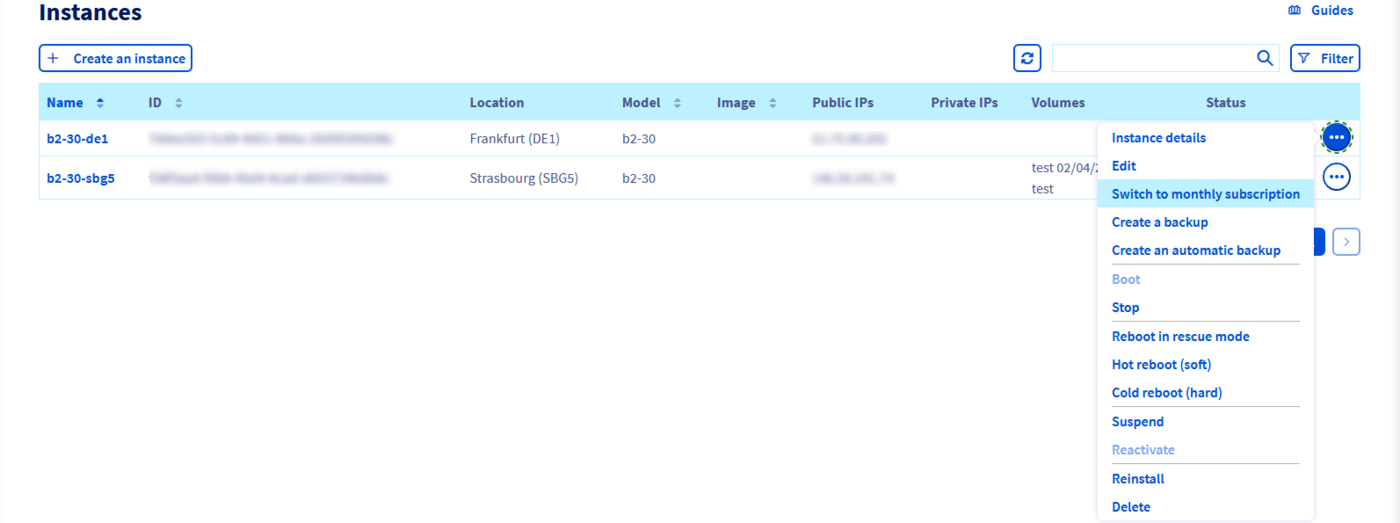
Choose the instance you would like to change the billing rate for, and open its options menu by clicking on the 3 dots on the right of the Instance. You will then be able to see the Switch to monthly subscription button:
You will then need to confirm that you want to change the billing rate:
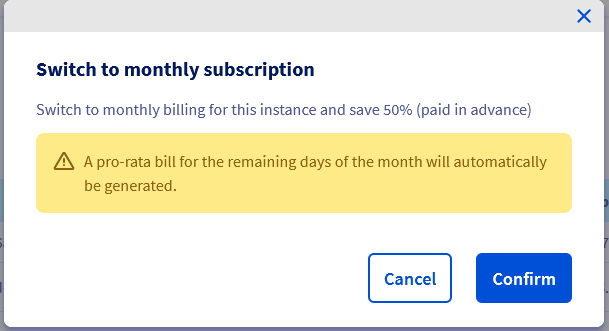
Once you have confirmed your choice, you will immediately receive a monthly prorated bill. The next bill will include the hourly-rate part of the month (1st of the month until the change) and the new monthly fee.
From the Openstack API
When creating an instance using the Openstack API, unless specified in the creation script, the instance is automatically created with an hourly subscription. To switch to a monthly subscription, execute the following command:
Replace "InstanceID" with the ID of the corresponding instance. This ID can be retrieved via the OVHcloud control panel or the OVHcloud API.
From the OVHcloud API
Log in to the OVHcloud API interface according to the relevant guide and follow the steps below.
Use the following call:
From a Terraform script
This is possible thanks to the metadata attribute from the resource openstack_compute_instance_v2:
Go further
Join our community of users.


 Cloud Guthaben aufladen
 715
715