

Load balancing methods
66 Views
 24.10.2025
  Cloud / OVHcloud Load Balancer
Objective
The OVHcloud Load Balancer service supports a variety of load balancing algorithms for your services. This setting dictates how the Load Balancer distributes incoming client requests among the servers in a farm.
This guide introduces the various load balancing methods and explains how to modify them.
Requirements
- An OVHcloud Load Balancer service in your OVHcloud account.
- You need to have created a server farm.
OVHcloud Control Panel Access
- Direct link: Load Balancer
- Navigation path:
Network>Load Balancer> Select your service
Instructions
Available Load Balancing Algorithms
The load balancing setting is applied at the server farm level and defines the method by which client requests are distributed among the servers within that farm.
For an overview of the OVHcloud Load Balancer service components, please refer to the Load Balancer Introduction guide.
| Algorithm | Features |
|---|---|
| First | Directs the connection to the first available server based on its ID (smallest to largest). |
| LeastConn | Selects the server with the lowest number of active connections. This is recommended for long-duration sessions with light traffic. The RoundRobin algorithm is used for tie-breaking among equally loaded servers. |
| RoundRobin | Distributes connections sequentially, one after the other, for each new request. This is the default algorithm. |
| Source | Uses a hash of the source IP address to consistently redirect the same client IP to the same server, provided the server remains operational. |
| URI | Uses a hash of part or all of the URI path to consistently redirect identical URIs to the same server, provided the server remains operational. (Applicable to HTTP/HTTPS farms only.) |
Modify a server farm’s load balancing method via the OVHcloud Control Panel
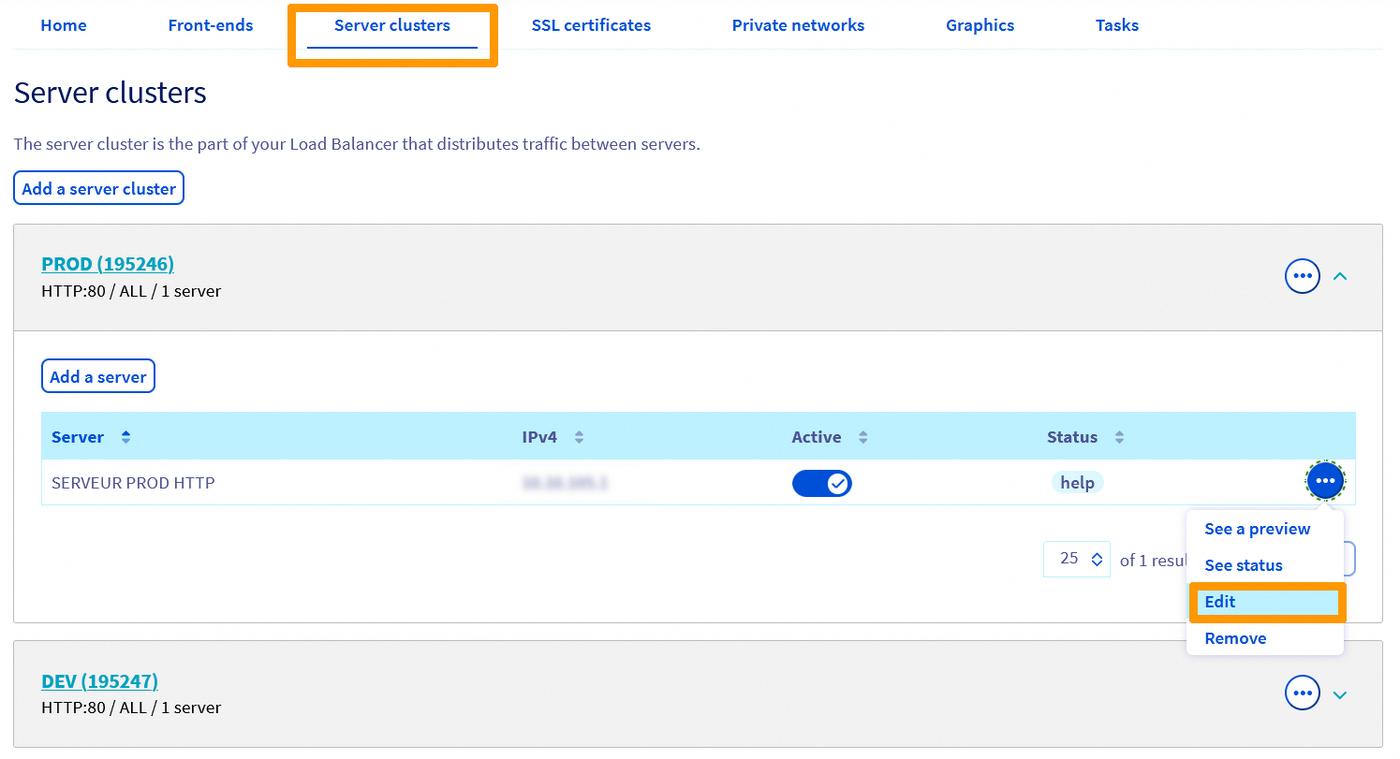
- In the
Server farmssection (1), locate the desired farm. You can edit it by clicking the three dots on the right-hand side (2), then onChange.
In Advanced settings, modify the Load balancing method.
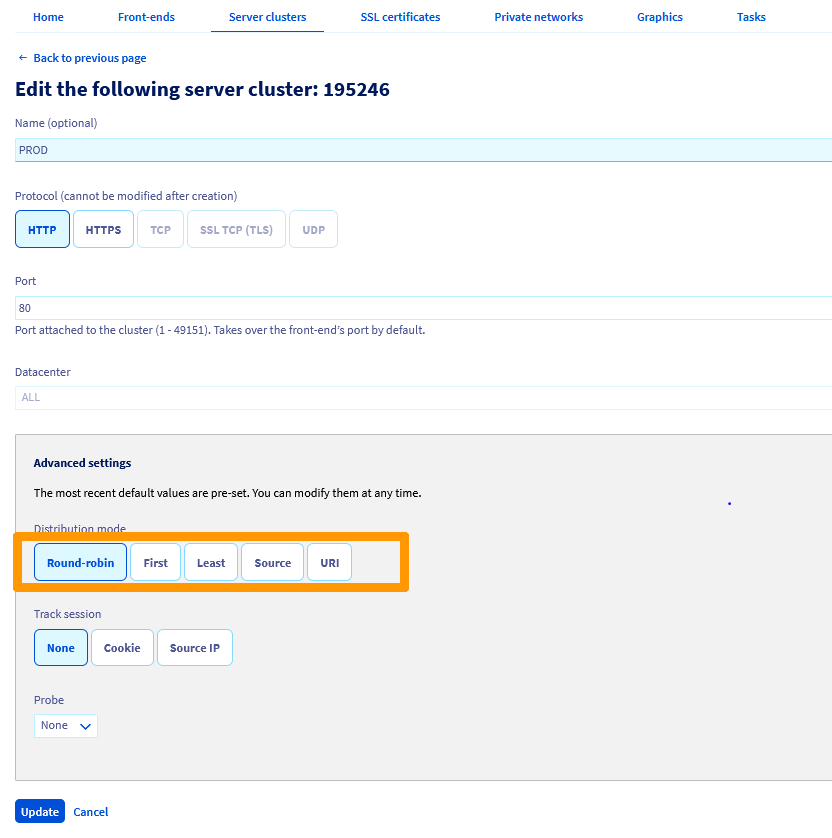
Once your preferred method is selected, click Update, then click Apply configuration in the yellow banner that appears.

Modify a server farm’s load balancing method via the OVHcloud API
The load balancing method is changed by updating the corresponding field within the server farm configuration.
View details on a server farm
Use this api call to view the details of a server farm given its ID. In this example, we work with an HTTP farm:
| Setting | Meaning |
|---|---|
| serviceName* | Your Load Balancer service ID |
| farmId* | The farm’s ID number |
| Response (BackendHttp) | Meaning |
|---|---|
| farmId | The farm’s ID number |
| balance | The load balancing algorithm currently set for the farm |
| zone | Name of the zone in which the farm is configured |
| port | Port used to contact the servers configured on the farm |
| probe | Type of probe currently configured on the farm |
| displayName | Name given to this farm |
| stickiness | Connection monitoring method currently set for the farm |
Modify a server farm’s load balancing method
Use this api call to edit the settings of a server farm given its ID. In this example, we work with an HTTP farm. To modify the balancing method, update the BackendHttp.balance field with an available algorithm:
| Setting | Meaning |
|---|---|
| serviceName* | Your Load Balancer service ID |
| farmId* | The farm’s ID number |
| BackendHttp.balance | Preferred balancing method for this farm |
Apply the modifications
| Setting | Meaning |
|---|---|
| serviceName* | Your Load Balancer service ID |
| zone* | Name of the zone in which to deploy the configuration |
Go further
Join our community of users.


 Load Balancer API Quick Reference
 73
73