

Web hosting - How to know your cluster and filer
104 Views
 12.08.2025
  Web / Web Hosting
Objective
Web Hosting plans run on a shared infrastructure called a cluster. OVHcloud has several clusters that host several web hosting plans.
Each cluster, for efficiency and security reasons, is also divided virtually into several segments called filers. The filers themselves contain several web hosting plans.
When using your web hosting plan, you may need to know the cluster and filer your web hosting plan is located on.
Find out how to find the cluster and filer numbers of your web hosting.
Requirements
OVHcloud Control Panel Access
- Direct link: Hosting plans
- Navigation path:
Web Cloud>Hosting plans> Select your web hosting plan
Instructions
Click on the tabs below to view each of the 2 steps.
Go to the Hosting plans page, then select the web hosting plan concerned.
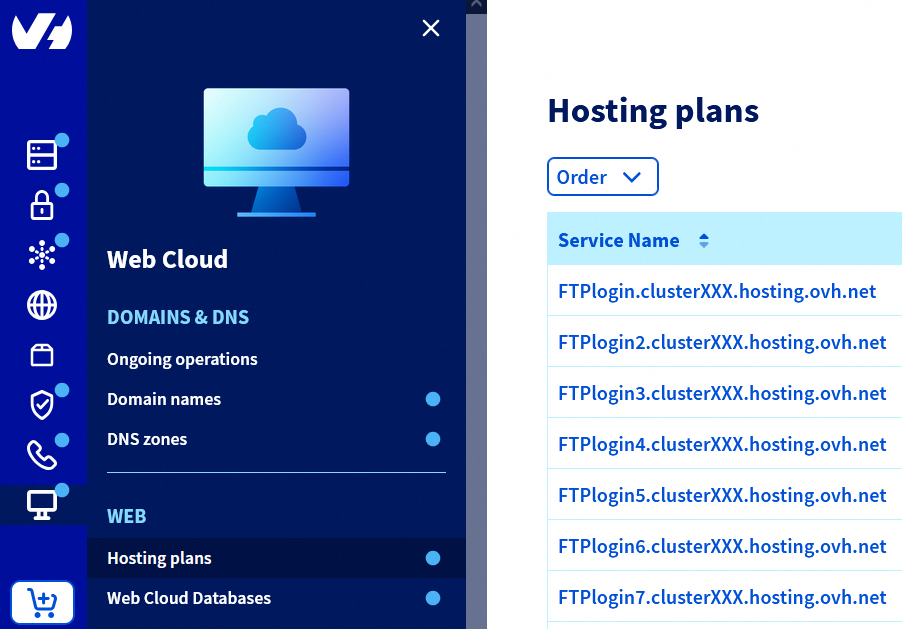
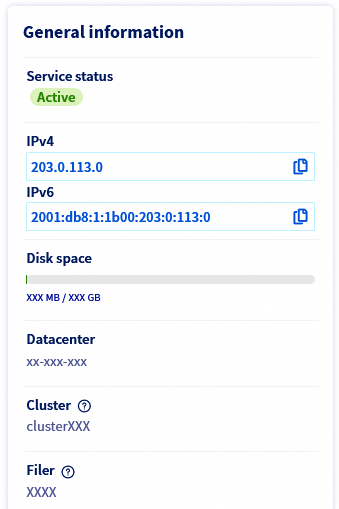
In the General information box on the page that appears, retrieve the cluster number under the mention Cluster (3 digits between 0 and 9) and the filer number under the mention Filer.
Go further
Web Hosting - List of IP addresses by cluster
For specialised services (SEO, development, etc.), contact OVHcloud partners.
If you would like assistance using and configuring your OVHcloud solutions, please refer to our support offers.
Join our community of users.


 How to get started with your web hosting plan
 6215
6215