

Everything you need to know about SMS users
1188 Views
 05.08.2022
  Telecom / SMS / Time2Chat
Objective
This guide will explain how to create and manage API users.
Requirements
- an active OVHcloud SMS account
OVHcloud Control Panel Access
- Direct link: SMS
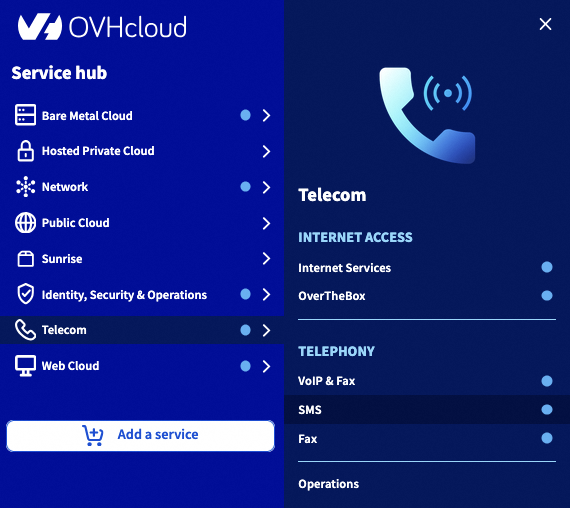
- Navigation path:
Telecom>SMS> Select your SMS account
Instructions
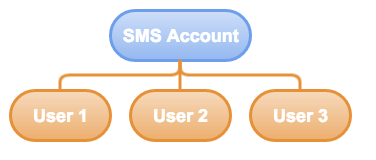
An SMS API user can be useful for a number of reasons:
-
It enables the holder of the SMS account to secure their access, when sending SMS messages via an external API. The calling script only recognises the user’s ID and password, not the session of the account holder’s ID.
-
Creating several API users may be useful in a company, especially for improved traceability. An API user who sends SMS messages in an abusive manner can then be detected by the account holder.
-
An API user can also be subject to restrictions (quotas) for SMS credits. This way, the SMS account holder can divide their credits between different API user accounts.
To better manage credit for your SMS accounts, you can set a limit and quota for your API users.
-
The quota is the number of available SMS credits for each API user.
-
The limit corresponds to the minimum threshold of SMS credits that an API user must have before receiving an alert to recharge or not the balance of these credits.
Step 1: Create an API user
Click on the API users tab. To add a user, click Actions, then Add.
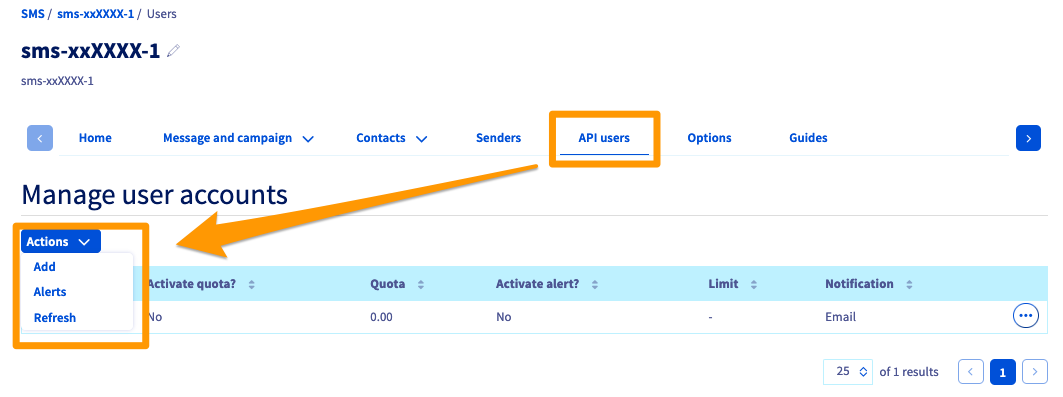
You can enter a name for the API user. The password for an API user must contain 8 alpha-numeric characters.
Step 2: Set a quota for an API user
You can manage quotas in the API users tab. Click ... next to the user concerned, then Quota.
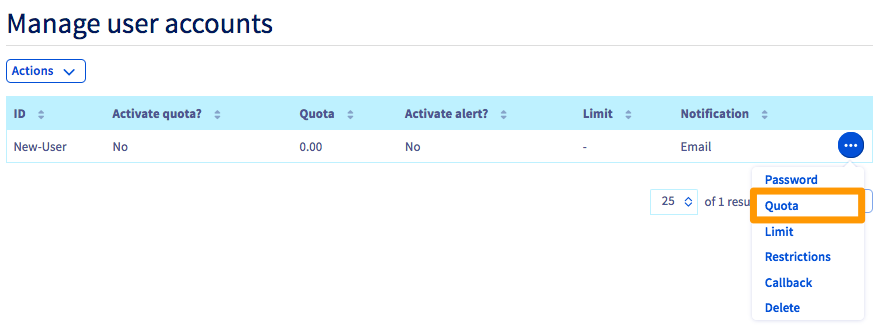
You can then perform two actions.
- Enable quota? Use this to define whether this user has a quota.
- New quota. Defines the user quota. Once this quota is reached, the user will be blocked from sending SMS messages.
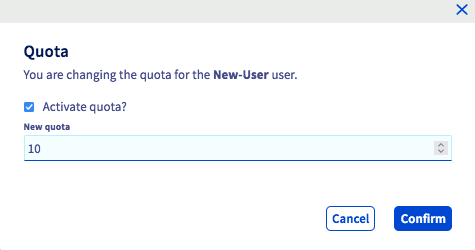
Assigning a quota to an API user will reduce the total credit of an SMS account by an equal amount.
As an example: an SMS account has a total of 200 credits. Assigning 150 credits to an API user will deduct 150 credits from the SMS account. It will then have 50 credits.
Step 3: Set a limit for an API user
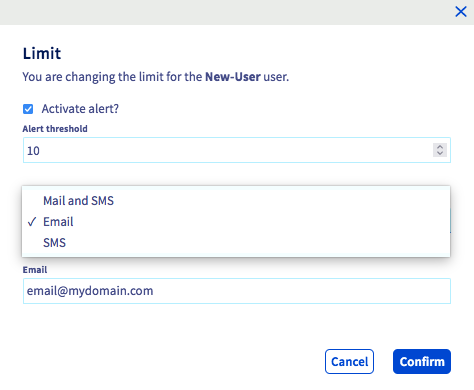
To configure a limit for a user, stay in the same menu, click ..., then Limit.
The following settings are now available:
- Enable alert? For enabling the limit alert.
- Alert threshold. Defines the level of remaining SMS credits that will trigger the notification.
- Notification. For choosing the notification type. Options include: email (enter your email address), SMS (enter your number in international format), or both.
When a notification is sent via SMS, it is deducted from your SMS credit.
Step 4: Define a restriction by IP for the http2sms feature
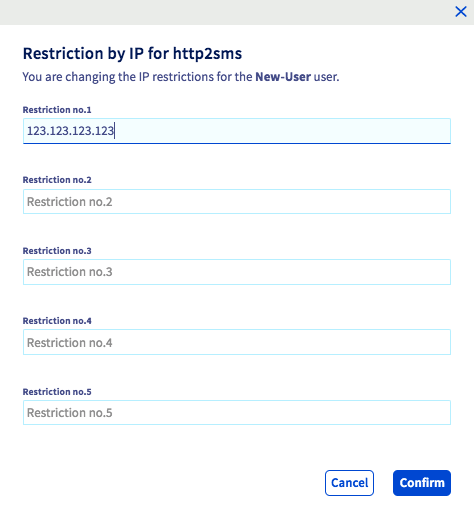
You can secure the http2sms feature by applying IP restrictions for each API user.
To enable it, click ... to the right of the user, then Restrictions.
You can enter up to 5 different IP addresses for sending HTTPS requests.
For further details on the http2sms feature, please refer to our guide on Sending SMS messages via a URL.
Step 5: Specify a callback URL
To set up custom tracking for SMS delivery (Delivery reporting or DLR), you can specify a callback URL by clicking ... to the right of a user, then Callback.
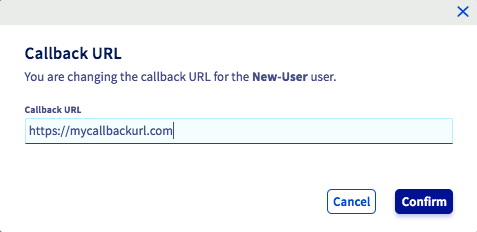
When the send status of an SMS message is updated, we call the specified URL. The following values are automatically inserted into the query string:
- id: The SMS identification number.
- ptt: A code that corresponds to the SMS status. The various ptt codes are explained in the table below.
- date: The DLR date.
- description: The DLR ID. The various ptt codes are explained in the table below.
- descriptionDlr: The DLR status description.
The ptt codes
To get a description of a specific ptt code, you can use the following API:
For more information on using OVHcloud APIs, please refer to our guide Getting started with OVHcloud APIs.
The table below provides a non-exhaustive list of the main ptt codes.
| Code | Description |
|---|---|
| 1 | An intermediary status indicating that the message is being retried due to a phone-related issue. |
| 2 | Used to indicate that the message has not yet been delivered due to an operator-related problem, but delivery is being re-tried within the network. |
| 3 | Used to indicate that the message has been accepted by the operator. |
| 4 | The message has been delivered. |
| 5 | The message has been confirmed as undelivered, but no detailed information related to the failure is known. |
| 6 | Cannot determine whether this message has been delivered or has failed, due to a lack of final delivery status information from the operator. |
| 8 | Used when a message has expired (could not be delivered within the life time of the message) within the operator’s SMSC, but is not associated with a reason for failure. |
| 20 | Used when a message in its current form is undeliverable. |
| 21 | Only used when the operator accepts the message before checking the subscriber’s credit. If the subscriber does not have enough credit, the operator will re-try sending the message until they have topped up their credit, or until the message expires. If the message expires and the latest reason for the failure is credit-related, this error code will be used. |
| 23 | Used when the message is undeliverable due to an incorrect/invalid/blacklisted/permanently barred MSISDN for this operator. This MSISDN should not be used again for message submissions to this operator). |
| 24 | Used when a message is undeliverable because the subscriber is temporarily absent, e.g. their phone is switched off, or they cannot be located on the network. |
| 25 | Used when the message has failed due to a temporary condition in the operator network. This could be related to the SS7 layer, SMSC or gateway. |
| 26 | Used when a message has failed due to a temporary phone-related error, e.g. SIM card full, SME busy, memory exceeded etc. This does not mean the phone is unable to receive this type of message/content (refer to error code 27). |
| 27 | Used when a handset is permanently incompatible or unable to receive this type of message. |
| 28 | Used if a message fails or is rejected due to suspicion of SPAM on the operator network. In some geographies, this could indicate that the operator has no record of the mandatory MO required for an MT. |
| 29 | Used when this specific content is not permitted on the network/shortcode. |
| 33 | Used when the subscriber cannot receive adult content because of a parental lock. |
| 39 | New operator failure. |
| 73 | The message failed due to the ported combinations being unreachable. |
| 74 | The message failed due to the MSISDN being roaming. |
| 76 | The message failed due to the ported combinations being blocked for the client (the client has been blacklisted from the ported destination). |
| 202 | The message failed due to the ported combinations being blocked for the client. Please contact Customer Support for additional information). |
The DLR IDs
| Status | Description |
|---|---|
| 0 | Creating or pending |
| 1 | Success |
| 2 | Failed |
| 4 | Pending |
| 8 | Buffered |
| 16 | Error/not billed |
Go further
Join our community of users.


 Manage your SMS history
 811
811