

Everything you need to know about SMS senders
41 Views
 28.10.2025
  Telecom / SMS / Time2Chat
Objective
This guide explains how to create and use senders for sending your SMS messages.
Requirements
OVHcloud Control Panel Access
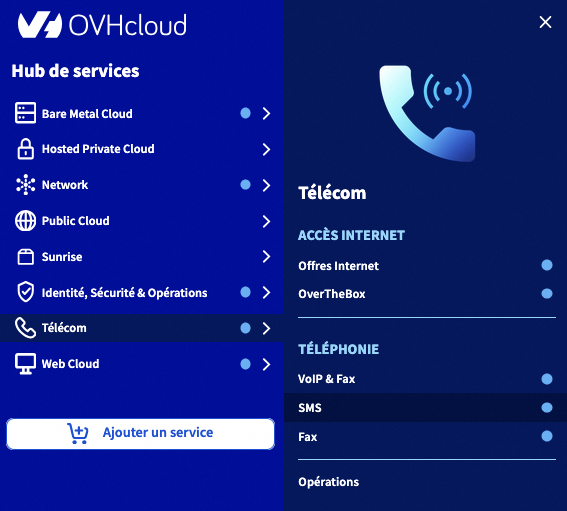
- Direct link: SMS
- Navigation path:
Telecom>SMS> Select your SMS account
Instructions
Available sender types
OVHcloud allows you to choose a sender type to send your SMS messages.
The "Short number allowing replies" sender is available by default on our SMS solutions. However, you can also use an alphanumeric sender or a virtual mobile number.
Short number allowing replies
Only for OVHcloud accounts in France excluding French overseas departments and territories.
It allows you to receive a reply via the "Received SMS" tab.
Sending SMS containing a URL
It is not possible to send an SMS containing a URL via a short number allowing replies. Any such message will be blocked.
If you need to send SMS messages containing URLs, you must use an alphanumeric sender.
Alphanumeric sender
You can customise your sender. However, you will no longer be able to receive a reply from the recipient of your SMS. To access the management of SMS senders, select the Senders tab (1) when you are on the relevant SMS account.
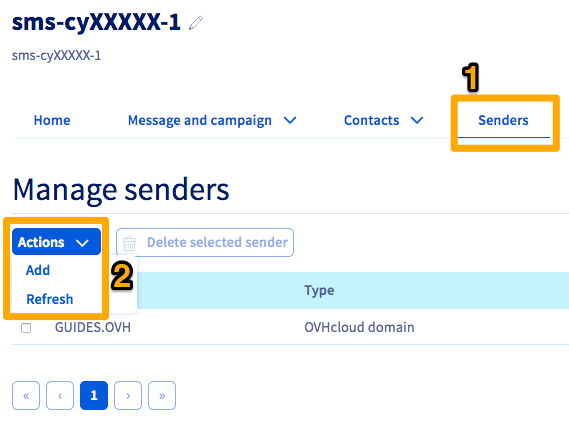
If you want to add an additional SMS sender, click on the Actions button in the centre, then on Add (2).
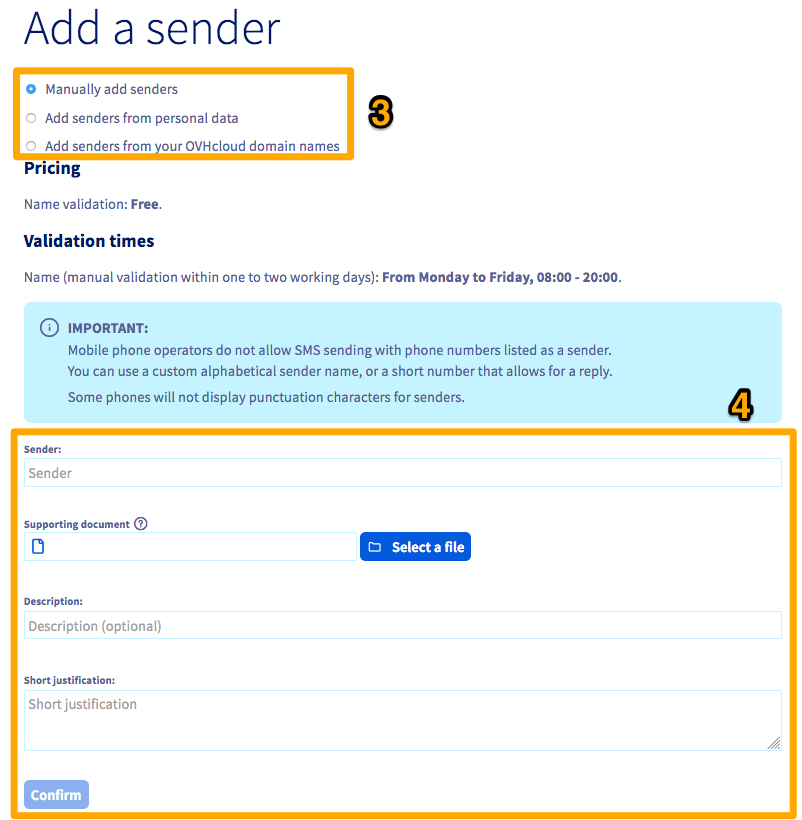
On the addition page, you have several options to configure a new SMS sender (3):
- Add senders manually: You must enter the desired sender, a description, and a justification for using this sender (4). A supporting document is also required.
Example: if you want to send your SMS with the name of your company as the sender, a company document will be requested.
The validation of an alphanumeric sender is usually processed within 72 hours after its creation.
We ask for a supporting document as part of our security policy. By default, this is a letterhead from the company or brand, including authorisation from a responsible person with a signature and company stamp, an identity document, or a Kbis extract if it is not a registered brand.
-
Add senders from personal data: You can request a sender based on the contact details of your OVHcloud account. A drop-down list of available senders will then appear.
-
Add senders from your OVHcloud domain names: You can use a domain name available in your OVHcloud account as a sender. A drop-down list of available senders will then appear.
Virtual mobile number
Only for OVHcloud accounts in France.
If you have an SMS offer with a virtual mobile number, you can use this number as a sender. For more information, see our page on virtual mobile numbers.
If you already have an SMS account, it is not possible to create a virtual mobile number for an existing account. You will need to order a new SMS account via the virtual mobile number offer page.
Go further
Join our community of users.


 Everything you need to know about SMS users
 1194
1194