

Cloud Archive Swift - Unfreezing your data stored in the Public Cloud Archive
447 Views
 12.04.2022
  Cloud / Object Storage S3
Objective
Public Cloud Archive is a cold storage solution designed to host large volumes of data, with no size limit and very attractive pricing.
Since cold storage data is supposed to be rarely accessed, a retrieval request is required, implying a delay prior to recovering the data. This time period varies depending on the age of data and the frequency of data access.
Requirements
- Unfreezing via python-swiftclient:
- Preparing an environment for using the OpenStack API by installing python-swiftclient
- Setting OpenStack environment variables
OVHcloud Control Panel Access
- Direct link: Public Cloud Projects
- Navigation path:
Public Cloud> Select your project
Instructions
Unfreezing your object from the Control Panel
Click on Cloud Archive in the left-hand menu.
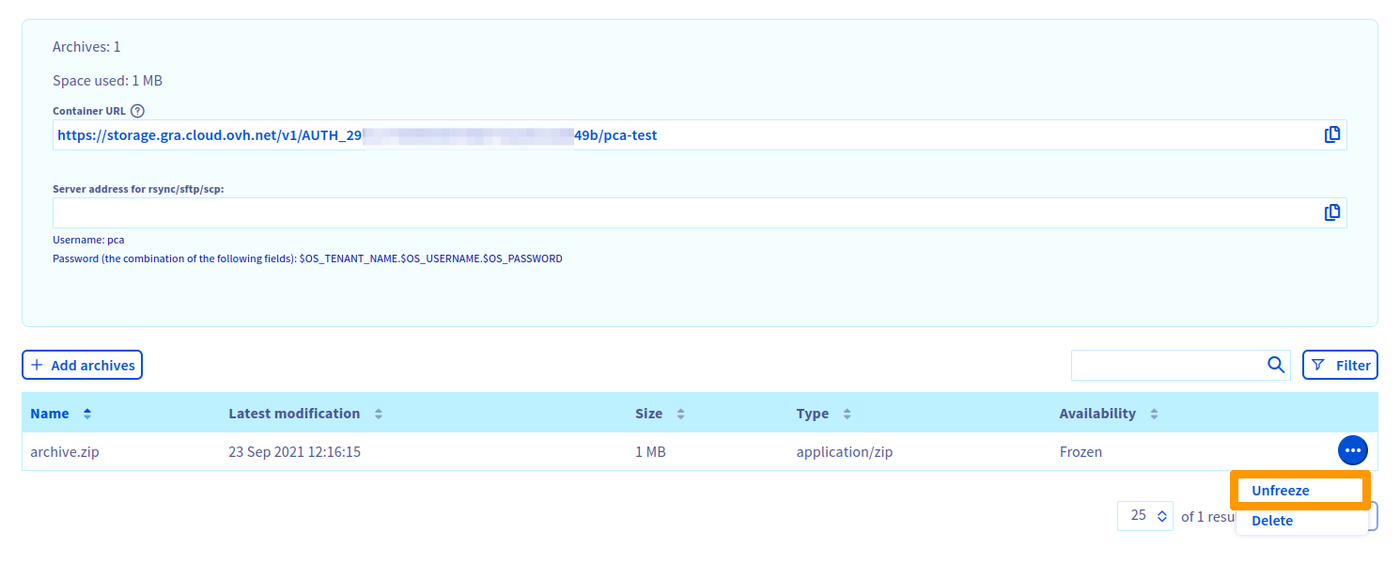
To unfreeze the archive, click on the button ... to the right of your archive, then Unfreeze to start the retrieval process.
Once the process has started, the date and time your archive will be available is displayed in the Availability column.
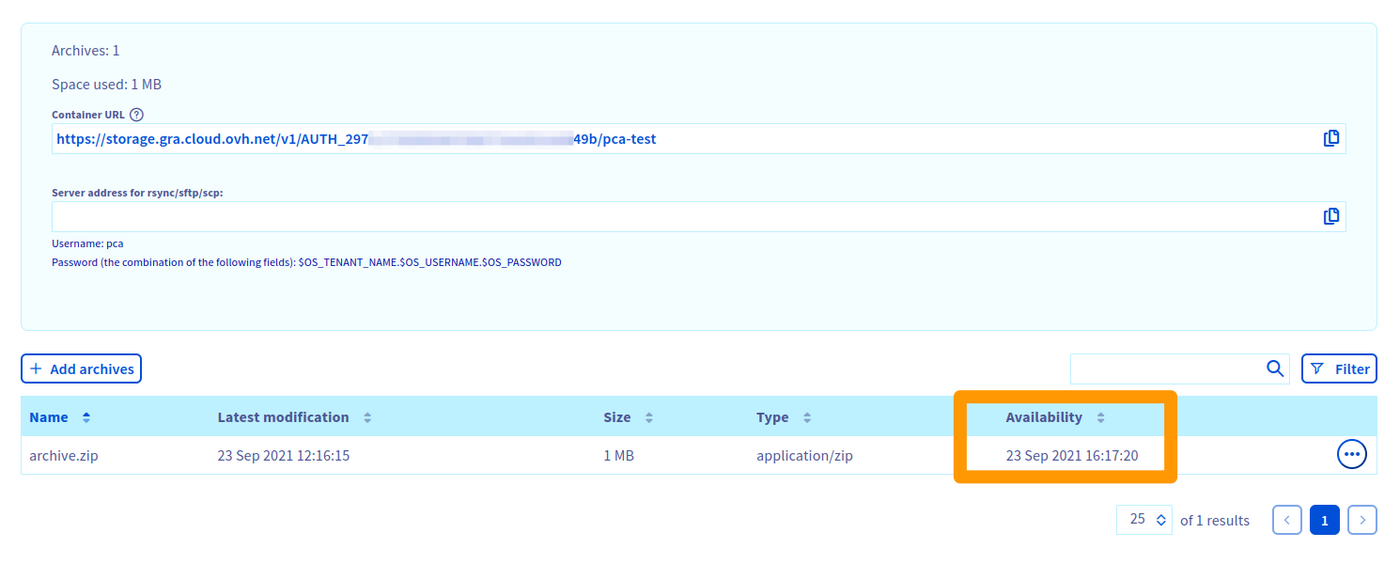
Your file will be ready for download after this time period. You can then start the download directly in your browser or via a Swift/SFTP/SCP client.
Unfreezing your object via python-swiftclient
Check the status of the object to download:
               Account: AUTH_702xxxxxxxxxxxxxxxxxxxxxxxxxxdaf
             Container: <pca_container>
                Object: <object>
          Content Type: text/plain
        Content Length: 746
         Last Modified: Tue, 10 Aug 2021 08:39:41 GMT
                  ETag: 51f122f524c46cafcf9628305db99144
            Meta Mtime: 1627974571.298786
         Accept-Ranges: bytes
 X-Ovh-Retrieval-State: sealed
           X-Timestamp: 1628584780.95458
            X-Trans-Id: txbb0eff9ebf9442eab0d02-0061123b5a
X-Openstack-Request-Id: txbb0eff9ebf9442eab0d02-0061123b5a
     X-Iplb-Request-Id: 6DBEFE1E:942A_3626E64B:01BB_61123B59_649EACF:8F28
       X-Iplb-Instance: 12308
The following line indicates that the object is frozen:
X-Ovh-Retrieval-State: sealedTherefore, the swift download command will return a 429 error:
Error downloading object '<pca_container>/<object>': Object GET failed: https://storage.gra.cloud.ovh.net/v1/AUTH_702xxxxxxxxxxxxxxxxxxxxxxxxxxdaf/<pca_container>/<object> 429 Too Many RequestsRelaunching the swift stat command:
               Account: AUTH_702xxxxxxxxxxxxxxxxxxxxxxxxxxdaf
             Container: <pca_container>
                Object: <object>
          Content Type: text/plain
        Content Length: 746
         Last Modified: Tue, 10 Aug 2021 08:39:41 GMT
                  ETag: 51f122f524c46cafcf9628305db99144
            Meta Mtime: 1627974571.298786
         Accept-Ranges: bytes
 X-Ovh-Retrieval-State: unsealing
           X-Timestamp: 1628584780.95458
 X-Ovh-Retrieval-Delay: 14313
            X-Trans-Id: tx9012d12434a447bd81528-0061123c54
X-Openstack-Request-Id: tx9012d12434a447bd81528-0061123c54
     X-Iplb-Request-Id: 6DBEFE1E:94D0_3626E64B:01BB_61123C54_6823B54:10ABF
       X-Iplb-Instance: 12309
The following line indicates that the object is being unfrozen:
X-Ovh-Retrieval-State: unsealingThe next line indicates the time period (in seconds) to wait before retrieving the object:
Once the time period has elapsed:
               Account: AUTH_702xxxxxxxxxxxxxxxxxxxxxxxxxxdaf
             Container: <pca_container>
                Object: <object>
          Content Type: text/plain
        Content Length: 746
         Last Modified: Tue, 10 Aug 2021 08:39:41 GMT
                  ETag: 51f122f524c46cafcf9628305db99144
            Meta Mtime: 1627974571.298786
         Accept-Ranges: bytes
 X-Ovh-Retrieval-State: unsealed
           X-Timestamp: 1628584780.95458
            X-Trans-Id: txaf1eac9ceb8a45efb36e1-0061127482
X-Openstack-Request-Id: txaf1eac9ceb8a45efb36e1-0061127482
     X-Iplb-Request-Id: 6DBEFE1E:ACCC_3626E64B:01BB_61127482_E75B0:1B979
       X-Iplb-Instance: 38343
The following line indicates that the object is now unfrozen:
X-Ovh-Retrieval-State: unsealedTo download the object:
Automating the object download
This feature requires the at package.
Error downloading object '<pca_container>/<object>': Object GET failed: https://storage.gra.cloud.ovh.net/v1/AUTH_702xxxxxxxxxxxxxxxxxxxxxxxxxxdaf/<pca_container>/<object> 429 Too Many RequestsGo further
If you need training or technical assistance to implement our solutions, contact your sales representative or click on this link to get a quote and ask our Professional Services experts for assisting you on your specific use case of your project.
Join our community of users.


 Cloud Archive Swift - Manage your archives with an SFTP/SCP client
 641
641