

Cloud Archive Swift - Managing your archives with a Swift client (Cyberduck)
353 Views
 18.06.2021
  Cloud / Object Storage S3
Objective
Object Storage is a storage solution that is managed primarily through the OpenStack API. However, you might not be familiar with managing storage space via command line.
There are graphical interface solutions that seamlessly make use of the OpenStack APIs. Cyberduck is a Swift client.
Other interfaces can be found on the Internet and configuration is similar to the configuration explained in this guide.
This guide will explain how to configure Cyberduck to manage your Object Storage using a GUI based on Openstack APIs.
OVHcloud provides services which you are responsible for with regard to their configuration and management. You are therefore responsible for ensuring they function correctly.
This guide is designed to assist you in common tasks as much as possible. If you encounter any difficulties performing these actions, please contact a specialist service provider and/or discuss the issue with our community on https://community.ovh.com/en/. OVHcloud cannot provide you with technical support in this regard.
Requirements
- Cyberduck installed on your computer.
- your username (OS_USERNAME) and project credentials (OS_PROJECT_NAME or OS_TENANT_NAME). Retrieve them by downloading the OpenRC file from the Users and Roles menu in the OVHcloud Control Panel.
- your OpenStack user password.
In case you have forgotten your OpenStack user password, you can change it by following this guide.
Instructions
This guide's last update is based upon version 7.9.2 of Cyberduck for MacOS.
Depending on the source of your OpenRC file download (from Horizon or from your OVHcloud Control Panel), your project ID may be named OS_PROJECT_NAME or OS_TENANT_NAME.
In Cyberduck, open an OpenStack Swift (Keystone 3) connection.
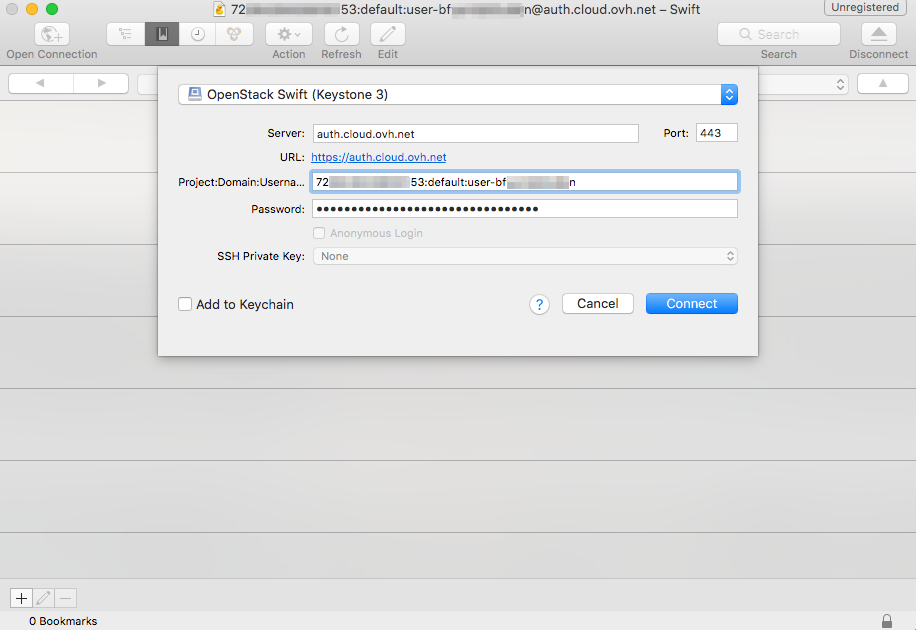
Enter the following information:
- Server: auth.cloud.ovh.net
- Project:Domain:Username: OS_PROJECT_NAME:default:OS_USERNAME
- Password: your OpenStack user password
Then click Connect. Once you're logged in, you will have access to the tree-view of your folders and files.
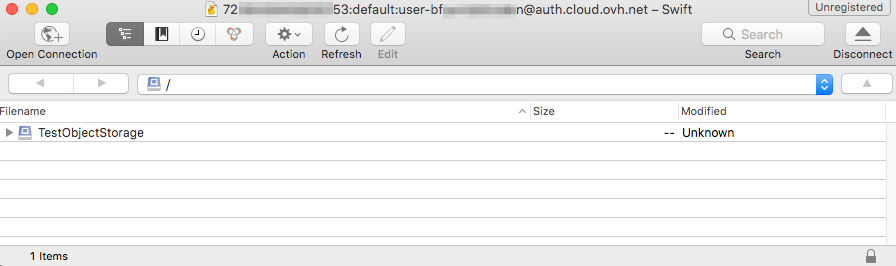
In case of connection difficulties, you can download the Cyberduck connection profile for OpenStack Swift (Keystone 3) and open it with Cyberduck.
Right-click here and click "Save Link Target As" to download the profile.
Go further
Getting started with the Swift API
If you need training or technical assistance to implement our solutions, contact your sales representative or click on this link to get a quote and ask our Professional Services experts for assisting you on your specific use case of your project.
Join our community of users.


 Cloud Archive Swift - Managing your archives with Rsync
 793
793