

Enterprise File Storage - Concepts
1629 Views
 24.09.2024
  Cloud / Enterprise File Storage
Objective
With Enterprise File Storage, you get NFS storage volumes that are fully managed by OVHcloud. In this quick start guide, you can learn about the concepts behind your Enterprise File Storage service, and its limitations.
Learn how Enterprise File Storage works
Instructions
What is Enterprise File Storage?
Enterprise File Storage is a file system solution managed by OVHcloud, based on the NetApp® ONTAP solution.
You can order one or more storage spaces between 1 TB and 58 TB with your OVHcloud customer account, with a granularity of 1 TB.
How the services work
When you order an Enterprise File Storage service between 1 and 58 TB via your OVHcloud account, you will receive an NFS storage space.
By default, the OVHcloud account is the administrative, technical and billing contact for the service. You can find more information in our guide Managing contacts for your services.

Each service can only belong to one OVHcloud account (NIC-handle). However, the technical and billing contacts can be associated with other accounts.
How volumes work
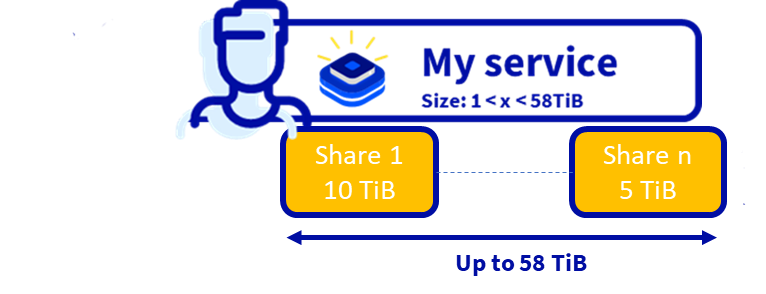
Once you have ordered your Enterprise File Storage service, you will have a service corresponding to your storage capacity. In this service, you can create one or more volumes, each volume corresponds to a partition.
These volumes allow you to store files, and are networked through an IP address provided by OVHcloud.
-
Each volume belongs to a service, but a service can contain multiple volumes.
-
The size of a volume cannot exceed the total size of the service minus the space allocated to the snapshots it contains.
-
The size of a volume can be scaled up or down.
You can find more information in our guide on Managing volumes.
The principle of ACL operation
For security reasons, a volume is not immediately accessible via its path. You need to create rules in the volume's access control list (ACL) in order to allow users to access it.
A rule consists of a source IP address of your network in the format x.x.x.x/x and the type of access, either read-only (RO) or read/write (RW).

You can create one or more rules per volume.
You can find more information in the guide Managing volume ACLs.
The working principle of snapshots
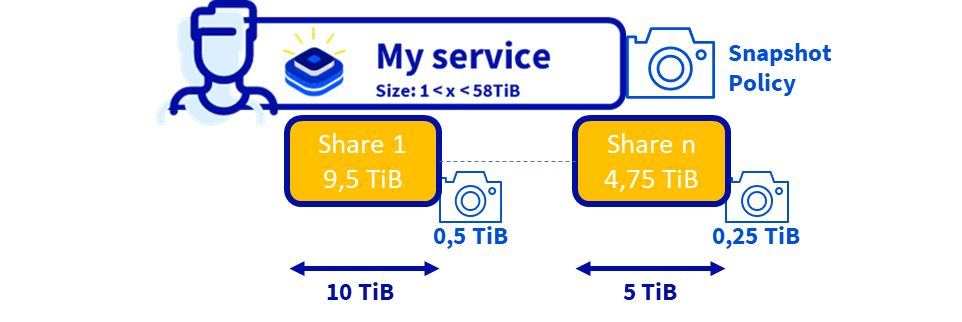
Enterprise File Storage's snapshot technology provides a local data protection solution in the same location as the production data. Thanks to snapshots, we can proceed to do a fast restoration.
An Enterprise File Storage snapshot is an image of a volume at a specific date and time.
It only takes a few seconds to create, regardless of the volume size, capacity used, or activity level on the volume.
The snapshot is a copy of the metadata of the volume at a given point in time (a snapshot of the inodes table).
The daily observed consumption of snapshots is between 1% and 5% of the volume's capacity for many applications. As a result, OVHcloud reserves 5% of its capacity for volume snapshots each time a volume is created.
You can find more information in the Managing volume snapshots guide.
Enterprise File Storage service limits
Limits of the Enterprise File Storage offer
- A service has an allocated and dedicated size between 1 TB and 58 TB.
- The granularity of a service is 1 TB
- The number of volumes per service is limited to 10 volumes per TB (e.g. 50 volumes for a 5TB service)
Volume limits
- A volume can't exceed the size of 29 TB minus the 5% reserved for snapshots (1.45 TB), i.e. 27.55 TB.
- The minimum volume size is 100 GB
- Size granularity for a volume: 1 GB
- Maximum file size: 16 TB
Limits of snapshots
- A volume can't have more than 200 snapshots.
- Maximum number of snapshot policies per volume: 1
- Maximum number of rules per snapshot policy: 4
ACL limits
- A volume has an IP address on the internal network in 10.x.x.x from OVHcloud.
- Maximum number of vRacks (private network service) attached to the service: 0 (support for vRack technology is not yet available)
- Maximum number of access lists: 1 per volume
- Maximum number of IPs per access list: 16 IPs per access list
Performance limits
- Minimum bandwidth per TB: no minimum
- Maximum bandwidth per TB: 64 MB/s and 4000 IOPS
Calculation of a volume
What is the difference between Terabyte (TB) and Tebibyte (TiB)?
-
T, the “tera-” prefix, is a metric and SI standard where you are using base-10. So 1 TB = 10^12=1000000000000 bytes = 1000 GB.
-
Ti, the “Tebi-” prefix, was created later as one of the Binary prefixes that are now an IEC/ISO standard where you are using base-2. It means 1024^4=2^40. So 1 TiB = 1099511627776 bytes = 1024 GiB.
-
Computers are using base-2 so the amount of storage that you can see in your OS is in TiB. Storage vendors tend to use TB because it makes for a larger number than TiB.
-
The problem is that they are similar (2,4%) at the KB level, but at the TB level they have a 10% difference which increases exponentialy.
-
For Enterprise File Storage, because we want to be transparent with you, we will deliver the volume in TiB even if you see TB as unit because the general public is using TB.
-
So if you order a 1 TB Enterprise File Storage, in reality, you will have 1TiB = 1,09951 TB.
Go further
If you need training or technical assistance to implement our solutions, contact your sales representative or click on this link to get a quote and ask our Professional Services experts for assisting you on your specific use case of your project.
Join our community of users on Discord: https://discord.gg/ovhcloud.


 Enterprise File Storage - FAQ
 650
650