

Isolating management machines from production
320 Views
 11.01.2022
  Cloud / Nutanix on OVHcloud
Objective
A Nutanix cluster contains two different types of management machines after delivery:
- VM, 1 CVM per node plus Prism Central
- Physical servers (nodes)
In order to increase the security of management machines, it is recommended to isolate them from the production environment.
This guide explains how to isolate management machines to improve security.
OVHcloud is providing you with services for which you are responsible, with regard to their configuration and management. You are therefore responsible for ensuring they function correctly.
This guide is designed to assist you in common tasks as much as possible. Nevertheless, we recommend that you contact the OVHcloud Professional Services team or a specialist service provider if you have difficulties or doubts concerning the administration, usage or implementation of services on a server.
Requirements
- A Nutanix cluster in your OVHcloud account
Instructions
Step 1
Connect to the Prism Central Web interface.
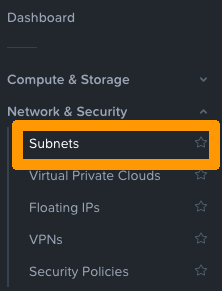
Go to Network & Security and open Subnets.
Step 2
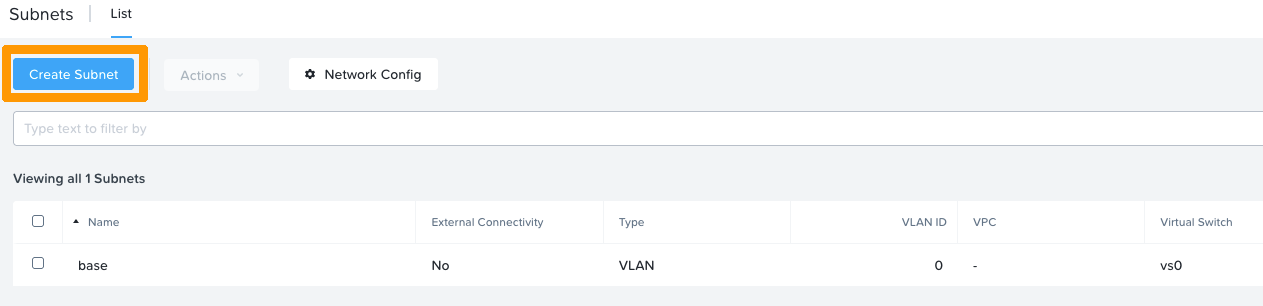
In this example, VLAN 0 is associated with the "base" subnet on the "vs0" virtual switch.
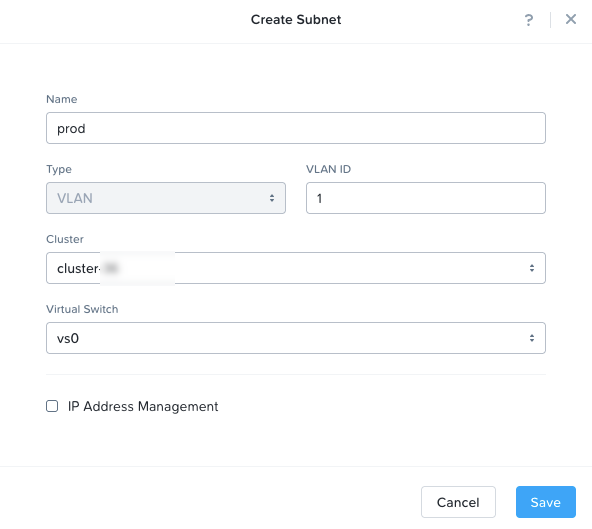
In order to isolate the management network, you can use a new subnet in VLAN 1 for example.
To do this, click on Create Subnet.
Enter a name for your network, then select a VLAN ID, cluster and the "vs0" virtual switch.
Go further
If you need training or technical assistance to implement our solutions, contact your sales representative or click on this link to get a quote and ask our Professional Services experts for assisting you on your specific use case of your project.
Join our community of users on https://community.ovh.com/en/.


 Configuring HYCU Backup
 862
862