

How to get information about a domain name with WHOIS
140 Views
 04.07.2025
  Web / Domain Names
Objective
Want to know if a domain name is available? You want to know certain information related to a domain name, such as the holder's contact details, the expiry date, etc. ?
WHOIS, short for “Who is?”, is a protocol that allows access to different data related to a domain name.
Find out how to use the WHOIS tool to get information on a domain name.
Requirements
- An Internet browser (e.g. Firefox, Chrome, Safari, Edge, etc.) on your computer, tablet or smartphone.
Instructions
OVHcloud provides an interface to allow you to execute the WHOIS command for a domain name.
The content and presentation of the information in the result of a WHOIS query may differ depending on the domain name extension (e.g. .com, .net, .ovh, etc.).
In addition, the registries that manage these extensions may allow domain name holders to hide personal information in WHOIS.
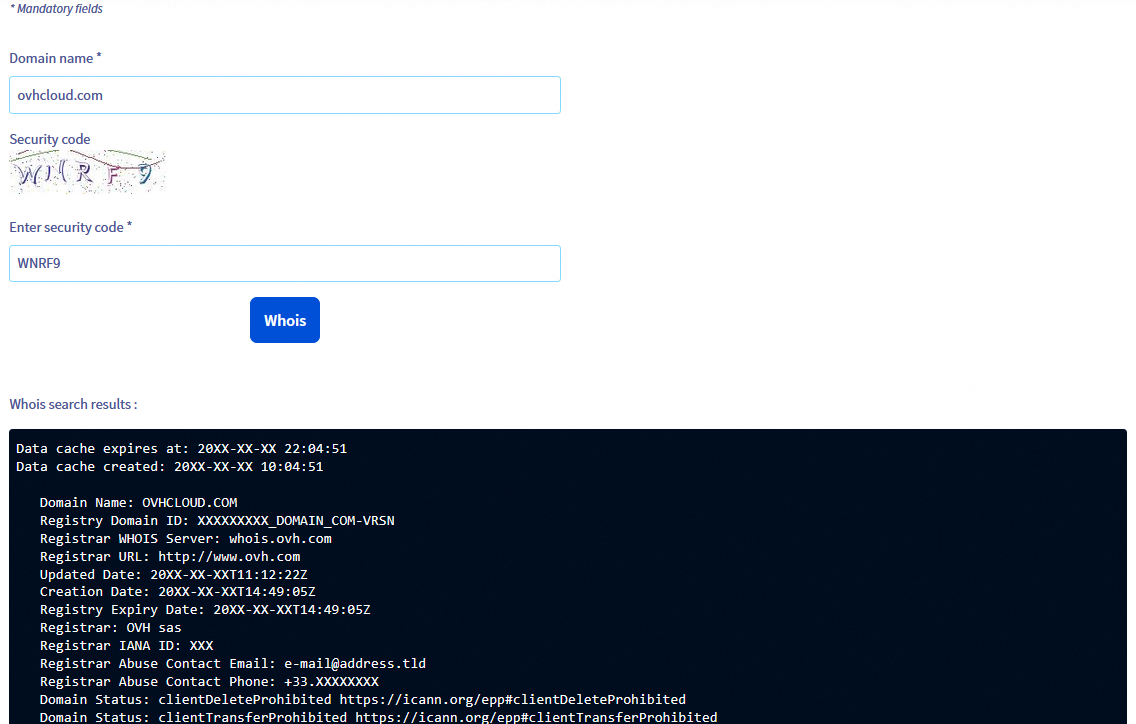
The following steps will take you to the WHOIS records associated with a domain name:
- Access our WHOIS online tool.
- On the page that pops up, enter the domain name (for example: domain.tld without the www) in the
Domain name *field, then enter theSecurity codein theEnter security code *field. - Click the
Whoisbutton to send the request. - See the result of the WHOIS query in the new section titled
Whois search results :under theWhoisbutton.
In this result, you will find all the information available on the domain name entered in step 2.
Go further
How do I configure the WHOIS display for a domain name?
For specialised services (SEO, development, etc.), contact OVHcloud partners.
If you would like assistance using and configuring your OVHcloud solutions, please refer to our support offers.
Join our community of users.


 Redirecting a domain name managed by OVHcloud
 5050
5050