

AI Notebooks - Billing and lifecycle
744 Views
 27.01.2026
  Cloud / AI Notebooks
Objective
OVHcloud AI Notebooks are managed Jupyter and VSCode notebooks with assigned CPU or GPU resources, eliminating the need for installation and maintenance. This documentation will detail the notebook lifecycle and billing.
Introduction
AI Notebooks are linked to a Public Cloud project. The whole project is billed at the end of the month, with pay-as-you-go. It means you will only pay for what you consume, based on the compute resources you use (CPUs and GPUs), their running time and data.
AI Notebooks lifecycle
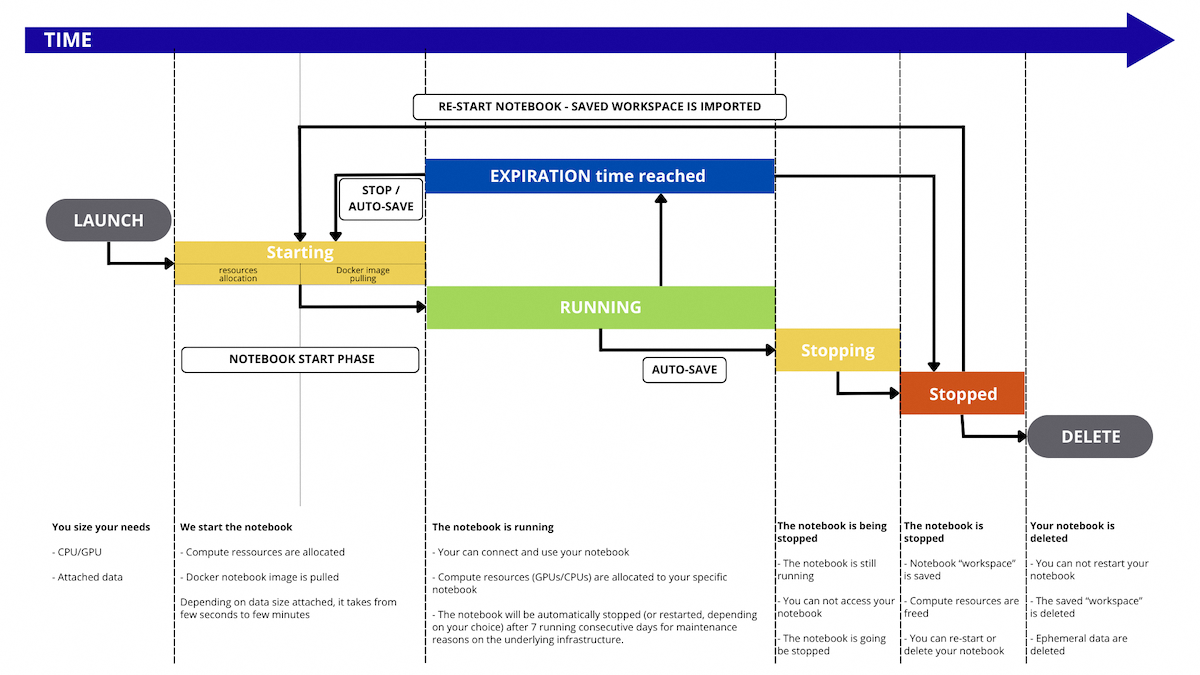
By default, your AI Notebook will automatically shut down after 7 consecutive days of being in a RUNNING state. All your settings and data are preserved and you can start it again anytime. You can also enable Automatic Restart to have it restart every 7 days, or contact our support to extend this period to 28 days.
During its lifetime, the notebook will go through the following statuses:
STARTING: The notebook is being started and, if any, the remote data is synchronized from the Object Storage. To learn more about data synchronization, please check out the Data - Concept and best practices documentation. Then, the system allocates the necessary compute resources (CPUs/GPUs) for your Notebook. Finally, the base framework you have chosen is pulled for use in the notebook.RUNNING: The notebook is running, you can connect to it using its endpoint and benefit from your compute resources and your attached data.STOPPING: The notebook is stopping, your compute resources are freed and your work included in your /workspace folder is automatically saved. If remote data is mounted on your notebook, it is synchronized back to the Object Storage if modified and mounted asRW, notRO.STOPPED: The notebook ended normally. You can restart it whenever you want or delete it. It will keep the same endpoint.FAILED: The notebook ended in error, e.g. the process in the notebook finished with a non 0 exit code. For more information, refer to this section of our Troubleshooting documentation.ERROR: The notebook ended due to a backend error. You may reach our support.DELETING: The notebook is being removed. When it is deleted, you will no longer see it, and it will no longer exist. Its internal /workspace data will not be deleted automatically after notebook deletion. If you are sure you want to delete it, you can find and delete it in thenotebooks_workspacecontainer of your Object Storage, under the notebook ID directory.
Billing principles
AI Notebooks is a pay-per-use solution. You only pay for the resources consumption.
Included in AI Notebooks resources:
- Dedicated CPU/GPU compute resources (based on the selected amount during notebook creation)
- Ephemeral local notebook storage (size depends on the selected compute resources). First 10GB are free.
- Workspace remote storage (Optional)
- Ingress/Egress network traffic (Optional)
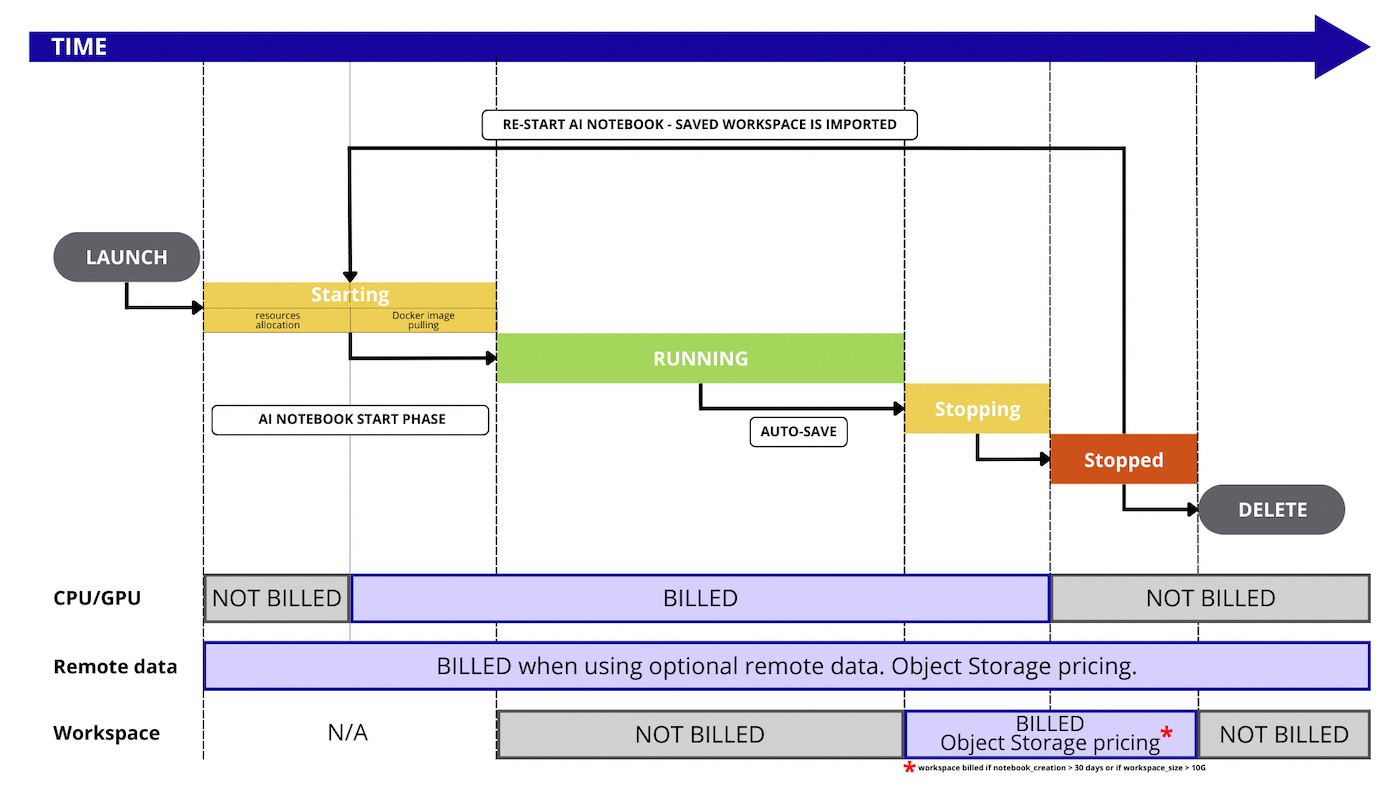
Here is a detailed graph that illustrates every step that is billed or not during the AI Notebook workflow:
Compute resources details
During the notebook creation, you can select compute resources, known as CPUs or GPUs. Their official pricing is available in the OVHcloud Control Panel or on the OVHcloud Public Cloud website.
Rates for compute are mentioned per hour to facilitate reading of the prices, but the billing granularity remains per minute.
As stated above and shown in the image above, you pay for these resources as long as you consume them. This happens when the image of your notebook is pulled, during the STARTING phase, but also during RUNNING and STOPPING phases, until you reach the STOPPED phase.
Storage details
There are three types of storage within AI Notebooks:
- Remote Object storage
- Workspace storage
- Ephemeral local storage
The pricing of these different storages is different.
Remote Object storage
Remote data is the one that comes from the OVHcloud Object Storage solution. During notebook creation, you are able to mount some Object Storage containers into your notebook.
In situations where you are utilizing notebooks with attached remote data, you will be charged separately for the storage of this data. The cost of Object Storage is independent of the pricing for notebooks.
Workspace storage
By default, your notebook will be mounted a remote Object Storage container on the /workspace location. This will be your default folder when you access your notebook.
You can store your data there.
Your /workspace folder is automatically saved when you stop your notebook. You can also trigger a manual data synchronization if needed.
The first 10GB are free for 30 consecutive days once your notebook is stopped, then you pay at the price of OVHcloud Object Storage.
Ephemeral local storage
Each compute resource (CPU or GPU) comes with local storage, that we can consider ephemeral since this storage space is not saved when you stop or delete your notebook.
The sizing depends on the selected amount of compute resources, check the details on the OVHcloud Public Cloud website.
This concerns locations outside your /workspace, as well as outside any other remote Object Storage containers you may have mounted on your notebook.
This storage is not billed as it is directly linked to the compute resource(s) you have chosen.
Pricing examples
Example 1: one GPU notebook for 10 hours then deleted
We start one AI Notebook, with two GPUs and we keep it running for 10 hours then we delete it.
- compute resources: 2 x GPU NVIDIA V100s (1,93€ / hour)
- remote storage: nothing
- duration: 10 hours then deleted
Price calculation for compute: 10 (hours) x 2 (GPU) x 1,93€ (price / GPU) = 38,6 euros, billed at the end of the month
Example 2: one GPU notebook for 10 hours but stopped, not deleted
We start one AI Notebook, with two GPUs and we keep it running for 10 hours then we stop it and finally we delete it after 10 days.
- compute resources: 2 x GPU NVIDIA V100s (1,93 / hour)
- remote storage: nothing
- workspace storage: 100GB used. First 10GB are free
- duration: 10 hours then stopped for 10 days
Price calculation for compute : 10 (hours) x 2 (GPU) x 1,93 (price / GPU) = 38,6 euros, billed at the end of the month Price calculation for workspace : 90 (GB) x 0,01€ (price for object storage / GB) = 0,9 euros, billed at the end of the month
Example 3: one GPU notebook for 10 hours with 1TB remote storage
We start one AI Notebook, with two GPUs and 1TB remote storage. We keep it running for 10 hours then we delete it.
- compute resources: 2 x GPU NVIDIA V100s (1,93 / hour)
- remote storage: 1TB in OVHcloud Object Storage
- workspace storage: 100GB used. First 10GB are free
- duration: 10 hours then we delete it.
Price calculation for compute: 10 (hours) x 2 (GPU) x 1,93 (price / GPU) = 38,6 euros, billed at the end of the month Price calculation for workspace: 90 (GB) x 0,01€ (price for object storage / GB) = 0,9 euros, billed at the end of the month
Also, price calculation for remote Object Storage : 1000 (GB) x 0,01€ (price for object storage / GB) = 10 euros, billed at the end of the month
Example 4: 15 CPU notebooks for 5 hours then deleted
We start 15 AI Notebooks, each of them with one vCPU
- compute resources: 1 x vCPU (0,03€ /hour /cpu)
- remote storage: nothing
- duration: 5 hours then we delete it.
Price calculation for compute: 15 (notebooks) x 5 (hours) x 1 (CPU) x 0,03€ (price / CPU) = 2,25 euros, billed at the end of the month
Images decommissioning
Objective
Products evolve and eventually reach the end of their lifecycle. Our objective is to ensure this transition happens smoothly.
All AI images follow the Python version lifecycle policy. Once a Python version reaches its end of life, the associated AI frameworks will be decommissioned.
What does it mean ?
- You will not be able to create new notebooks based on this Python version.
- Your existing notebooks will continue to work until you delete them.
- During this period, the images will still receive security updates.
- Once the underlying OS reaches its end of life, you will still be able to start your notebooks, but the image will no longer be maintained. We strongly encourage you to migrate to a newer image version.
Feedback
Please send us your questions, feedback and suggestions to improve the service:
- On the OVHcloud Discord server
If you need training or technical assistance to implement our solutions, contact your sales representative or click on this link to get a quote and ask our Professional Services experts for a custom analysis of your project.

