

Transferring a .uk domain name to another registrar
2247 Views
 13.03.2026
  Web / Domain Names
Objective
The process of changing the registrar for Top Level Domains (TLD) of the UK country code (.uk) differs from the one explained in our guide regarding generic TLDs. The instructions below concern the following extensions:
- .uk
- .co.uk
- .ac.uk
- .gov.uk
- .me.uk
- .net.uk
- .org.uk
- .plc.uk
- .sch.uk
This guide explains how to initiate an outgoing transfer for these TLDs in the OVHcloud Control Panel.
If the domain name in question should stay registered at OVHcloud but modified in terms of its management or holder information, an outgoing domain name transfer is not the appropriate procedure.
To transfer the domain name management to another OVHcloud customer account, a change of contacts must be made instead. The procedure is described in this guide.
If you also need to change the domain name holder, you should do so before you change the domain name contacts. To do this, use our instructions for changing the holder of a domain name.
Requirements
- A .uk domain name registered with OVHcloud
- The domain name is still active i.e. not expired or otherwise locked on the part of OVHcloud
- The domain name is not the subject of an ongoing dispute with the responsible registry Nominet
OVHcloud Control Panel Access
- Direct link: Domain names
- Navigation path:
Web Cloud>Domain names> Select your domain name
If the domain expired less than 90 days ago, it can still be transferred. Contact our support teams by creating a support request in your OVHcloud Control Panel to unlock the domain name for transfer.
If you are the domain's holder but cannot manage it in the OVHcloud Control Panel, neither via your own access nor via the administrative contact, consult this guide before proceeding.
Instructions
The TLDs in question have a registrar TAG which corresponds to a domain name registrar such as OVHcloud. The transfer process is initiated by changing the TAG to the one identifying your new registrar.
In case you do not know the required TAG yet, you can request it at your new provider or look it up on this Nominet registrar list.
1 - Edit your domain name's TAG to initiate the transfer to another registrar
You must be logged in as the administrator to perform these actions.
Click the tabs below to view each of the 3 steps.
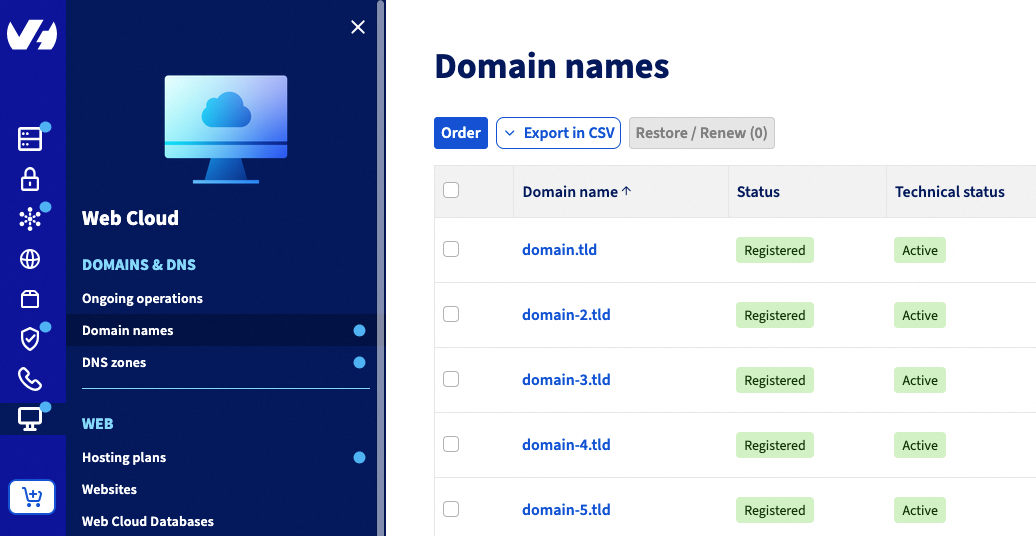
Go to the Domain names page, then choose the domain name concerned.
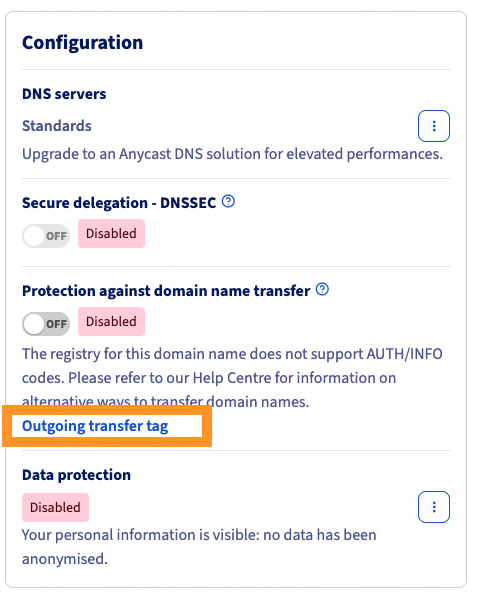
In the Configuration section, click on the Outgoing transfer tag link.
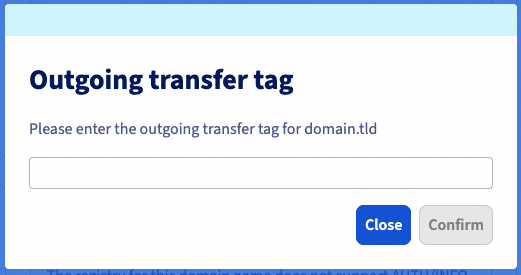
In the popup window, enter the TAG of your future registrar, then click on Confirm.
If you are unable to modify your domain name's TAG in the OVHcloud Control Panel, you can request at the registry to modify it on your behalf. Find more information on the official Nominet website.
2 - Follow up the transfer process with your new registrar
Successfully changing the TAG initiates the transfer process.
Contact your new provider for details as well as any follow-up questions.
Go further
Transferring a domain name to another registrar
For specialised services (SEO, development, etc.), contact OVHcloud partners.
Join our community of users.


 Transferring a domain name to another registrar
 18693
18693