

Installing CUDA on a dedicated GPU server
847 Views
 14.12.2017
  Cloud / Dedicated Server (bare metal)
Objective
You can install Compute Unified Device Architecture (CUDA) on a GPU server, but it requires a series of actions which we will explain to you in this guide.
Requirements
- You must own a GPU server.
- You must be logged into your server via SSH
Instructions
Once you have reinstalled the distribution/operating system, follow the instructions below.
Ubuntu
Update the kernel
Modify the grub.cfg file
Edit the following file, and comment out the OVH kernel part:
At this point, you will need to reboot the server. It should reboot on a new kernel.
To check this, you can type the following commands:
Then install a library and stop lightdm:
Install CUDA
Now, you just need to install CUDA by following the procedure below:
The nvidia-smi should now function properly:
CentOS 7
Update the OS
After the CUDA installation we must to perform an OS upgrade
Then we need to prepare the OS installing the following components:
Now we need to disable nouveau driver by changing the configuration /etc/default/grub file. Add the nouveau.modeset=0 and rd.driver.blacklist=nouveau into line starting with GRUB_CMDLINE_LINUX.
Below you can find example of grub configuration file reflecting the previously suggested change:
GRUB_TIMEOUT=5
GRUB_DISTRIBUTOR="$(sed 's, release .*$,,g' /etc/system-release)"
GRUB_DEFAULT=saved
GRUB_DISABLE_SUBMENU=true
GRUB_TERMINAL_OUTPUT="console"
GRUB_CMDLINE_LINUX="crashkernel=auto rhgb quiet rd.driver.blacklist=nouveau nouveau.modeset=0"
GRUB_DISABLE_RECOVERY="true"
Then we update the Grub information
Now we include the blacklist noveau concept in the following path
blacklist nouveauFinally we need to reboot the server
Install CUDA
Now we must to find the CUDA Toolkit RUN file for our specific OS version in the Nvidia official page -> Nvidia
Then we can execute the package installation
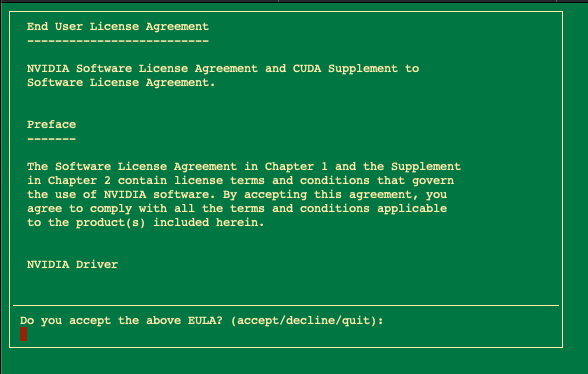
Accepts the process
And then select all the components to install
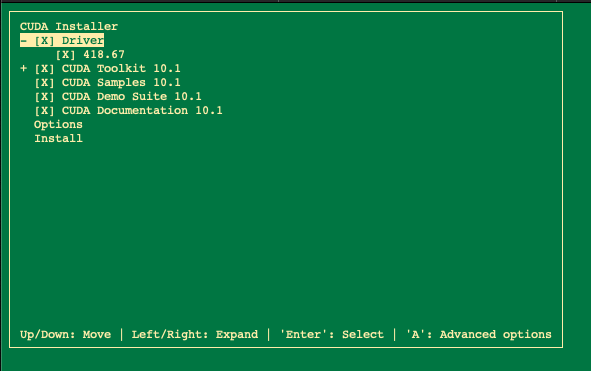
When the installation will be finished we can export system path to Nvidia CUDA binary executables. Open the ~/.bashrc using your preferred text editor:
And add the following two lines:
export PATH=/usr/local/cuda/bin:$PATH
export LD_LIBRARY_PATH=/usr/local/cuda/lib64:$LD_LIBRARY_PATH
Then we do the Re-login the updated ~/.bashrc file
And finally we can check the driver version and d the service statuas with the following commands
Go further
Join our community of users.


 How to prevent your emails from being marked as spam
 5833
5833