

Exchange - Configure your email account on Outlook for macOS
2264 Views
 09.10.2024
  Web / Microsoft Hosted Exchange
Objective
You can configure Exchange accounts on email clients, if they are compatible. By doing so, you can use your email address through your preferred email application.
Requirements
- You must have an Exchange solution.
- You must have Microsoft Outlook installed on your Mac.
- You need to have the required credentials for the email address you would like to configure.
Are you using Outlook for Windows? Read our guide: Configuring your Exchange account in Outlook for Windows.
Instructions
Step 1: Add the account
Once you have launched Outlook on your device, you can add an account in two different ways:
-
When you start the application for the first time: A setup wizard will appear and prompt you to enter your email address.
-
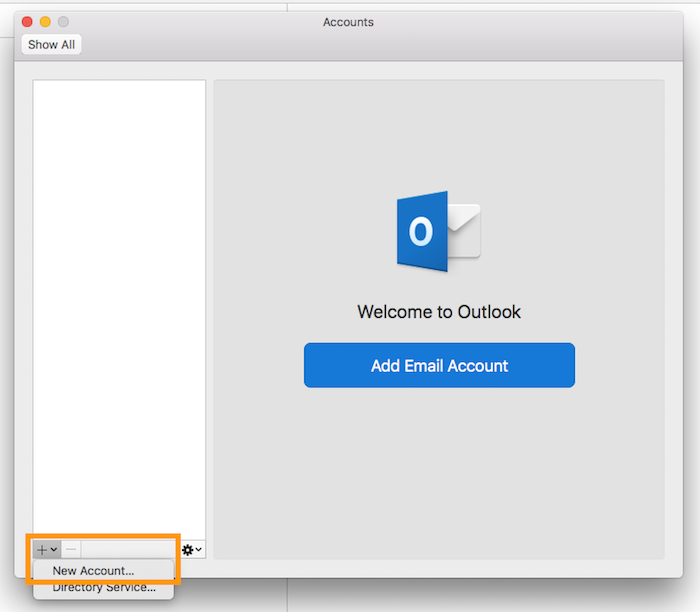
If you have already added an account: Click
Toolsin the menu bar at the top of your screen, thenAccounts. In the window that pops up, click+, thenNew account.
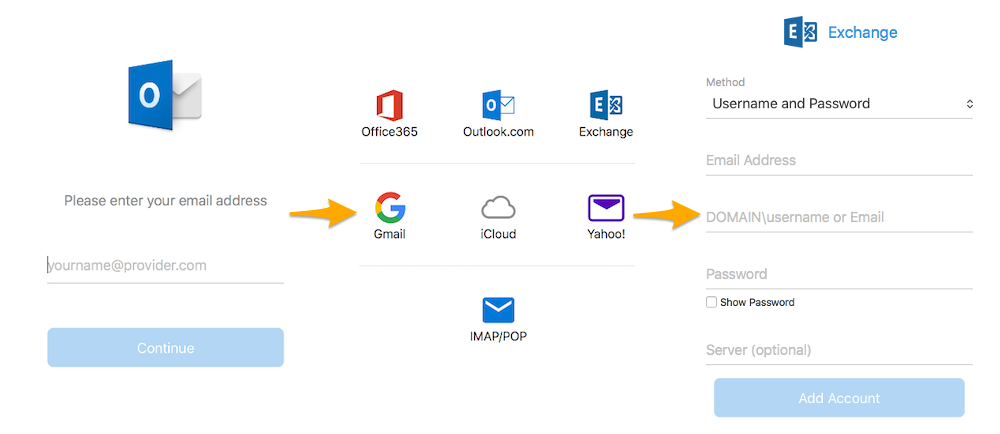
Enter your email address, then click Continue. If you are asked to choose a provider, select Exchange. Then fill in the information requested.
| Information | Description |
|---|---|
| Method | Leave Username and password (selected by default). |
| Mail address | Enter a name that will distinguish this account from any other accounts added in Outlook. |
| DOMAIN\username or email address | Enter your full email address. |
| Password | Enter the password for your email address. |
| Server | Depending on the DNS configuration for your domain name, you may not need to enter the server. If you do, enter the details for the server your Exchange service is hosted on. You will find these details in your OVHcloud Control Panel by going to the General information tab for the Exchange service concerned, then the Connection section. |
Once you have entered this information, click Add account. If the information is correct, Outlook will successfully connect to the account.
To check that the account has been properly configured, you can send a test email.
Step 2: Use the email address
Once you have configured your email address, you can start using it! You can now send and receive emails.
OVHcloud offers a web application that includes various collaborative features, which can be accessed at Webmail. You can log in using your email credentials.
Go further
For more information on configuring an email address from the Outlook app on macOS, see the Microsoft Help Center.
Join our community of users.


 Exchange - Configure your email account on Outlook for Windows
 9502
9502