

Check Virtual MAC Support on Your Dedicated Server
3406 Views
 28.04.2025
  Cloud / Dedicated Server (bare metal)
Objective
In order to use virtual MAC (vMAC) addresses on a dedicated server, you first need to make sure your server supports this feature.
Support for the vMAC function is a prerequisite for all actions concerning virtual MACs.
This guide explains how to check in the OVHcloud API if your dedicated server supports the virtual MAC feature.
Requirements
- A dedicated server in your OVHcloud account
- Access to the OVHcloud API
If you are not familiar with using the OVHcloud API, please refer to our guide on Getting started with the OVHcloud API .
Instructions
Open the following API endpoint in the API console:
Enter the internal server name into the serviceName field, then click Execute.

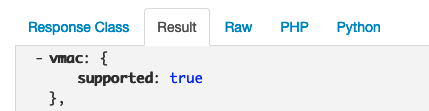
The result will show a "vmac / supported" entry which can be "true" or "false" (boolean value).
Interpretation of the result
-
false: You cannot use the virtual MAC feature on this server.
-
true: You can use the virtual MAC feature on this server.
Go further
First Steps with the OVHcloud API
Assigning a Virtual MAC on a Dedicated Server
Dedicated Server - Configuring Additional IPs in Bridge Mode
Join our community of users.


 Configure Additional IPs in Bridge Mode on a Dedicated Server
 8344
8344