

How to use IAM policies using the OVHcloud API
4324 Views
 10.10.2025
  IAM
IAM
Objective
This guide will explain how to provide specific access rights to users of an OVHcloud account.
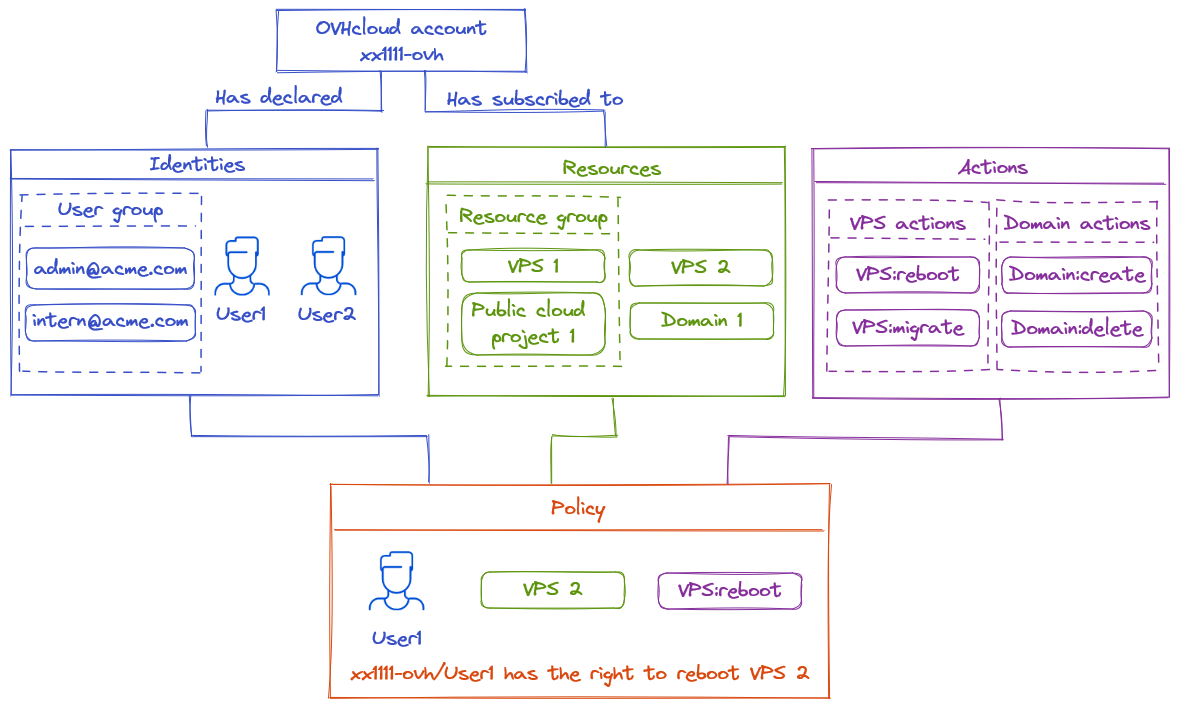
The access management of OVHcloud is based on a policy management system. It is possible to write different policies that give users access to specific features on the products linked to an OVHcloud account.
In detail, a policy contains:
- One or more identities targeted by this policy.
- It can be account IDs, users or user groups (like the ones used in Federation).
- One or more resources impacted by this policy.
- A resource is an OVHcloud product that will be impacted by this policy (a domain name, a Nutanix server, a Load Balancer, etc.).
- One or more actions allowed, denied or excepted by this policy.
- Actions are the specific rights affected by this policy (reboot a server, create an email account, cancel a subscription, etc.)
For example, we can create a policy to give to a user called John, for a VPS, access to the action "reboot".
This guide explains in detail how these policies can be declared using the OVHcloud API, and how to list the identities, resources and actions available for them.
Requirements
- You have an OVHcloud account.
- You know how to manage account users.
- You have one or more OVHcloud products linked to this OVHcloud account (Load Balancer, domain name, VPS, etc.).
Instructions
Policies
This first part describes how to create and update policies.
Resources, resource groups and actions needed to create a policy will be described in the next sections.
API definition
https://api.ovh.com/console-preview/?section=%2Fiam&branch=v2#get-/iam/policy
| Method | Path | Description |
|---|---|---|
| GET | /iam/policy | Retrieve all policies |
| POST | /iam/policy | Create a new policy |
| GET | /iam/policy/{policyId} | Retrieve the given policy |
| PUT | /iam/policy/{policyId} | Update an existing policy |
| DELETE | /iam/policy/{policyId} | Delete the given policy |
Retrieve all policies
The following example shows how a policy is built.
Find all policies, including those pregenerated by OVHcloud, by calling the API endpoint: /iam/policy
Example output:
/iam/policy
In this example, the account "urn:v1:eu:identity:account:xx1111-ovh" can do every action ("action":"*") to the group of resources "urn:v1:eu:resourceGroup:aa0713ab-ed13-4f1a-89a5-32aa0cb936d8". This policy is owned by "xx1111-ovh" (it corresponds to the admin role, it is created by OVHcloud and cannot be modified).
Items in policies are defined by URNs. These URNs are defined by the following pattern:
| urn | : | version | : | plate | : | type | : | sub-type | : | id | |
|---|---|---|---|---|---|---|---|---|---|---|---|
| Description | immutable prefix | : | version of the IAM system | : | Plate where the urn is located | : | Type of the current urn | : | (optional) Subtype for identity or resource type | : | Unique identifier associated to the urn |
| Possible values | urn | : | v1 | : | eu, ca, us | : | identity, resource, resourceGroup | : | For identity type: account, user, group For resource type: any resourceType | : | Alphanumerical value |
| Account ID Example | urn | : | v1 | : | eu | : | identity | : | account | : | xx1111-ovh |
| User group Example | urn | : | v1 | : | eu | : | identity | : | group | : | xx1111-ovh/admin@mycompany.com |
| VPS Example | urn | : | v1 | : | ca | : | resource | : | vps | : | vps-5b48d78b.vps.ovh.net |
| Resource Group Example | urn | : | v1 | : | us | : | resourceGroup | : | aa0713ab-ed13-4f1a-89a5-32aa0cb936d8 |
The resources URNs and actions can end with a * wildcard character. This allows referring to multiple resources or actions in a single line.
Example of a resource URN with a wildcard :
urn:v1:eu:resource:vps:* will match any vps resource.
Example of an action with a wildcard :
vps:apiovh:* will match any action of the vps type.
Policy attributes
- id: Unique identifier of the policy. It follows the UUID format.
- owner: The account that created this policy.
- name: The policy name. It's possible to use this name to organize the policies. There is no format to follow (except that the prefix "ovh-" is reserved for OVHcloud policies).
- readOnly: If true, it indicates that the policy cannot be edited. It often represents policies managed by OVHcloud.
- identities: The identities concerned by the policy. They are specified by a URN. account:account-id for the account, user:account-id/username for an account user, group:account-id/username for a user group.
- resources: The resources concerned by the policy. They are specified by a URN. resource for a resource, resourceGroup for a resource group.
- permissions: Can be allow, deny or except:
- allow: Array of actions allowed for the identities regarding the resources. All actions are denied by default.
- deny: Array of actions explicitely denied for the identities regarding the resources. A denied action will be prevent no matter what others policies could allow
- except: Extension of the allow parameter. Array of actions not to allow even though they are included in the allow actions. For instance, this is useful when there is a wildcard allow action but it is necessary to exclude a specific action that otherwise would be included in the wildcard. Contrary to deny, except is limited to the current policy scope.
- permissionsGroups: List of permissions groups applied to this policy.
- conditions: List conditions applied to the policy
- expiredAt: Date after which the policy will be disabled.
- createdAt: Creation date of the policy.
- updateAt: Last update date of the policy.
Create a policy
Create a new policy using this API route:
| Method | Path | Description |
|---|---|---|
| POST | /iam/policy | Create a new policy |
For example, create a policy to authorise a user named "user1" to do some actions on a VPS:
create policy examples
This policy is not for an account but for a user, so the identity URN corresponds to the format "urn:v1:eu:identity:user:account-id/username**".
This policy uses a wildcard with an except. This allows you to easily give a large set of permissions. Here the user user2 will have all permissions of the vps type on vps-5b48d78b.vps.ovh.net except for the permission to delete a snapshot.
With these POST /iam/policy requests, the policies will be created.
Check it via GET /iam/policy:
GET /iam/policies
The policies have been created successfully. Now, "user1" can carry out reboots and create snapshots on the VPS "urn:v1:eu:resource:vps:vps-5b48d78b.vps.ovh.net". "user2" can execute any vps action except for the deletion of snapshots on the VPS "urn:v1:eu:resource:vps:vps-5b48d78b.vps.ovh.net".
Conditions
It is possible to add conditions to policies. The policy will only be valid if the conditions are met. Conditions are added to an access policy in the following form:
For example, a policy with this condition is valid if the targeted resources are of type dnsZone with the tag "environment:prod", except on Saturday and Sunday in the Paris time zone.
The operator field specifies how the conditions will be evaluated:
- AND: All conditions must be validated
- NOT: None of the conditions must be validated
- OR: At least one condition must be validated
- MATCH: Condition evaluation operator
The available conditions are:
| Condition | Operator | Data Type | Description | Example |
|---|---|---|---|---|
| date(location).Date | EQ BEFORE AFTER IN | YYYY-MM-DD | Filter on calendar days | "date(America/New_York).Date": "2024-12-25" |
| date(location).Hour | EQ BEFORE AFTER GE LE GT LT IN | int | Filter on hours | "date(Europe/Paris).Hour.IN" : "7,8,9" |
| date(location).WeekDay | EQ BEFORE AFTER GE LE GT LT IN | string | Filter on days of the week | "date(Europe/Berlin).WeekDay.AFTER": "monday" |
| resource.Tag(tag_key) | EQ STARTS_WITH ENDS_WITH | string | Filter on tags | "resource.Tag(environment): "dev" |
| resource.Name | EQ IN STARTS_WITH ENDS_WITH | string | Filter on resource names | "resource.Name.Start_with": "vps-" |
| resource.Type | EQ IN STARTS_WITH ENDS_WITH | string | Filter on resource types | "resource.Type.In": "dnsZone,vps" |
| request.IP | EQ IN IN_RANGE | IP v4 | Filter on client source IP | "request.IP.IN_RANGE": "10.23.0.0/16" |
Dates use time zones based on IANA database names. If not specified, the date will be evaluated in UTC time zone.
The available operators for condition types are:
- EQ: The value must exactly match the specified value
- BEFORE or LT (less than): The value must be strictly less than
- AFTER or GE (greater or equal): The value must be equal to or greater than
- GT (greater than): The value must be strictly greater than
- LE (less or equal): The value must be equal to or less than
- IN: The value must be included in the list
- START_WITH: The value must start with the specified value
- END_WITH: The value must end with the specified value
- IN_RANGE: The value must be in the specified IP subnet
If not specified, the default operator is EQ.
Policies targeting other OVHcloud customer accounts
Access policies can target other OVHcloud customer accounts.
The targeted account of this policy will be able to manage the rights received that way on its own policies, but will never be able to override the rights set on the access policy.
For example, an account xx1111-ovh gives rights on vps:apiovh:ips/* to account xx2222-ovh:
Account xx2222-ovh will be able to give the right vps:apiovh:ips/delete to its own users, but will never be able to grant the right vps:apiovh:reboot.
Access to the support will still be reserved to the owner of the resource.
Identities
Policies apply to users, which can be accounts, users or user groups.
This section describes how to retrieve or create user for the policy.
API definition
https://api.ovh.com/console-preview/?section=%2Fme&branch=v1#overview
| Method | Path | Description |
|---|---|---|
| GET | /me/identity/user | Retrieve all users of this account |
| POST | /me/identity/user | Create a new user |
| GET | /me/identity/user/{user} | Get details of this specific user |
| PUT | /me/identity/user/{user} | Alter a user |
| DELETE | /me/identity/user/{user} | Delete a user |
| GET | /me/identity/group | Retrieve all groups of this account |
| POST | /me/identity/group | Create a new group |
| GET | /me/identity/group/{group} | Get details of this specific group |
| PUT | /me/identity/group/{group} | Alter a group |
| DELETE | /me/identity/group/{group} | Delete a group |
Create users
List all the current users related to the account by calling:
/me/identity/user
These users can be used on policies with the URN format: urn:v1:eu:identity:user:xx1111-ovh/user1
To create a new user, call the API route with the following body:
post /me/identity/user
Create user groups
List all the current user groups related to the account by calling:
/me/identity/group
These user groups can be used on policies with the URN format: urn:v1:eu:identity:group:xx1111-ovh/admin@mycompany.com
To create a new user group, call the API route with the following body:
post /me/identity/group
For more information, refer to the documentation for user management.
With SSO connection enabled
If the federation is enabled through the SSO connection, policies only apply to user groups as described in the previous section.
Resources
Policies refer to resources. The resources are all OVHcloud products subscribed to by the OVHcloud account that can be controlled by this account.
This section describes how to retrieve resources information to use in a policy.
API definition
https://api.ovh.com/console-preview/?section=%2Fiam&branch=v2#get-/iam/resource
| Method | Path | Description |
|---|---|---|
| GET | /iam/resource | List all resources |
| GET | /iam/resource/{resourceId} | Retrieve a resource |
Example
See all the resources linked to the OVHcloud account by calling:
/iam/resource
In this example, the account has 3 resources available (a VPS, an email domain and a CDN). Each of this resources has a set of attributes to identify them on policies.
Resource attributes
- id: Unique identifier of the resource. It follows the UUID format.
- urn: Resource URN.
- name: The resource name.
- displayName: The resource name as displayed in the user interface.
- type: The resource type (vps, publicCloudProject, dnsZone, domain, emailDomain, etc.)
- owner: The resource owner (Account ID)
Resource Groups
To ease the policy management for a large number of resources, it is possible to set up a resource group which aggregates several resources to a unique URN.
API definition
https://api.ovh.com/console-preview/?section=%2Fiam&branch=v2#get-/iam/resourceGroup
| Method | Path | Description |
|---|---|---|
| GET | /iam/resourceGroup | Retrieve all resource groups |
| POST | /iam/resourceGroup | Create a new resource group |
| GET | /iam/resourceGroup/{groupId} | Retrieve the given resource group |
| PUT | /iam/resourceGroup/{groupId} | Update an existing resource group |
| DELETE | /iam/resourceGroup/{groupId} | Delete the given resource group |
Retrieve a resource group
List all resource groups by calling /iam/resourceGroup.
This API route can be called with a query-string parameter "details" to expand the results with all the attributes of the returned resources.
Example output:
/iam/resourceGroup
In the example, we can see that this resource group "urn:v1:eu:resourceGroup:aa0713ab-ed13-4f1a-89a5-32aa0cb936d8" has 3 resources. It means that a policy applied to this resource group will be applied on those 3 resources.
Resource group attributes
- id: Unique identifier of the resource group. It follows the UUID format.
- urn: Resource group URN to use on the policy.
- readOnly: Cannot be modified if
true. The default resource groups are read-only. - name: The resource group name.
- owner: The resource group owner (Account ID).
- resources:
- If details = false: Array of resources UUID.
- If details = true: The resources will be expanded with their attributes (as the result we have via the resource API).
- createdAt: Creation date of the resource group.
- updateAt: Last update date of the resource group.
Create a resource group
Create a resource group with this API route:
| Method | Path | Description |
|---|---|---|
| POST | /iam/resourceGroup | Create a new resource group |
The following example creates a resource group called "Test_Envrionment" containing 2 resources:
Action
Policies contain a list of Actions that will be allowed or denied to users.
These actions are specific to every product, such as rebooting a database server, ordering an upgrade, restoring a snapshot, etc.
API definition
https://api.ovh.com/console-preview/?section=%2Fiam&branch=v2#get-/iam/reference/action
| Method | Path | Description |
|---|---|---|
| GET | /iam/reference/action | Retrieve all actions |
Example
List all the actions available for policies with the API, for example:
action example
This action is "vps:apiovh:reboot", it targets the ability to reboot a VPS.
The call to /iam/reference/action will list all of the available actions (WARNING: This contains a huge amount of items).
It is strongly recommended to specify the resourceType as a query-string parameter for this API call (see the next section).
Action attributes
- action: The action itself
- description: The action description
- resourceType: The resource type targeted by this action
- categories: The categories of this action (CREATE, READ, EDIT, OPERATE, DELETE)
Permission group
OVHcloud provides permission groups that group together all of the actions required for specific use cases.
Permission groups are accessible via the following API:
| Method | Path | Description |
|---|---|---|
| GET | /iam/permissionsGroup | Retrieve all permission groups |
These permission groups can then be used in addition to or in place of unitary actions in access policies:
A full description of the permission groups can be found in our dedicated documentation.
Resource types
API definition
| Method | Path | Description |
|---|---|---|
| GET | /iam/reference/resource/type | Retrieve all resource types |
Example
Here is a part of the output:
/iam/reference/resource/type
Go further
Join our community of users.


 How to use IAM policies using the OVHcloud Control Panel
 2851
2851