

Object Storage Swift - Using Object Storage with Rclone
589 Views
 27.10.2021
  Cloud / Object Storage S3
Objective
OVHcloud Object Storage can be synchronised using Rclone.
This guide explains how to sync object storage via your OVHcloud Control Panel.
Rclone is an external synchronisation program - you can find further details for its use in its official documentation.
Requirements
- You need to have created an Object Storage container (you can create one from the Control Panel or from Horizon)
- You need to have created an OpenStack user account
Instructions
Once you have created your container and OpenStack account, you only need to do two things:
- Retrieve the Rclone config file:
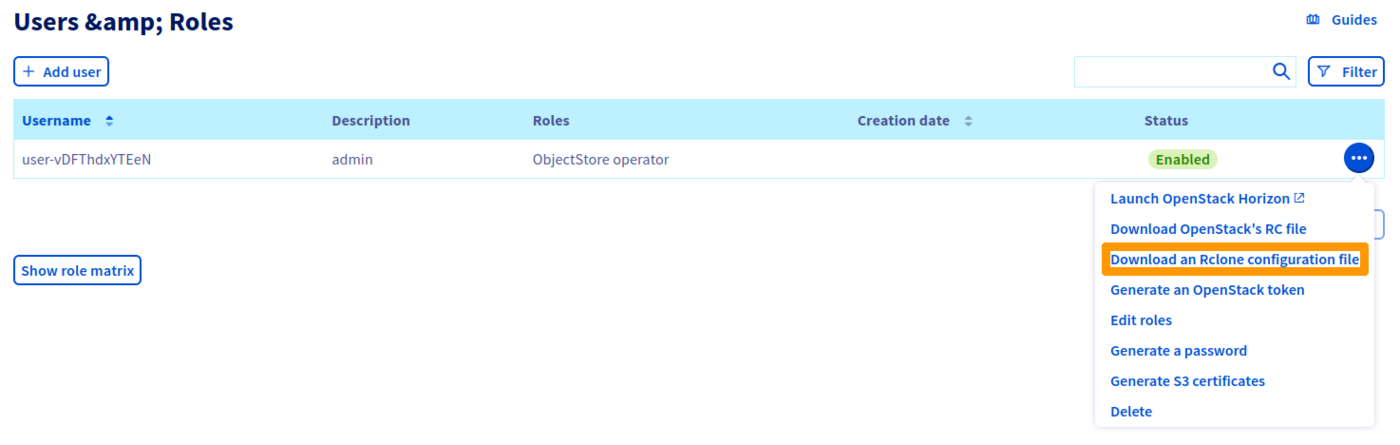
Once your OpenStack user account has been created, you can retrieve the config file you need for Rclone from your Control Panel.
To do this, when you are on the OpenStack users page in your Control Panel, click on ... to the right of the user and then Download an Rclone configuration file.
- Configure Rclone:
Once the file has been downloaded, you can launch the following command to add your new storage space:
You will be asked to insert the config data that appears in your file.
You can also copy-paste the contents of your file in the Rclone config area .config/Rclone/Rclone.conf).
Once the configuration is complete, you can test it by listing your containers, for example:
(Where BackupStorage is the name given to your storage space.)
You can find more detailed instructions on how to synchronise your object storage and Rclone on the official Rclone website: Official Rclone documentation.
Go further
If you need training or technical assistance to implement our solutions, contact your sales representative or click on this link to get a quote and ask our Professional Services experts for assisting you on your specific use case of your project.
Join our community of users.


 Object Storage Swift - Synchronise Synology NAS with Object Storage
 561
561